

Facebook and Instagram (Meta)
One Meta login can feed four things — ad spend, lead forms, Page and Instagram messages, and publishing — and only the first works for every company today; the screen says which.
Dieser Artikel ist vorerst auf Englisch, Französisch und Spanisch verfügbar. Sie lesen die englische Fassung. Français · Español
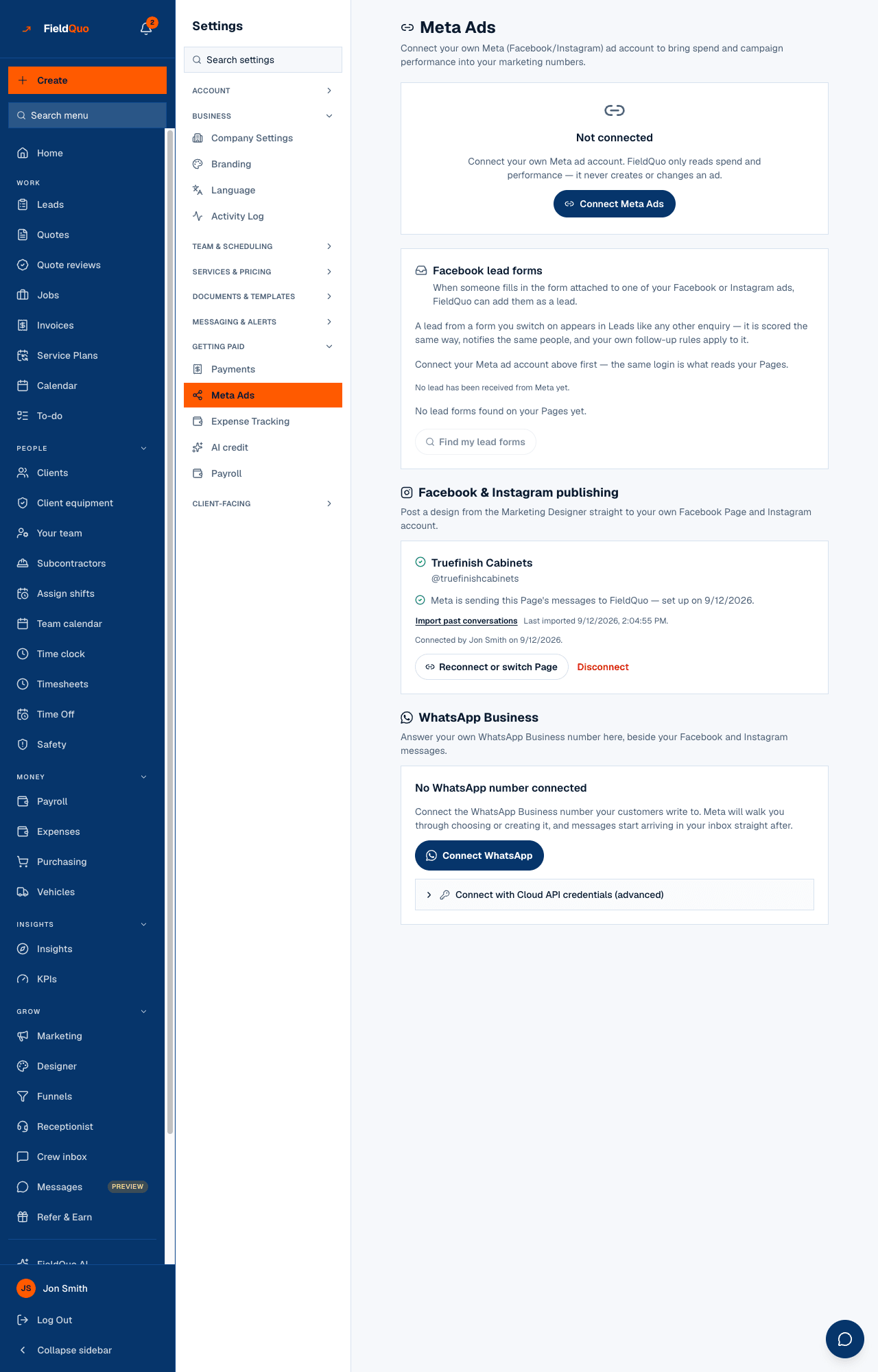
Everything Meta lives on one screen, Settings → Meta Ads, because a contractor thinks “I connected my Facebook” and should not have to learn which of several places holds which half. The screen has four panels, each an independent permission from Meta: the ad account (spend and campaign performance), Facebook lead forms, Facebook & Instagram publishing, and WhatsApp Business (its own article, WhatsApp Business).
The honest state today: the ad-account connection works, and reads spend only. The other three are built end to end and are waiting on Meta's approval of the permission behind them; each panel says so in a sentence and offers no button that would fail. Nothing is missing on your side.
Overview
The screen's subtitle is the promise: Connect your own Meta (Facebook/Instagram) ad account to bring spend and campaign performance into your marketing numbers. FieldQuo asks Meta for read access to your ad account and nothing more — the not-connected card says it plainly: FieldQuo only reads spend and performance — it never creates or changes an ad.
Once connected, Sync now reads your campaigns' daily spend and results into Marketing → Marketing spend, where they roll into cost per lead on the KPI dashboard. A row synced from Meta is marked as such, never overwrites a figure you typed by hand, and is flagged as a possible duplicate when it looks like one you already entered.
How to connect the ad account
- Open Settings → Meta Ads and press Connect Meta Ads. You leave for Facebook's login and consent screen.
- If your login manages more than one ad account, the page asks Which ad account? — pick one and press Connect this account.
- The card now shows the account's name, id and currency with a Connected badge. Press Sync now. The first sync reads the last 30 days; a sync can cover at most 90 days at a time.
- Open See your campaigns → to find the rows under Marketing spend.
Syncing is manual. There is no nightly Meta sync: press Sync now when you want fresh numbers. If your ad account bills in a different currency than your company, the rows are imported as reported and converted only when totals are shown, marked ≈ approximate.
What each control changes
| Control | What it does |
|---|---|
| Sync now | Reads spend and results per campaign per day from Meta and writes or updates the rows it created earlier. Shows how many were created, updated, errored or look like duplicates. |
| Reconnect | Appears when the card reads Needs reconnecting — Meta says the stored token no longer works. Same login as connecting; nothing already imported is lost. |
| Disconnect | Stops syncing. Rows already imported stay in your marketing spend history. |
| Lead form On / Off | Which of your Facebook lead forms become leads in FieldQuo. Disabled today, with the reason on the switch: the permission is not approved yet. |
| Find my lead forms | Asks Meta for the forms on your Pages. Disabled for the same reason. |
| Connect Facebook & Instagram (publishing) | Not offered today; the panel reads Waiting on Meta's approval. When it lands, the same Page connection carries both publishing and Page messaging. |
When a lead form is switched on, a lead from it lands on the Leads board like any other enquiry — scored the same way, notifying the same people, with your follow-up rules applying — and carries the campaign it came from, which is the one case where a dollar of ad spend is linked to a specific lead. Every other channel is still blended: a homeowner who saw the ad and phoned is not attributed. See Facebook lead forms and Marketing spend.
Page and Instagram messages
The Messages screen is built to answer your Facebook Page and Instagram business conversations — grouped Needs a reply and Waiting on them, with a private note, a status and a monthly review of which conversations became jobs. Today it reads FieldQuo is waiting on Meta's approval for Page messaging. The inbox is built and ready — there's nothing for you to do until that approval lands. The connection will switch on under Settings → Meta Ads when Meta approves it. See Connect your Facebook Page and Instagram.
Do not buy FieldQuo for the Facebook inbox this month. The ad-spend sync is the part that works for every company today; the inbox, lead forms and publishing depend on a review that is with Meta, not with you or with FieldQuo.
What Meta sees, and what FieldQuo stores
- FieldQuo stores the access token Meta issues for your ad account, encrypted; the token is what Sync now uses. Disconnect deletes the connection.
- No client data is sent to Meta by the ad-account connection — it is a read in one direction.
- A funnel is the one client-facing page where a Meta pixel can fire. If you paste a pixel id into a funnel's Ad tracking pixels panel, the pixel records a page view and a Lead event when a visitor sends the contact form, with no personal details attached. FieldQuo adds no cookie-consent banner anywhere; if your visitors are somewhere that requires one, that is yours to provide. See Funnels.
Who can see it
Settings → Meta Ads is for the owner and administrators, the same shelf as Payments: connecting a company's ad account is a company-level act, and every route under it refuses anyone else. The imported spend is then visible wherever Marketing spend is.
Häufige Fragen
Can FieldQuo create or pause my ads?
No, and it does not ask Meta for the permission to. It reads spend and performance only.
Why are my lead forms listed but greyed out?
Receiving a lead needs one more permission that Meta has not approved for FieldQuo yet. The switches are disabled with that reason on them rather than hidden, so you can see that no lead is arriving and that it is not your fault.
I disconnected — is my spend history gone?
No. Rows already imported stay in Marketing spend; only future syncing stops.
War das hilfreich?