

Payment terms
The one line that says when the client pays — where you set it, where it prints, and how the payment schedule takes it over.
Dieser Artikel ist vorerst auf Englisch, Französisch und Spanisch verfügbar. Sie lesen die englische Fassung. Français · Español
Payment terms are one line of text on Company Settings — “50% deposit, balance on completion”, “Net 30”, “Due on receipt”. FieldQuo prints that line on every quote you send and shows it on the quote and invoice pages your staff read. Nothing invents one for you: leave the field blank and the section simply does not appear.
Overview
The terms print on the quote PDF, in the quote email, and on the approval page the client opens — after the total and the process steps, so they are read at the moment the client is deciding. By default they do not print on the invoice PDF or the invoice email: an invoice is a demand for the amount due by the due date, and the schedule has already happened by then. If you want them on invoices too, add the Payment terms section to your invoice layout on Settings → PDF Templates — see PDF Templates. Staff always see them on the invoice page, under Payment terms, so whoever is asked about them on a doorstep can answer.
Under the terms, the document lists the payment methods your company accepts (cash, e-transfer and cheque by default). There is no screen to change that list today.
What is on the screen
Open Settings → Company Settings. The first card is Scope of work and terms: a Default scope of work box with trade templates to start from, and under it the Payment terms field with the placeholder “e.g. 50% deposit, balance on completion — or Net 30”. The helper line under the field says what happens to what you type: a schedule it can read prints as cards, anything else prints as you wrote it, and blank means no section at all.
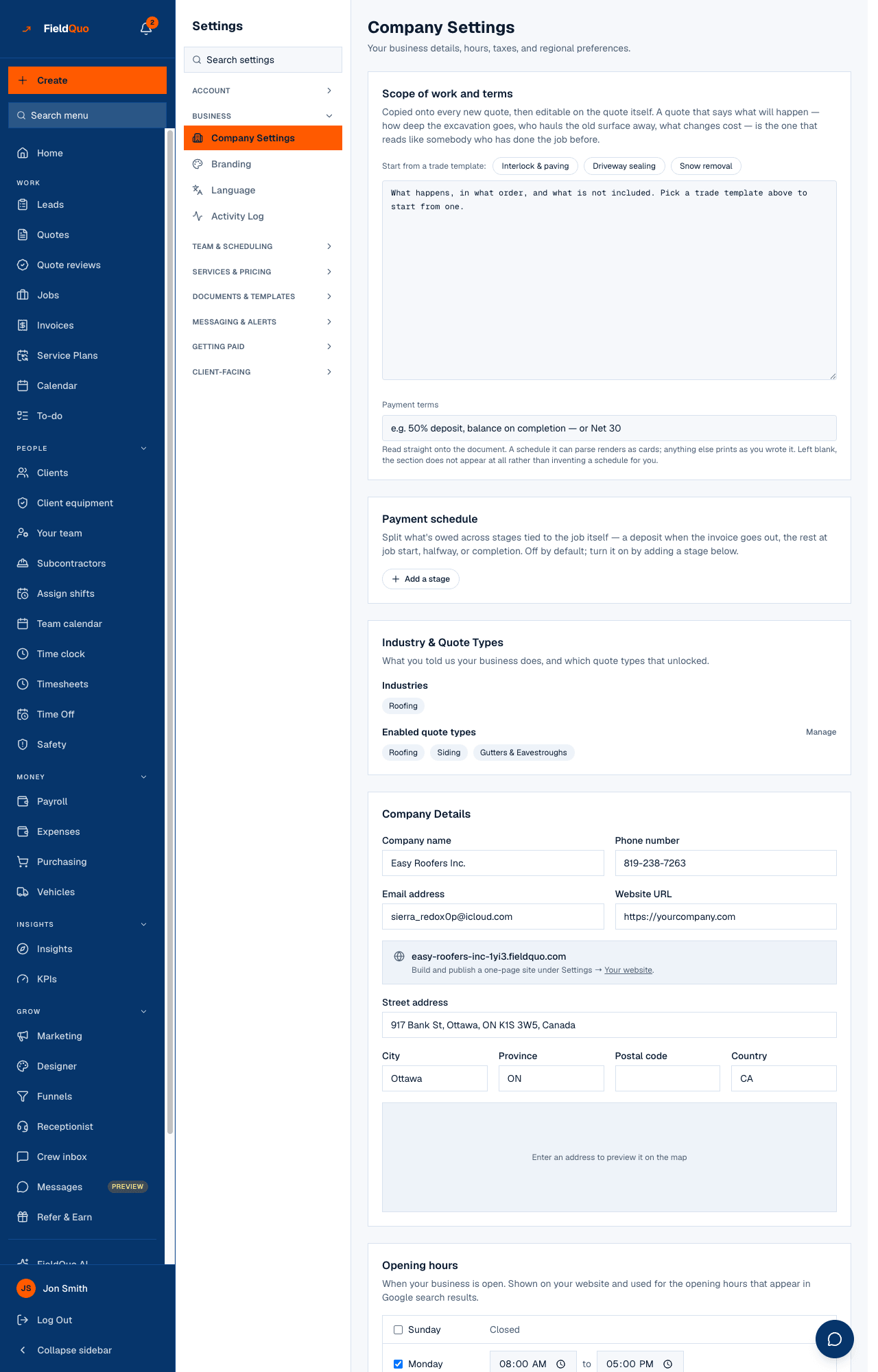
How to set your payment terms
- Open Settings → Company Settings.
- In Scope of work and terms, type your terms in Payment terms — a sentence, or a set of percentages.
- Press Update Settings. The next quote you create carries the new terms; quotes already sent keep what they were sent with.
Write percentages if you want cards. “50% deposit, 50% on completion” prints as two large blocks the client reads in a second; “Payment by e-transfer within 14 days of invoice” prints as that sentence, verbatim.
Cards or a sentence: how the text is read
FieldQuo tries to read a milestone schedule out of your terms and shows cards only when it is sure. The rule is deliberately conservative — a mangled set of cards would be worse than the plain sentence it replaced.
| What you typed | What the client sees |
|---|---|
| 50% deposit, 50% on completion | Two cards: 50% Deposit · 50% Completion — a leading “on”, “at” or “due” is dropped from the label |
| 30% deposit, 40% job start, 30% on completion | Three cards: Deposit · Job start · Completion |
| 50%, 40%, 10% | Cards with stand-in labels — Deposit · Progress payment · On completion — always in English, whatever the document's language |
| Net 30 | The sentence, printed as written |
| 10% discount for cash | The sentence — one percentage is not a schedule, and the parts must add up to about 100% |
When a payment schedule is switched on
The Payment schedule card below the terms is the rule-based version: real invoices raised off the job's own dates — a deposit when the invoice is created, the rest at job start, halfway or completion. As soon as it has stages, the Payment terms field locks and is rewritten from the schedule (“30% Deposit, 40% Job start, 30% On completion”, or your own stage names), so the document a client reads always says what will actually be billed. Press Turn off — go back to free text to edit the sentence by hand again. See Deposits and payment schedules.
Who can change it
Company Settings is for people who may run the company: the owner, administrators, and anyone on the Manager or Dispatcher level. Estimators and Crew do not see the Company Settings row in the menu; the terms still print on the quotes they write. A read-only support session sees the card but cannot save it.
Häufige Fragen
Do the terms change on quotes I have already sent?
No. A quote is read from the terms current when it was created, and a signed PDF keeps saying what it said. Change the terms and the next new quote picks them up.
Can I set different terms per quote?
Not today — the terms are one company-wide line. What you can vary per quote is the scope of work, which is copied onto each quote and editable there.
Why is the Payment terms field greyed out?
A payment schedule is active. The text is generated from the schedule's stages so the two cannot disagree. Turn the schedule off to type freely again.
War das hilfreich?