

The Invoices list
Every invoice your company has raised, what is still owed, what is past due, and how to find one fast.
Dieser Artikel ist vorerst auf Englisch, Französisch und Spanisch verfügbar. Sie lesen die englische Fassung. Français · Español
Invoices is the money screen: three tiles that say where you stand, then every invoice with its status, its client, its due date and what is still owing on it. It is the page to open when someone asks “have they paid?”.
Overview
Open Invoices in the sidebar under Work. The heading reads Invoices — Track payments and billing. and the New Invoice button sits top right. The tiles sum the same per-invoice figures the rows print, so a half-paid invoice counts its remaining balance in Outstanding, not its face value.
What is on the screen
- Outstanding — the total still owed across every invoice. When some of it is late, a red line adds “… of that is past due.”
- Paid — everything received, including partial payments on invoices that are not settled yet.
- Total Billed — the face value of every invoice, paid or not.
- Search invoices... — filters the list by invoice number or client name as you type.
- One row per invoice: the number (INV-2026-0008), a status chip, the client, Due … with the due date, and on the right the balance owing — or Paid in full in green with the invoice total underneath.
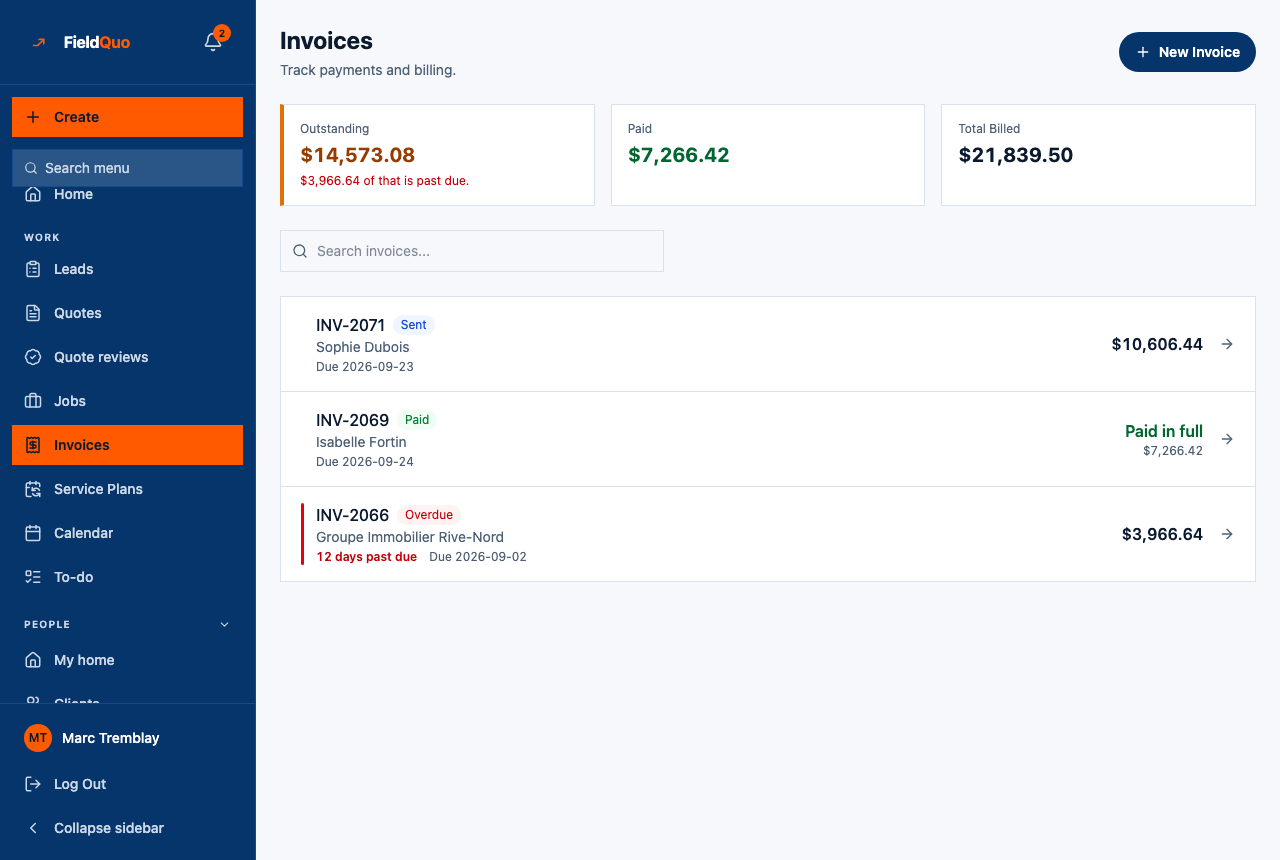
Lateness is measured from the due date every time the list loads: an invoice due yesterday reads 1 days past due in red this morning without anyone touching it. A draft is never late — it was never billed to anyone — and an invoice with no due date is not late either; it simply has no due date.
The status chips
| Chip | What it means |
|---|---|
| Draft | Saved, never emailed. The client has not seen it. Only drafts can be deleted. |
| Sent | Emailed to the client at least once, with a balance still owing. Stays Sent through partial payments. |
| Paid | Nothing owing and at least one payment received — online or recorded by hand. |
| Overdue | Past its due date with a balance owing. The red days past due line under the client name is measured from the due date on every load, whatever the chip says. |
| Refunded / Partially refunded | Money went back to the client through Stripe. Amber, not red — you did this, there is nothing to chase. |
| Disputed | A client's bank has opened a chargeback. Red, because the window to send evidence is closing — see Disputes and chargebacks. |
How to find an invoice
- Type part of the number or the client's name into Search invoices.... The list narrows as you type; No invoices match your search. means nothing did.
- Press the row. The invoice opens with its banners (unsent, overdue, partly paid), the document as the client sees it, the Payment History and the job behind it.
- To see only one client's invoices, open the client's record instead — it lists their quotes, jobs and invoices together.
The list shows the current version of an amended invoice, with a balance re-derived from every payment across all its versions. You never have to add up v1 and v2 yourself.
Who can see it
Anyone whose access level includes invoices at View only or higher: the Estimator, Dispatcher and Manager presets, administrators and the owner. The Crew preset has no invoices at all and gets a “no access” panel instead of an empty list — an empty list would say “you have none”, which is a different and untrue statement.
A person whose access has the See prices switch off still sees the rows, but every money figure on this screen is an em dash. FieldQuo does not print “$0.00 outstanding” over a book it was told not to price.
Häufige Fragen
Why does a row show less than the invoice total?
The right-hand figure is what is still owed, with Paid … underneath when part has been received. The Outstanding tile adds up exactly those figures, so the column and the tile always agree.
Why is there no red line on an invoice I know is late?
It has no due date, or it is still a draft. Set a due date when you create or edit the invoice; a draft is not late because it was never sent.
Can I export this list?
No. FieldQuo imports lists but does not export them. Each invoice downloads on its own as a PDF — see What to hand your accountant.
War das hilfreich?