

Answer Facebook and Instagram messages from FieldQuo
Connect your Facebook Page once and its messages — and your linked Instagram account's — arrive in Messages, where you answer them within Meta's 24-hour reply window.
Dieser Artikel ist vorerst auf Englisch, Französisch und Spanisch verfügbar. Sie lesen die englische Fassung. Français · Español
When a homeowner writes to your Facebook Page, or to the Instagram professional account linked to it, the conversation lands in Messages in FieldQuo and you answer it there. The reply goes out from your Page or your Instagram account — the homeowner never sees FieldQuo.
Two rules come from Meta, not from FieldQuo, and most of this article is about them: a business may only reply within 24 hours of the customer's last message, and only one app at a time may answer a given conversation. While Messages shows Early preview. at the top, it works and parts of it may still change.
Connect your Page
- Open Settings → Meta Ads (owner and administrators only) and scroll to Facebook & Instagram publishing.
- Press Connect Facebook & Instagram, sign in to Facebook and allow every permission Meta shows.
- If your login manages several Pages, choose one under Which Page? and press Connect this Page.
- Check the line under the Page's name. Meta is sending this Page's messages to FieldQuo — set up on … means new messages will arrive on their own.
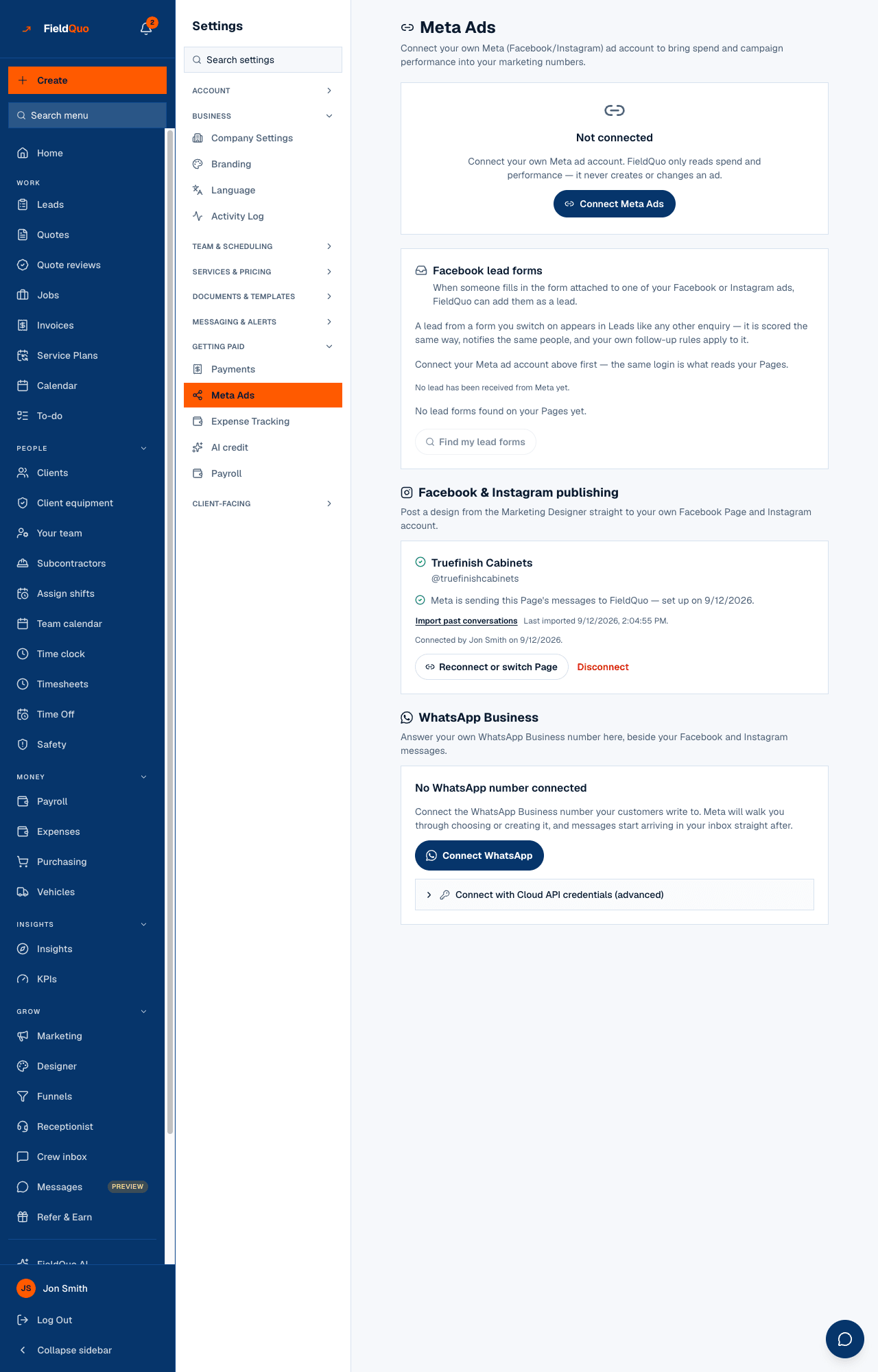
Other lines tell you what is wrong: Messages from this Page aren't reaching FieldQuo comes with Try subscribing again; Your inbox isn't switched on for this Page yet comes with Connect the inbox; a line naming permissions Meta has not granted means Meta has not yet approved them for FieldQuo. Instagram needs an Instagram professional account linked to the Page — otherwise the card reads No Instagram account linked to this Page — Facebook only.
What arrives, and who sees it
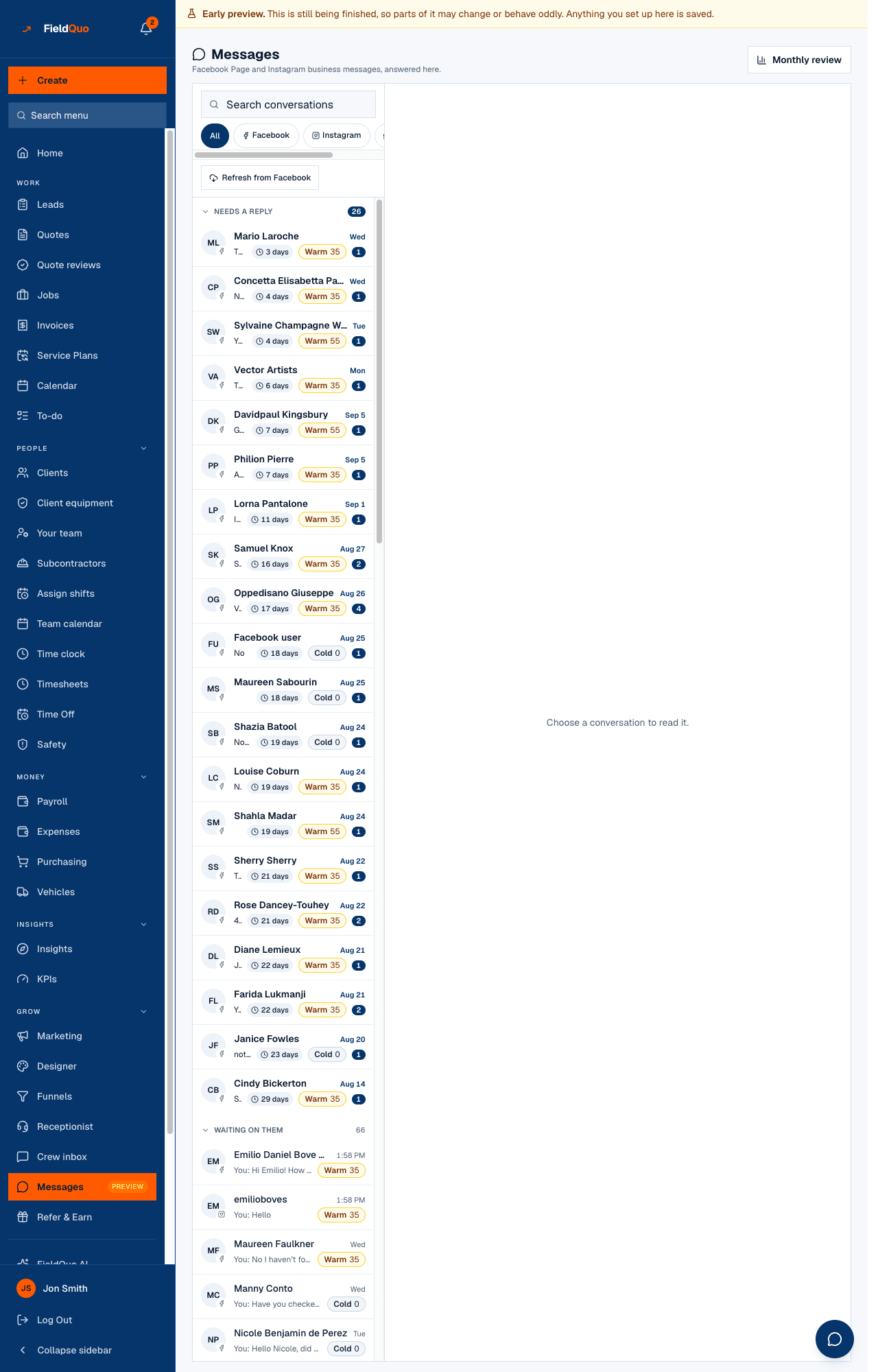
- Every new conversation appears in Messages, marked Facebook or Instagram. The Facebook and Instagram chips filter the list, and conversations are grouped under Needs a reply, Waiting on them, Snoozed and Done.
- What the person sends comes with it: text, photos and other attachments, and a map pin when they share a location on Messenger.
- Conversations from before you connected are not delivered by Meta on their own. Import past conversations on the settings card, or Refresh from Facebook in Messages, pulls up to the last 30 days; it can run once every ten minutes.
- Your replies from FieldQuo are text only on Facebook and Instagram — the paperclip for photos and files is shown on WhatsApp conversations only.
- Anyone whose access includes Requests at View only or more can read the inbox and gets a push notification for a new message if they turned notifications on; replying needs View, create, and edit.
The 24-hour reply window
Facebook and Instagram only let a business reply within 24 hours of the customer's last message. The window restarts every time they write again. FieldQuo works it out before you type, so the conversation tells you where you stand instead of letting Meta bounce a reply you already wrote.
| The conversation shows | What you can do |
|---|---|
| Nothing — the window is open | Reply as normal. |
| Less than an hour left to reply. | Reply now; after that, replying from FieldQuo stops until they write again. |
| Reply window closed. — it has been longer than 24 hours | Nothing can be sent from FieldQuo. The conversation reopens as soon as they write again; until then call or email them — Open …'s client record to call or email takes you there when the conversation is linked to a client. |
| Reply window closed. — this person has not messaged your Page or account | Only somebody who wrote to you can be answered here. Reach them another way. |
Meta has an exception for replies by a human agent up to seven days later, but it is a permission FieldQuo does not hold, so there is no way around the 24 hours from FieldQuo on Facebook or Instagram.
“Another app is in control of this conversation”
Meta lets only one app at a time answer a conversation. If Meta's own automated replies or Business AI already took it, your reply fails with Not sent — another app is in control of this conversation at Meta. Your message is still in the box. and the conversation shows what to change:
- In Meta Business Suite, open “Inbox” → “Automations” and turn off the automated replies and Business AI for the Page or Instagram account.
- Facebook: in your Page's settings, open the “Conversation Routing” tab and set FieldQuo as the default app. Instagram: in Meta's conversation routing settings for the account, set FieldQuo as the app that answers messages.
- Then press Send again — your message is still in the box. A conversation Meta's automation already holds may stay with it until it is handed back; new conversations come to FieldQuo.
- On Facebook only, Ask to take over this conversation asks Meta to hand this one over. The app holding it decides and FieldQuo is not told its answer, so press Send to find out.
Instagram: “Allow Access to Messages”
If an Instagram reply fails with Not sent — Meta refused this Instagram reply because Instagram messaging isn't enabled for this connection., the conversation explains why and what to change. On your side there are two things:
- In the Instagram app, turn on the setting Meta requires: Instagram Settings > Messages and story replies > Message controls > Connected Tools > Allow Access to Messages.
- If the notice names a permission your connection is missing, press Reconnect in settings and allow everything Meta asks. The person reconnecting needs at least “Moderate” task access on the Facebook Page.
- Press Send again. If it still fails, contact FieldQuo support.
Häufige Fragen
Can I message someone who has never written to my Page?
No. Facebook and Instagram only let a business answer somebody who wrote to it in the last 24 hours. Call or email them instead.
Does disconnecting the Page delete the conversations?
No. The access is deleted and new messages stop arriving, but the conversations already in Messages stay, and reconnecting picks them up again.
Why did a reply fail although I answered within the hour?
Most often another app holds the conversation — see “Another app is in control of this conversation” above. The failed reply says which case it is.
War das hilfreich?