

Payroll settings
When you pay — frequency, the day the period closes, payday — and the deduction and earning components a pay run applies: fixed amounts, percentages of gross, and progressive tax bands you or your accountant supply.
Dieser Artikel ist vorerst auf Englisch, Französisch und Spanisch verfügbar. Sie lesen die englische Fassung. Français · Español
Settings → Payroll is what Payroll runs calculate from: the pay cycle, and the components that turn a gross figure into net. Until something is set up here, pay runs are gross-only and say so. The footer states the division of labour: “FieldQuo does the arithmetic with the rates you save here. It does not file or remit anything, and it doesn't update rates when they change — review them each tax year with your accountant.”
Overview
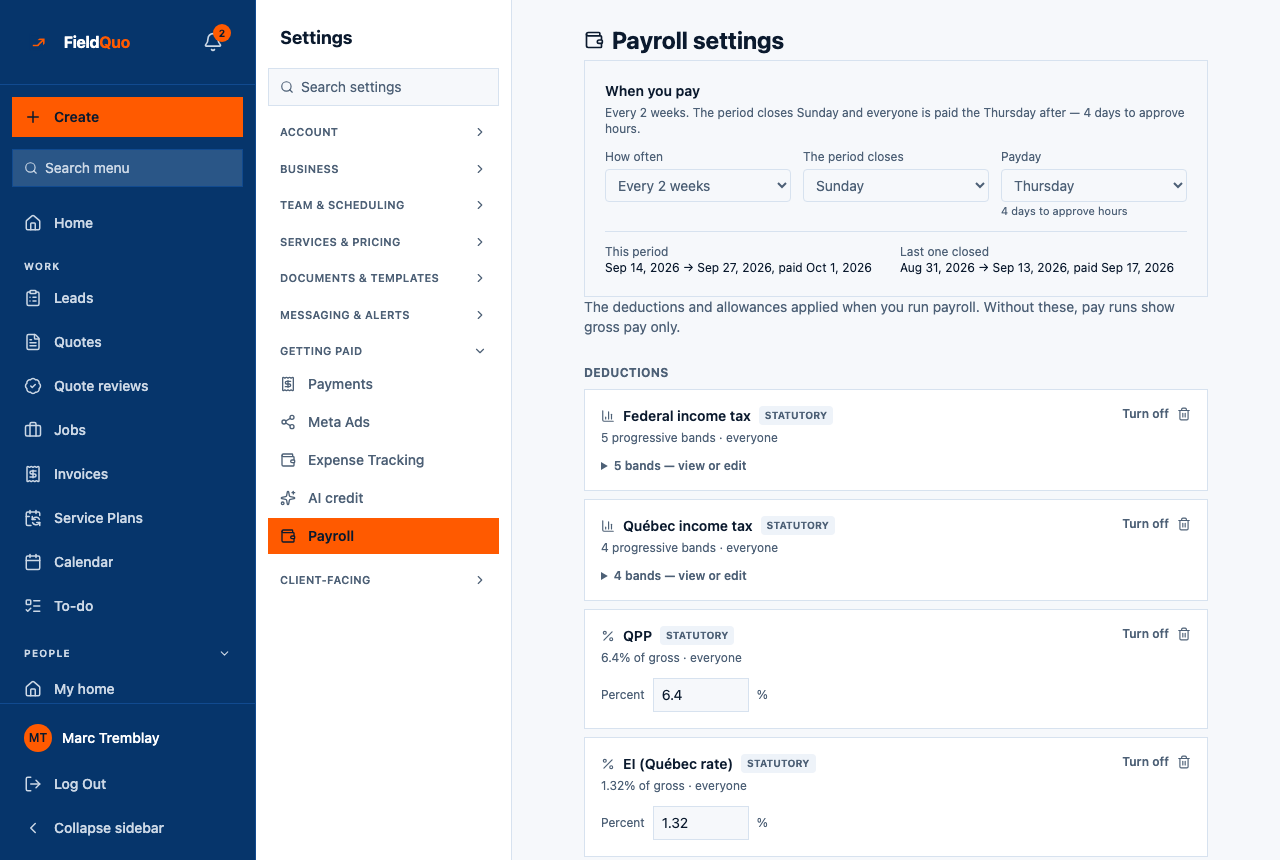
The page is headed Payroll settings — “The deductions and allowances applied when you run payroll. Without these, pay runs show gross pay only.” A When you pay card comes first, then Start from your region (offered while you have no components), then two lists: Deductions and Allowances & earnings, with Add a component at the bottom.
What is on the screen
- When you pay — How often, The period closes (a weekday), Payday (a weekday), the number of days that leaves to approve hours, then This period and Last one closed with their dates and paydays. Until it is set, it reads “not set — using the default below” with a Set it up button.
- Start from your region — Canada, United States or United Kingdom, each with “3 components · 2024 figures”. In bold: “These are published figures for the year shown — confirm every one with your accountant.”
- Deductions — one row per component with its name, a statutory badge where it came from a template, an off badge when turned off, and how it is worked out: “5.95% of gross”, “5 progressive bands”, or a fixed amount, plus Turn off / Turn on and a remove button.
- Allowances & earnings — the same rows for money added rather than taken off, such as a tool allowance.
When you pay
The period end and the payday are two separate controls because overtime is worked out against a weekly threshold: a period that contains whole weeks pays overtime once; one that splits a week understates it twice. The card says the gap between the two days out loud — “4 days to approve hours” — because “Sunday to Thursday” means nothing until somebody counts it.
| Setting | What it changes |
|---|---|
| How often | Every week, Every 2 weeks, Twice a month or Once a month. Sets which period New pay run is pre-filled with, how a salary is divided, and how per-period time off accrues. |
| The period closes | The weekday a period ends on. Weekly and every-2-weeks periods then contain whole weeks; the calendar frequencies show a note that weekly overtime is worked out on the partial weeks inside each period. |
| Payday | The weekday people are paid. Only the “paid …” date under This period on the Payroll screen and the review gap read it — FieldQuo does not pay anyone on that day. |
Everyone can read the pay cycle — a worker needs to know when payday is — but only an owner or administrator can change it: “Only an owner or admin can change when the company pays.” A gap of a day or less between period close and payday shows a warning.
How to add a component
- Open Settings → Payroll. If you have no components yet, press your region under Start from your region to seed the statutory set, then check each figure with your accountant.
- Press Add a component and name it — “Union dues, Tool allowance”.
- Choose Deduction or Allowance / earning.
- Choose how it is worked out: Fixed amount (same amount every pay period), Percent of gross (“e.g. CPP at 5.95%”) or Progressive bands (income tax brackets: “Annual thresholds, lowest first. Leave the last ‘up to’ blank for ‘and above’.”).
- Press Add. From the next Calculate on, it is applied to everyone on the run.
The Canada set is Federal income tax (five 2024 bands), CPP at 5.95% and EI at 1.66% — the employee share only. Provincial tax is not included: add your province's brackets as a separate Progressive bands component. The United States set has no state tax; the United Kingdom set has no NI category letters.
What each control changes
| Control | What it changes |
|---|---|
| Fixed amount | The Amount per pay period is added or deducted on every run for every person, whatever their hours. |
| Percent of gross | The percentage of that person's gross on the run. |
| Progressive bands | The period's gross is annualised, taxed through the bands, and divided back down to the period — the way every published tax table is written. Add band and Remove band edit the list; the last band's “up to” is left blank for “and above”. |
| Turn off / Turn on | A component turned off shows the off badge and is skipped on the next Calculate. Nothing is deleted; turn it back on any time. |
| Remove | “Past payslips keep what was already deducted.” The component is gone from future runs; every past run keeps its own copy of the lines. |
Who can see it
Owners and administrators only. The Payroll settings row is hidden from every other level, and every write answers “Only an owner or admin can change payroll settings.” A Manager who has been granted run payroll still cannot edit the rates here — the two are different questions on purpose.
Häufige Fragen
Can a component apply to only one person?
No. Every component applies to everyone on the run. A row from an earlier version marked “assigned individually” reaches no payslip and is flagged in amber; recreate it as a normal component or remove it.
Do the statutory rates update themselves each year?
No. They are published figures for the year shown, seeded once, and then they are your numbers. Review them each tax year with your accountant and edit the bands.
Where does someone's hourly rate live?
On their team record and worker record, not here. This screen holds what is applied to everyone; the rate is per person — see Manage Team.
War das hilfreich?