

Branding
Your logo and the three brand colours — primary, secondary and neutral — that appear on every quote, invoice, PDF, email, booking page and website a client sees, with the contrast worked out for you.
Dieser Artikel ist vorerst auf Englisch, Französisch und Spanisch verfügbar. Sie lesen die englische Fassung. Français · Español
Branding is where the white-label promise is kept. Upload a logo, pick a primary colour, and every document and page a homeowner meets carries your name and your colour — never FieldQuo's. A client comparing three contractors should not be able to tell that two use the same software.
The page is three cards and one button. It is deliberately not a design tool: one colour drives everything, the contrast is measured rather than assumed, and the back office your team works in stays neutral whatever you pick.
Overview
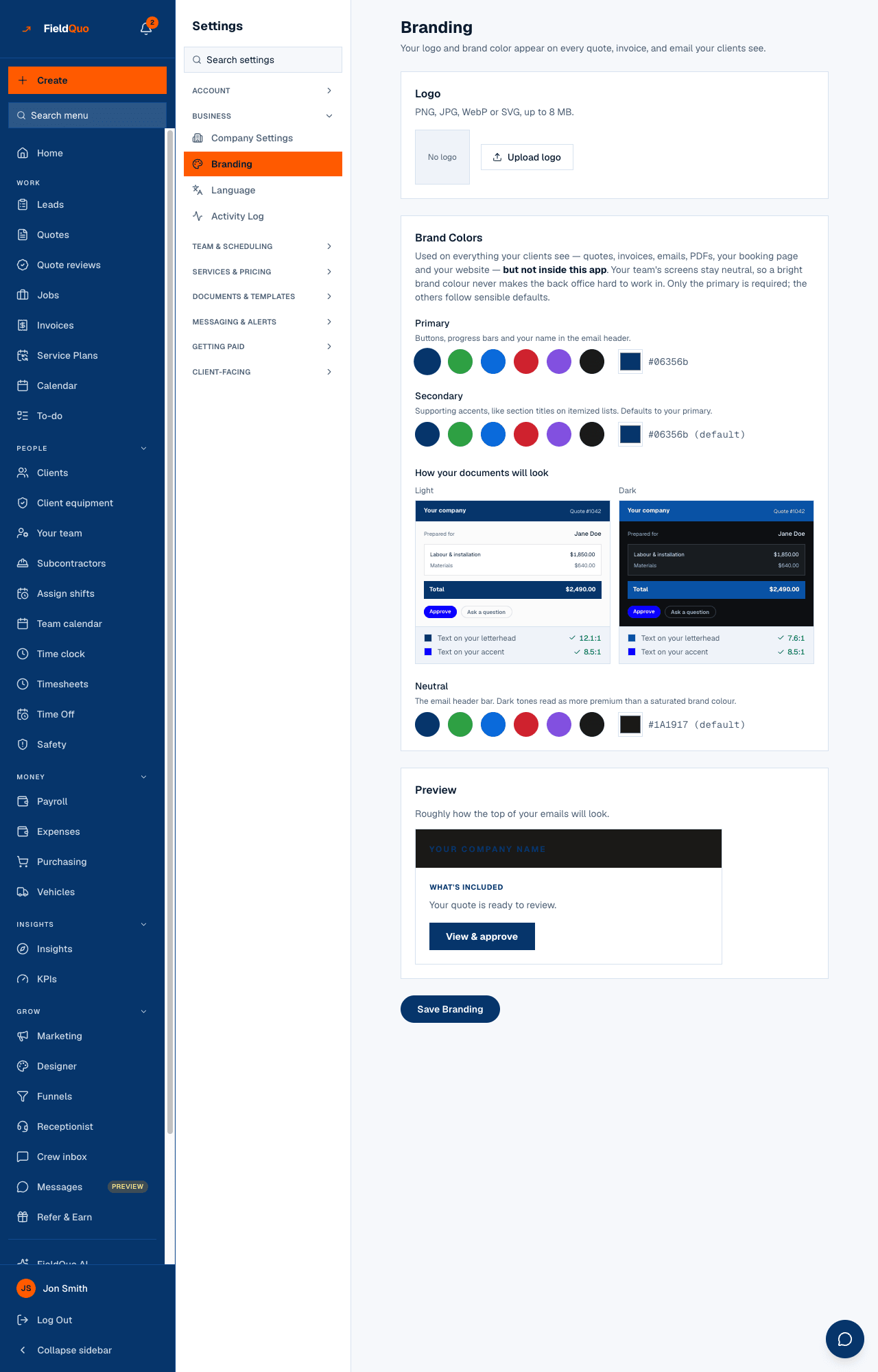
The heading reads Branding — Your logo and brand color appear on every quote, invoice, and email your clients see. Only the primary colour is required; the secondary and the neutral follow sensible defaults until you set them, and each has a Reset link to go back to following the primary.
The brand colour is for what the *client* sees. Your team's screens stay neutral on purpose — a contractor who picks lime green should not get a lime-green back office. The colour is applied per surface: quote, invoice, email, PDF, booking page, portal, website.
What is on the screen
Top to bottom:
| Card | What it holds |
|---|---|
| Logo | A preview square and Upload logo (or Replace logo once one exists). PNG, JPG, WebP or SVG, up to 8 MB. |
| Brand Colors | Primary — six preset swatches plus a custom picker. Secondary — same controls, Reset to follow the primary. How your documents will look — a Light and a Dark preview that update as you pick. Neutral — the email header bar, default a near-black. |
| Preview | Roughly how the top of your emails will look: the neutral header with your logo, a section title in the secondary, and a View & approve button in the primary. |
| Save Branding | One button for the whole page; it reads Saving… then Saved ✓. |
How to set your branding
- Open Settings → Branding.
- Press Upload logo and choose the file. A transparent PNG or an SVG looks best on both the light and the dark header. The old logo is removed when you replace it.
- Pick a Primary colour — a preset, or the picker for your exact hex.
- Leave Secondary and Neutral on their defaults unless your brand has them; check the Light and Dark previews.
- Press Save Branding.
Pick the colour from your van, your business card or your existing website so every surface matches. A colour that changes from one document to the next reads as two companies.
What each colour changes
- Primary — buttons, progress bars, links and your name in the email header; the accent on the quote approval page, the invoice pay page, the booking page and the client portal.
- Secondary — supporting accents such as section titles on itemized lists. Defaults to the primary, so a company that never sets it still looks consistent.
- Neutral — the header bar of every email and the dark band at the top of documents. Dark tones read as more premium than a saturated brand colour, which is why the default is near-black.
Contractors pick yellow, white and mid-grey, and a naive “dark colour gets white text” rule fails on all three. FieldQuo measures the contrast of every text-and-background pair it draws from your colour and substitutes a legible pair when yours is not — so a yellow brand still prints readable buttons. It cannot make a white logo visible on a white page; check the previews.
Who can see it
The row needs the user-management capability: the owner, administrators, Managers and Dispatchers. The save goes to the same route as Company Settings and is refused for anyone else, so a crew member who reaches the address cannot change your brand.
Häufige Fragen
Does the logo appear on the PDF?
Yes — on the quote PDF, the invoice PDF and the email carrying them, in the header where your company name is.
Why does my back office not use my colour?
By design. The white-label promise is about the homeowner's view. The screens your staff use all day stay neutral so a bright brand colour never makes them hard to work in.
What happens if I never set a secondary or a neutral?
The secondary follows your primary and the neutral stays near-black. Both are derived at render time, so changing the primary later moves the secondary with it.
War das hilfreich?