

The texts clients receive
The two automated texts a client can get — On my way and an appointment reminder — what they say, in which language, from which number, how STOP works, and everything FieldQuo does not text.
Dieser Artikel ist vorerst auf Englisch, Französisch und Spanisch verfügbar. Sie lesen die englische Fassung. Français · Español
FieldQuo sends a client exactly two kinds of text message: On my way, when a crew member taps that status on a job visit, and an appointment reminder before a booked appointment or a scheduled job visit. Both open with your company name, both go out in the client's language, and both respect a STOP reply. That is the whole list — quotes, invoices, booking confirmations and review requests go by email.
Reminders are off until you choose a lead time under Settings → Notifications. Nothing is billed per text.
Overview
Each text leaves from your company's own texting number if you have one, otherwise from a shared FieldQuo number — which is why every message starts with your company name: on a shared line the name in the body is what tells the client who is texting. Nothing in the message says FieldQuo.
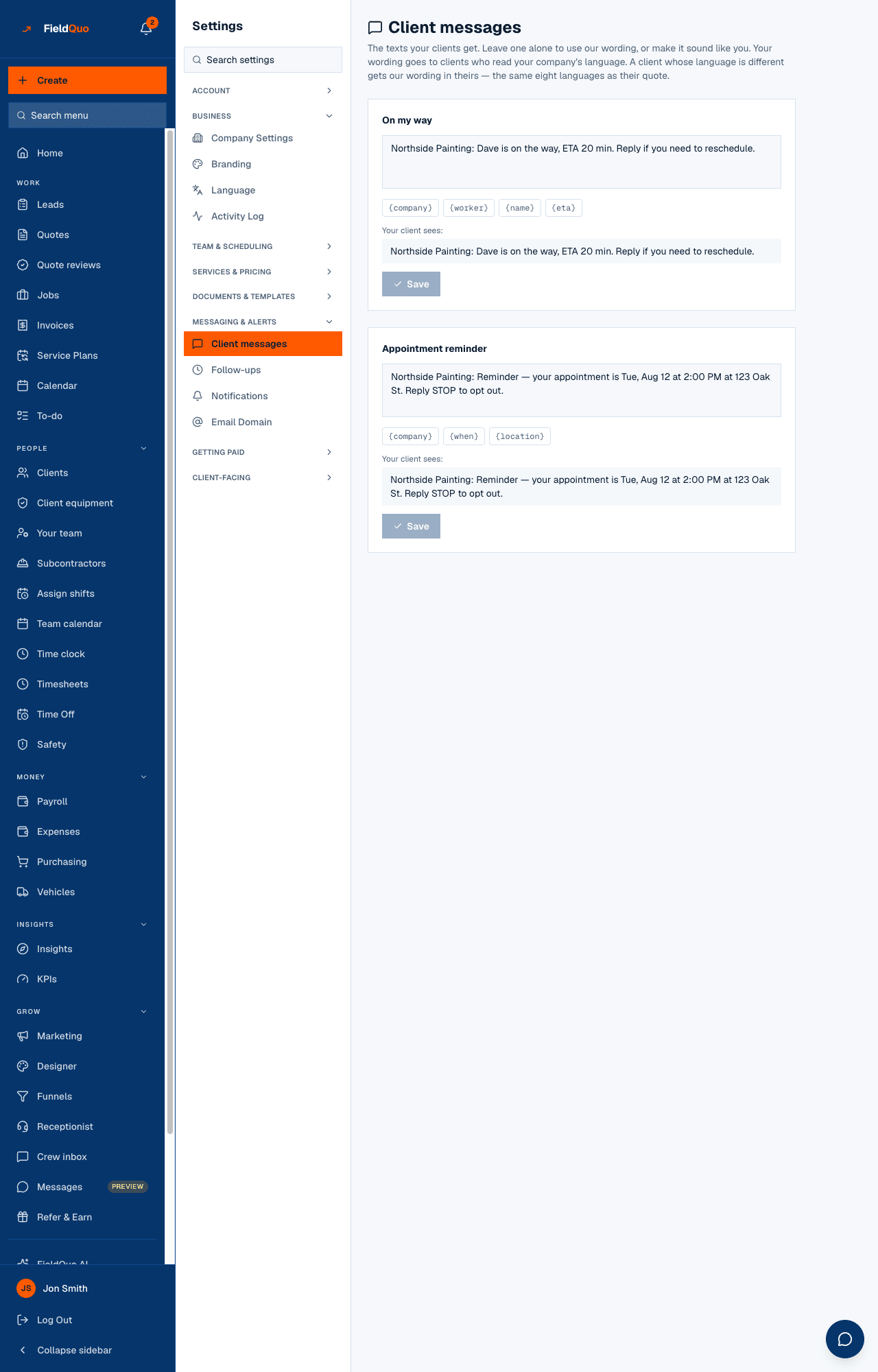
Appointment reminders is marked partial in FieldQuo's own feature list: reminders go by text message only — there is no email reminder. The wording of both texts is editable on Settings → Client messages.
The two texts
| Text | Built-in wording (English) | When it is sent |
|---|---|---|
| On my way | “[Company]: [Worker] is on the way, ETA 20 min. To reschedule, call [phone].” | The moment a crew member sets a job visit to On my way. The ETA is worked out from where their phone was when they tapped to the job's address, rounded up to five minutes, and left out when either end is unknown. The phone line is dropped if your company has no phone on file. |
| Appointment reminder | “[Company]: Reminder — your appointment is Tue, Sep 15, 2:00 PM at 123 Oak St. Reply STOP to opt out.” | Once, inside the lead time you chose (2, 24 or 48 hours before), for a booked appointment or a scheduled job visit that is not cancelled or completed. Checked hourly. |
The time in a reminder is written in your company's time zone and the client's own date format. “Reply STOP to opt out” stays in English in every language, because STOP is the keyword carriers and the inbound handler recognise.
Replies to these texts are not read by anyone. The on-my-way text points at your phone number for a reason: a client who texts back “can we do 3 instead?” is talking to nobody. Only STOP and START are acted on.
Which language a client gets
The text follows the client's language the way their quote did — the eight client languages FieldQuo writes documents in (English, French, Spanish, Ukrainian, Punjabi, Tagalog, German, Italian); anything else reads English. If you rewrote a message on Settings → Client messages, your wording goes to clients who read your company's language; a client whose language is different gets FieldQuo's built-in wording in theirs. FieldQuo does not machine-translate your sentence.
STOP, and starting again
- A reply of STOP (or STOPALL, UNSUBSCRIBE, CANCEL, END, QUIT — a trailing full stop or exclamation mark is ignored) opts that phone number out. Neither text is sent to it again, and a number that opted out of calls is refused texts too.
- START or UNSTOP reverses the text opt-out. It never restores call consent, which is deliberately one-way.
- On the shared FieldQuo number, a STOP opts the number out of every company that holds it on a client record — the only honest reading of “stop texting me” sent to a line that texts for many.
- The gate is checked at the moment of every send, for both texts, from one place.
What you control
- Open Settings → Notifications → Appointment reminders and pick Off, 2 hours before, 24 hours before or 48 hours before. Off is the default; a company that never chose a lead time sends no reminders.
- Open Settings → Client messages to reword either text. Only the chips shown work — {company}, {worker}, {name}, {eta}, {phone} for On my way; {company}, {when}, {location} for the reminder. An unknown token is refused at Save, and a message past 320 characters is flagged because it costs three segments.
- Read Your client sees: under the editor — it is the exact string that will go out — then Save, or Use default to return to FieldQuo's wording.
A crew member sends On my way from the job visit on their phone; nobody has to remember to text. There is no button to send a reminder by hand, and a visit is reminded at most once.
What FieldQuo does not text
- A booking confirmation — that goes by email, from your company, when a visit is booked on your booking page.
- A quote, an invoice, an overdue-invoice chase or a “your job is complete” message — email only.
- A review request — email only, and only to a client with an email address.
- A text from the phone receptionist — it reads a booking link out loud; it cannot text it today.
Full detail on what is and is not automated: Texting clients: what is automated and what is not.
Who can change it
Settings → Notifications is owner and administrator only. Settings → Client messages needs the Manager level or above — an owner, an administrator, a Manager or a Dispatcher. Any crew member assigned to a visit can trigger On my way from their phone.
Häufige Fragen
Does a text cost me anything?
No. Client texts are included in your plan and nothing is billed per message. (The crew texting line and the phone receptionist are separate and metered.)
Why did a client not get a reminder?
One of: reminders are Off under Settings → Notifications; the client has no phone number; the appointment is cancelled or completed; it was already reminded once; or the number replied STOP.
Can the client reply to reschedule?
Not by text — replies are not read. The on-my-way text gives your phone number for that; a visit booked on your booking page also has its own manage link by email.
Does the text come from my number?
From your own texting number if your company has one; otherwise from a shared FieldQuo number, with your company name at the start of the message.
War das hilfreich?