

Time off requests
How anyone on the team asks for time off, how the request finds the right manager, what approving it changes on the calendar and the balance, and who can do what.
Per ora questo articolo è disponibile in inglese, francese e spagnolo. Stai leggendo la versione inglese. Français · Español
Time Off is one screen with two audiences. Everybody sees their own balances and requests and can ask for days off; a manager also gets a Team tab with the requests waiting on them, who is off next, and everyone's balances.
The balances come from the policies an owner sets up under Settings → Time Off Policies — see Time off policies. Without a policy there is nothing to request against, and the screen says so.
Blackout dates, the limit, holidays — and the manager's screen
Three rules sit above every policy's balance, set under Time off policies. A blackout range (Dec 15 – Jan 5, say) refuses any request touching it, naming the range and the reason; the form says so as soon as you pick the dates, before you type a note. Most people off at once refuses a request when that many colleagues are already approved off on any day of it — the refusal names who. Pending requests do not count; only approved leave does. Statutory holidays inside a request are not charged against the balance and are listed under the dates.
The Team view is now the manager's desk: Requests (N) as a table — the person, the policy and its type with when it was submitted, the dates, the total in hours (from their working hours; days when none are set) and ✓ approve, ✕ decline, › details. View history opens what was decided earlier. Hours approved: 2026 sums approved time by person and type, with a chip per type to filter. On the right, Upcoming time off as cards and the Policies card, which shows each policy with how many people hold it, the blackout ranges and the limit.
Details (›) opens the request: category, first and last day, Time requested, Post-balance — what the person would have left once it is approved — the note, and Other employees off during those dates, or No other employees off. That last line is the limit showing its work. On a phone it opens as a sheet from the bottom.
Add time off lets a manager enter leave for somebody — a phone call that said Dana is off Thursday. It is the same request, created already approved with the manager as reviewer, and the balance, blackout ranges and limit still apply.
Overview
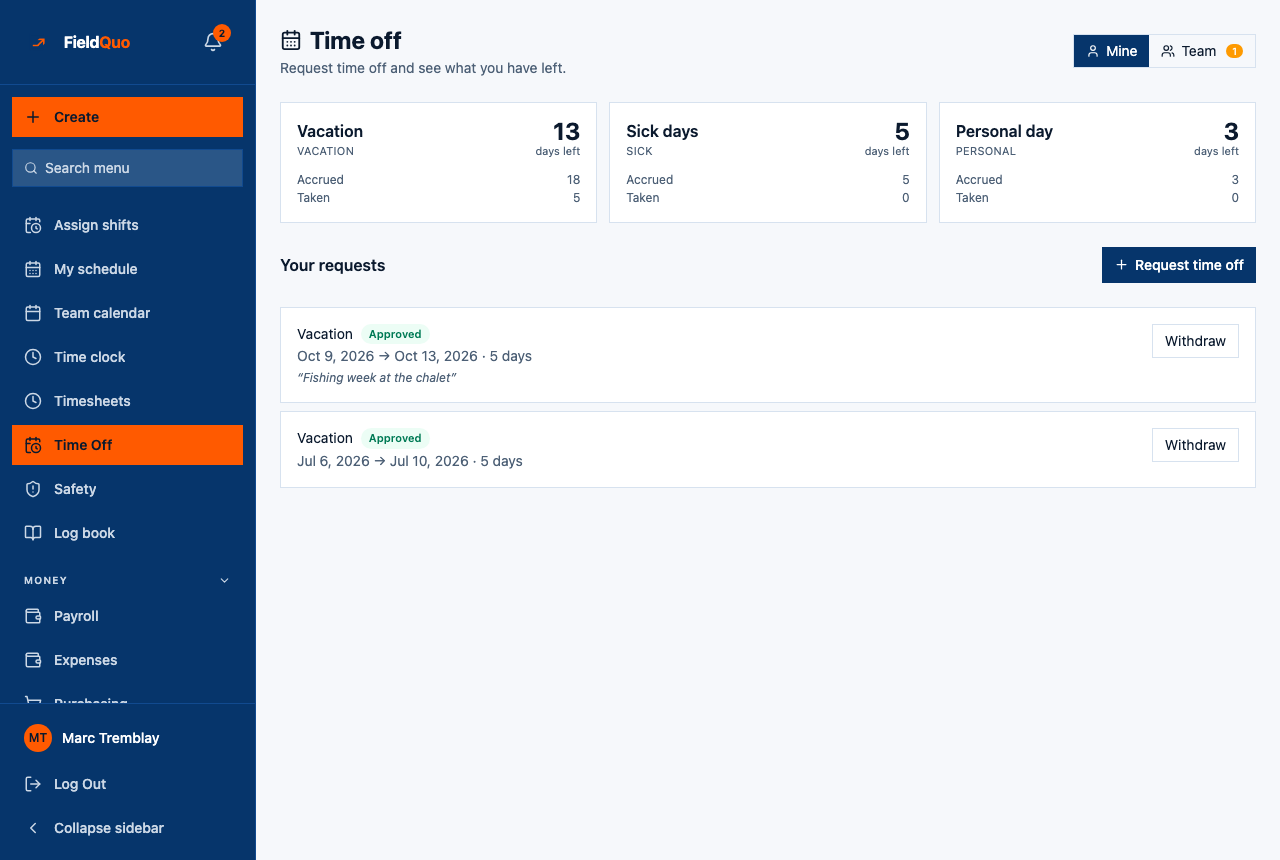
The heading reads Time off — Request time off and see what you have left. For a manager, two buttons on the right switch between Mine and Team; the Team button carries a count of requests still pending.
A request has four states, shown as a pill on its row: Pending, Approved, Declined and Cancelled. Approved time off is what the rest of the product reads: the Scheduler refuses to put a shift on an approved day off, and the public booking page stops offering that person's slots on those days. A pending request changes neither.
What is on the screen
- Mine — one balance card per policy (for example Vacation, Sick, Personal) showing the days left, then Accrued, Taken and, when something is pending, Awaiting approval. A vacation-pay policy shows money accrued instead of days.
- Your requests with the Request time off button, then each request: the policy, the pill, the dates, the number of days, your note, and Withdraw on a request you can still take back.
- Team — Awaiting approval with Approve and Decline on each request, Who's off next, Balances this year as a table (Person, Policy, Accrued, Taken, Left), and Earlier.
How to request time off
- Open Time Off and press Request time off.
- Choose the Type — the policy. Beside it the form says how many days you have available, or that unpaid leave isn't limited by a balance.
- Set First day and Last day. For a single day, tick Half day only to ask for 0.5.
- Add a Note (optional) — *Anything your manager should know* — and press Submit request.
Days are counted on your own working days (from your working hours; Monday to Friday if none are set), so a Friday-to-Monday request is two days, not four. The request is refused if it overlaps one you already have pending or approved, or if it needs more days than you have left after what is already pending.
A policy that does not require approval books itself: the form says This type is approved automatically — submitting books it. Otherwise the row says who it is waiting on — Waiting on Marie.
Where a request goes
Each worker has a Reports to field under Settings → Workers. A request goes to that manager first. If the manager is themselves on approved leave that day, it escalates to their manager, and the row says so — escalated because Marie is away. With nobody set, or everyone above on leave, it waits on an owner or administrator.
Everyone who can manage people gets a Time off requested notification in their feed. Nobody can approve their own request; the server answers You can't approve your own time off — it goes to your manager. A person can approve requests from anyone below them in the reporting line; an owner, administrator, Dispatcher or Manager can approve anyone's.
What each action changes
| Action | What happens |
|---|---|
| Approve | The balance is checked again at that moment — other requests may have been approved since — then the days are taken from the balance, the pill turns Approved, and the days go on the calendar for scheduling and booking. |
| Decline | The pill turns Declined. Nothing is taken from the balance. |
| Withdraw | Available to the requester on a pending or approved request that has not started. An approved request gives its days back to the balance. Once the first day has passed, only a manager can cancel it. |
Every approval, decline and cancellation is written to the Activity Log with the policy and the number of days.
Who can see it
Every access level sees Time Off and the Mine tab. The Team tab appears only when the server allows it — the owner, administrators, Dispatcher and Manager. A person who can see the team's requests but is not in anyone's reporting line and cannot manage people sees them read-only: You can see requests but not approve them.
Domande frequenti
Why does my request say it is waiting on an owner?
No manager is set on your worker record, or everyone above you is away today. An owner or administrator sets Reports to under Settings → Workers.
Can a manager book time off for somebody else?
No. A request is always made by the person taking the time; a manager approves, declines or cancels it.
Does a pending request block the schedule?
No. Only approved time off is read by the Scheduler and the booking page. A request nobody has answered changes nothing.
È stato utile?