

Testimonials on your website
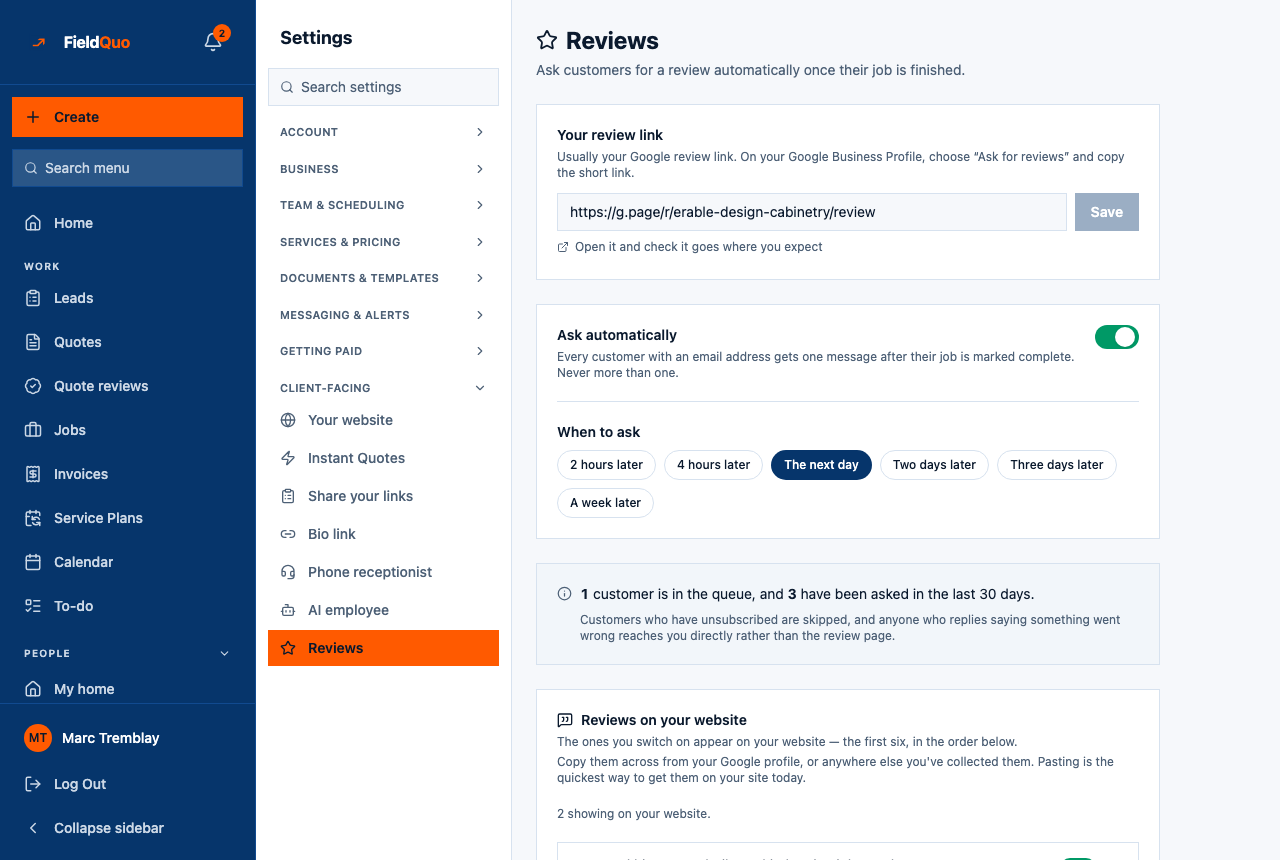
Reviews on your website, on the Settings → Reviews screen: add reviews one at a time or paste a list, switch on the ones to show, order them, and embed them on a site FieldQuo did not build.
ਇਹ ਲੇਖ ਫ਼ਿਲਹਾਲ ਅੰਗਰੇਜ਼ੀ, ਫ਼ਰਾਂਸੀਸੀ ਅਤੇ ਸਪੈਨਿਸ਼ ਵਿੱਚ ਉਪਲਬਧ ਹੈ। ਤੁਸੀਂ ਅੰਗਰੇਜ਼ੀ ਸੰਸਕਰਣ ਪੜ੍ਹ ਰਹੇ ਹੋ। Français · Español
The reviews you already have — on Google, on Facebook, in a folder of thank-you emails — are worth more on your own website than anywhere else. The lower half of Settings → Reviews is where they go. Each review starts switched off; the ones you switch on appear on your FieldQuo website, the first six in the order you set, and in an embed you can paste into any other site.
Overview
The card is titled Reviews on your website — “The ones you switch on appear on your website — the first six, in the order below.” — and, underneath, “Copy them across from your Google profile, or anywhere else you've collected them. Pasting is the quickest way to get them on your site today.” FieldQuo does not read reviews from Google for you; you copy them in, and you decide what is shown.
What is on the screen
- A line saying how many are live: “2 showing on your website.” or “None are showing on your website yet — switch on the ones you want.” This counts what the public site will actually show, capped at six, not how many rows you have.
- One row per review — the customer's name and what they said, a Show on the website switch reading “on your website” or “not showing”, Move up and Move down, Edit and Remove.
- Add a review — Customer's name and What they said, then Add review.
- Paste a list — a box for “One review per block: the name on its own line, what they said underneath, and a blank line between each. A spreadsheet's CSV works too — paste it or choose a file.”, with Choose a CSV file and Import.
- Your reviews on your own website — the embed code, for a site you already have.
How to add reviews
- Open Settings → Reviews and scroll to Reviews on your website.
- For one review: type the Customer's name and What they said and press Add review. For many: paste blocks into Paste a list — name, then the text, then a blank line — or press Choose a CSV file with name and review columns, then Import. The result reads “Added 5, updated 0, skipped 1.”
- Imported reviews start switched off. Press Show on the website on each one you want live.
- Use Move up and Move down to set the order. The first six switched-on reviews are what the site shows.
What each control changes
| Control | What it does |
|---|---|
| Show on the website | Publishes the review to your website and the embed. Off, the review stays on file and is invisible to the public. The published count updates immediately. |
| Move up / Move down | Changes the order on the site. Only the first six switched-on reviews are shown, so order decides which ones make the cut. |
| Edit | Changes the name or the text. Trailing quote marks and stray dashes are tidied on save. |
| Remove | Deletes the review after a confirmation. It cannot be undone; paste it again if needed. |
| Import | Reads pasted blocks or a CSV. A review identical in name and text to one already on file is updated rather than duplicated; empty or too-short lines are skipped and counted. |
On a website FieldQuo did not build
The Your reviews on your own website block is an iframe plus a small script. Its note says what it does: it shows the reviews you have approved, in your own colours, with no FieldQuo branding — and until you have one it shows nothing and shrinks to no height, so it is safe to paste in before you have any. Keep the script with the iframe; it sizes the box. The same block is offered for the booking calendar and the instant estimate — see Embed booking and quote forms.
On a FieldQuo-built site, switched-on reviews also feed the “What clients say” section and a Reviews page of their own; regenerating the site rebuilds those from this list. See Website pages and blocks.
Who can change it
Adding, editing, switching, ordering, removing and importing reviews all need the user:manage permission — the owner, an administrator, or a Manager or Dispatcher — and the Reviews row in Settings is shown only to them. Reviews are shown as they were typed; FieldQuo never rewrites a customer's words.
ਅਕਸਰ ਪੁੱਛੇ ਜਾਂਦੇ ਸਵਾਲ
Does FieldQuo pull my Google reviews in automatically?
No. Copy them from your Google profile and paste them in — the paste box accepts a plain list or a CSV. There is no Google connection for reviews.
Why does the count say 2 when I have 12 reviews?
Only switched-on reviews are counted, and only the first six of those. Ten of yours are either switched off or beyond the sixth position.
Do the ratings from the review-request email become testimonials?
No. The 1-to-5 answers feed the satisfaction KPI and are never published. A testimonial is only what you add here yourself.
ਕੀ ਇਹ ਮਦਦਗਾਰ ਸੀ?