

Pay-over-time financing
Two separate things: Affirm at checkout, where the lender decides and you are paid in full, and an optional monthly figure on quotes on terms you state yourself.
ਇਹ ਲੇਖ ਫ਼ਿਲਹਾਲ ਅੰਗਰੇਜ਼ੀ, ਫ਼ਰਾਂਸੀਸੀ ਅਤੇ ਸਪੈਨਿਸ਼ ਵਿੱਚ ਉਪਲਬਧ ਹੈ। ਤੁਸੀਂ ਅੰਗਰੇਜ਼ੀ ਸੰਸਕਰਣ ਪੜ੍ਹ ਰਹੇ ਹੋ। Français · Español
FieldQuo does not lend money and does not approve anyone. What it offers is two things you can switch on separately: Affirm as a second option beside the card at checkout, so a client can split an invoice into payments while you are paid in full up front; and a monthly figure on the quote approval page, shown only when you have entered your own rate and term. Neither is on by default.
Overview
Pay-over-time is offered at checkout through Stripe, where the lender decides. FieldQuo does not lend and does not approve anyone. The monthly figure shown on a quote appears only if you enter your own rate and term — FieldQuo never invents one.
The two controls live on two screens: the Offer pay-over-time (Affirm) switch on Settings → Payments, and the Financing card on Settings → Instant Quotes.
Affirm at checkout
- There is nothing to set up in Stripe first. Your Stripe account has no Affirm switch of its own — FieldQuo asks Stripe to enable it the moment you turn the option on, and checks the answer every time this page loads.
- Open Settings → Payments. Once Stripe is active, the card Offer pay-over-time (Affirm) appears with a switch.
- Turn it on. Invoices between $50 and $30,000 in USD or CAD then show Affirm beside the card on the pay page; anything outside that range, or a company Stripe has not yet enabled Affirm for, gets a card-only page rather than a broken one. The line under the switch says which it is: Affirm: active, pending Stripe's review, not enabled by Stripe on your account (with what Stripe is asking for), or not available for accounts in your country.
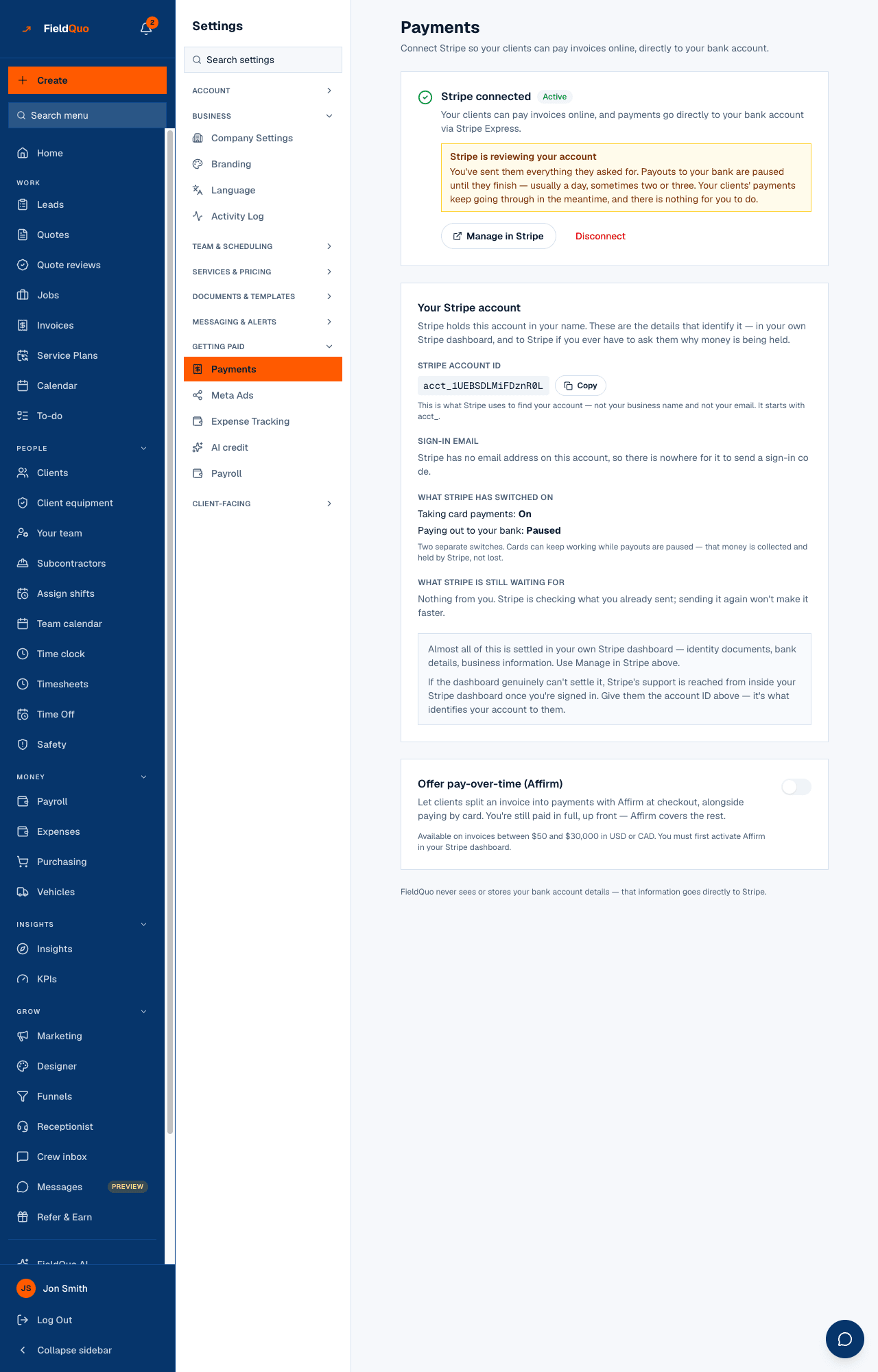
You are still paid in full, up front; Affirm collects the instalments from the client. The fee on an Affirm payment is Affirm's rate, higher than the card rate, and it is passed through on that payment the same way a card fee is — see Payment processing fees and payouts. A client who pays by card on the same page pays the card fee, nothing more.
A monthly figure on quotes
- Open Settings → Instant Quotes and find the Financing card.
- Turn it on and write What to tell the homeowner in your own words — “We offer financing on approved credit — ask us for details.” Add a Provider link (optional) if you use a lender; the client gets a button to them.
- Under Your stated terms (optional), fill in both Annual rate (APR %) and Term (months), or neither. Press Save.
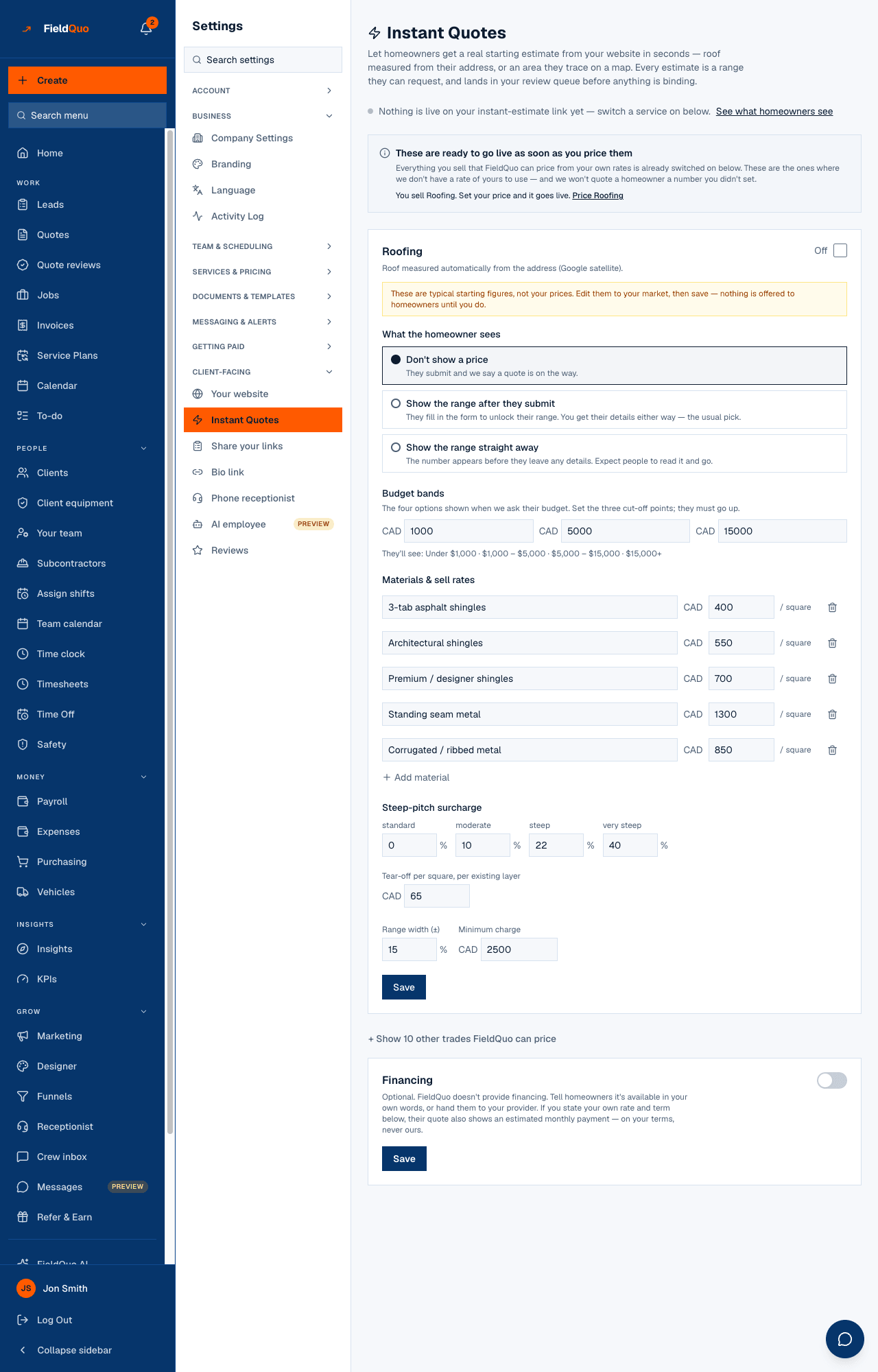
With both terms stated, the quote approval page shows an estimated monthly payment under the total, labelled as an estimate on your stated terms. The instant-estimate page shows your note and the provider button, never a monthly figure. Leave either field blank and no monthly figure is shown anywhere — there is no default rate and no default term.
What each control changes
| Control | What it does |
|---|---|
| Offer pay-over-time (Affirm) — on | Eligible invoices offer Affirm beside the card at checkout. Affirm's fee is passed through on those payments only. |
| Offer pay-over-time (Affirm) — off | Every pay page is card-only, even if Stripe has already enabled Affirm on your account. |
| Financing card — on, no terms | The quote says financing is available, in your words, with a button to your provider if you gave one. No number. |
| Financing card — rate and term stated | The quote adds an estimated monthly payment, computed from your APR and term and labelled as your estimate. |
| Financing card — off | Nothing about financing appears on quotes or estimates. |
The limits
Do not promise a rate or a monthly amount you cannot honour. The figure on the quote is computed from the terms you typed and shown to the homeowner as yours. At checkout, Affirm quotes its own terms and its decision is the lender's, not FieldQuo's and not yours.
- Affirm: invoices from $50 to $30,000, USD or CAD only, and only once Stripe reports Affirm active on your account — the line under the switch in Settings → Payments.
- The monthly figure: whole months, an APR between 0% and 100%, both fields or neither.
- Bank debit and service plans are not financing — a plan is your own instalments, on your own invoices. See Service plans.
Who can change it
Both switches are for the owner and administrators: Settings → Payments is a billing-admin screen, and the Instant Quotes rate card, financing included, refuses anyone else on save.
ਅਕਸਰ ਪੁੱਛੇ ਜਾਂਦੇ ਸਵਾਲ
Does FieldQuo check the client's credit?
No. Affirm does, at checkout, and decides alone. FieldQuo never sees the application.
Can I show a monthly figure without stating a rate?
No. No terms, no figure — a number FieldQuo invented would be a term you could be held to.
Is Affirm available in Canada?
Yes, for invoices in CAD as well as USD, within the $50–$30,000 range, once Stripe reports it active on your account. Affirm serves US and Canadian accounts only; the switch says so for any other country.
ਕੀ ਇਹ ਮਦਦਗਾਰ ਸੀ?