

Payouts held or under review
Why clients' payments can keep going through while nothing reaches your bank, how Settings → Payments tells you which of the two it is, and what to do about each.
ਇਹ ਲੇਖ ਫ਼ਿਲਹਾਲ ਅੰਗਰੇਜ਼ੀ, ਫ਼ਰਾਂਸੀਸੀ ਅਤੇ ਸਪੈਨਿਸ਼ ਵਿੱਚ ਉਪਲਬਧ ਹੈ। ਤੁਸੀਂ ਅੰਗਰੇਜ਼ੀ ਸੰਸਕਰਣ ਪੜ੍ਹ ਰਹੇ ਹੋ। Français · Español
Taking payments and being paid out are two different switches on a Stripe account. Stripe can keep accepting your clients' cards while holding the money, and from inside the app everything looks like it is working — invoices go to Paid, the balance builds up, and nothing arrives. Settings → Payments now says so in an amber banner the moment Stripe reports payouts off, and tells you whether the wait is on you or on Stripe.
This article is that banner, the account card under it, and the reasons Stripe gives.
Overview
Every time you open Settings → Payments, FieldQuo asks Stripe for the live state of your account: whether charges are enabled, whether payouts are enabled, what is still outstanding, what is being verified, and Stripe's own reason if the account is restricted. Nothing here is cached from an earlier day.
Payouts stop for two reasons that call for opposite actions: Stripe is waiting on you (a document, a bank account, a director's name), or Stripe is checking what you already sent. Telling those apart is the whole point of the banner — prompting someone to “provide more information” while Stripe reviews it is how the same document gets uploaded four times.
The “Your Stripe account” card
Below the connection, owners see a card titled Your Stripe account. It exists because someone whose payouts are held could not previously identify their own account to the company holding their money. It shows:
- Stripe account ID with a copy button, and the Sign-in email Stripe sends the Express sign-in code to.
- What Stripe has switched on — Taking card payments: On / Off and Paying out to your bank: On / Paused.
- What Stripe is still waiting for — each outstanding item in plain words (“A photo of your ID”, “A bank account for payouts”, “Your business number (BN)”), with Stripe's deadline when there is one; or “Nothing from you. Stripe is checking what you already sent; sending it again won't make it faster.”
This card is owner-only: the account ID and sign-in email are the credential half of the company's banking relationship. Administrators see the banner and the connection but not this card. The full list of what Stripe asks for, and why, is in What Stripe asks for, and why.
How to clear a hold
- Open Settings → Payments and read the banner. If it says reviewing, stop here — there is nothing to send.
- If it says holding, read What Stripe is still waiting for on the account card, so you know what to have ready.
- Press Manage in Stripe. Stripe's Express dashboard opens with a notification banner that collects exactly those items and the settings that satisfy them.
- Provide what is asked. Come back to Settings → Payments; the page re-reads Stripe on every load, so the banner changes to reviewing as soon as Stripe has your submission, and disappears when payouts are back on.
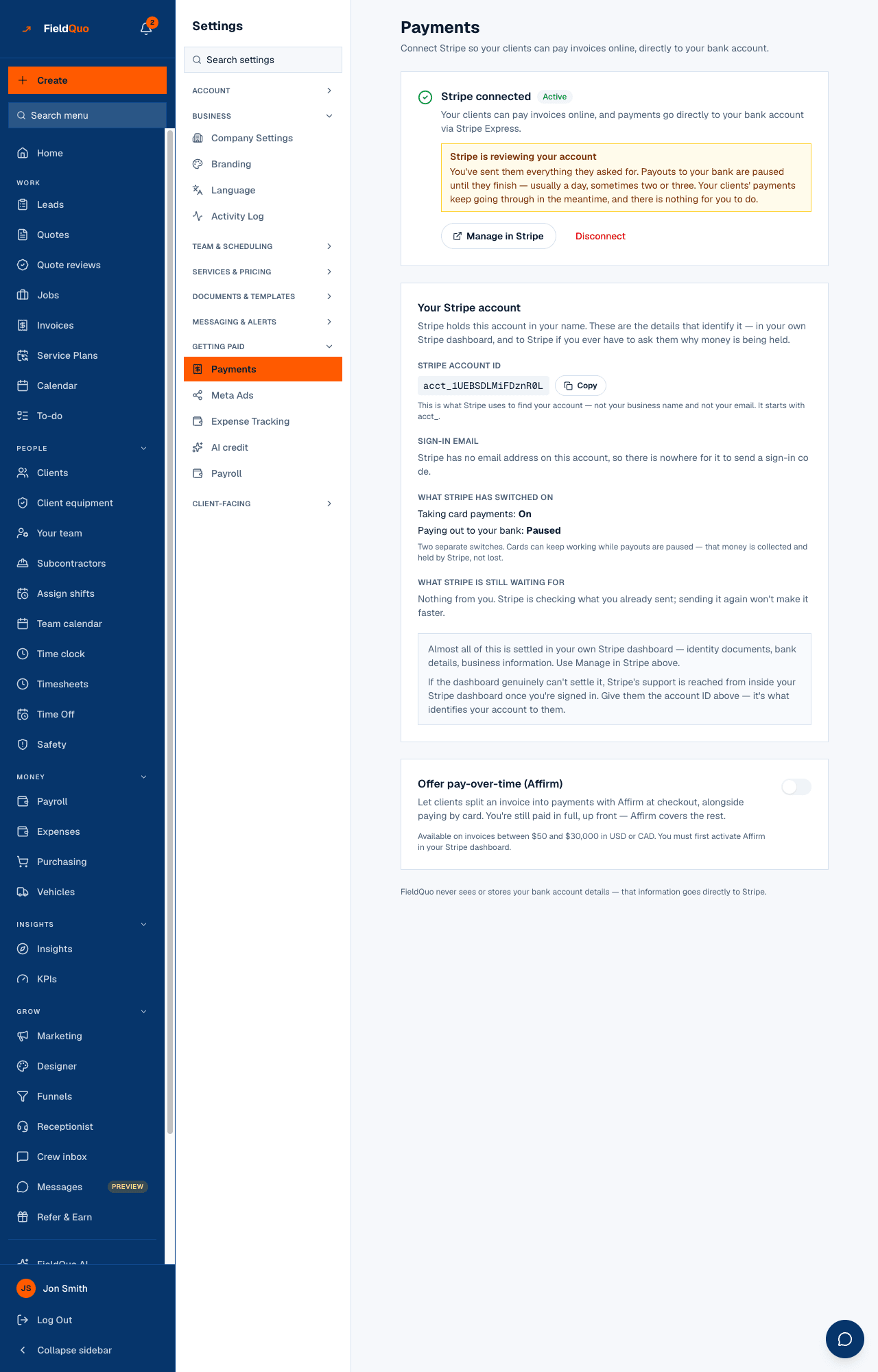
If Stripe's dashboard genuinely cannot settle it, Stripe's support is reached from inside that dashboard once you are signed in. Give them the account ID from the card — it is what identifies your account to them. FieldQuo cannot lift a hold; the account is yours, held in your name.
The reasons Stripe gives
When Stripe restricts an account it sends a machine code. FieldQuo prints the sentence for it rather than the code:
| What the page says | What it means |
|---|---|
| Stripe is waiting on information that is now overdue. | Something on the list passed its deadline. Provide it and payouts resume after review. |
| Stripe is still checking what you sent. There is nothing to do. | Verification in progress — the reviewing case. |
| Stripe is reviewing the account. | A manual review, no item outstanding. Usually a day or three. |
| Stripe is reviewing a possible sanctions-list match. | A name matched a watch list. Stripe resolves it; it may ask for ID. |
| Stripe closed the account for suspected fraud / for a terms of service violation / after a sanctions-list match. | The account is closed. Only Stripe can reopen it — contact them from the dashboard. |
| FieldQuo paused this account. | A platform pause. Contact FieldQuo support. |
What keeps working while payouts are paused
Everything on the client's side. Pay buttons still work, charges still succeed, invoices still go to Paid, and the processing fee is still taken at the published rate. The money sits in your Stripe balance and is paid out, on the standard schedule, once payouts are enabled again — nothing is lost and nothing needs re-sending. Instant payouts are refused while payouts are off.
Who can see it
Settings → Payments is for owners and administrators. The Your Stripe account card, with the ID and sign-in email, is owner-only. A read-only support session sees everything on the page, including that card, because “why is this company's money held” is the most common reason a support session is opened — and can change nothing.
ਅਕਸਰ ਪੁੱਛੇ ਜਾਂਦੇ ਸਵਾਲ
My clients paid a week ago and my bank shows nothing. Is the money gone?
No. Open Settings → Payments: if the amber banner is there, Stripe is holding the balance until it has what it needs, or while it reviews. It pays out once payouts are enabled again.
Can FieldQuo release the money?
No. The Stripe account is yours, in your name; FieldQuo never holds the money and cannot lift a hold. Stripe's dashboard, and Stripe's support from inside it, are the only levers.
Should I upload the document again to speed things up?
Not if the page says reviewing. Sending it again will not make it faster and often restarts the queue.
ਕੀ ਇਹ ਮਦਦਗਾਰ ਸੀ?