

ਸਿਰਫ਼ FieldQuo ਵਿੱਚ
A chat room for every job
Every scheduled job gets its own room in Chat, with the crew booked on its visits and the office already in it — nobody adds anybody by hand.
ਇਹ ਲੇਖ ਫ਼ਿਲਹਾਲ ਅੰਗਰੇਜ਼ੀ, ਫ਼ਰਾਂਸੀਸੀ ਅਤੇ ਸਪੈਨਿਸ਼ ਵਿੱਚ ਉਪਲਬਧ ਹੈ। ਤੁਸੀਂ ਅੰਗਰੇਜ਼ੀ ਸੰਸਕਰਣ ਪੜ੍ਹ ਰਹੇ ਹੋ। Français · Español
Chat is your company talking to itself. #general is everyone on the team; a direct message is two people; and every job on the calendar has its own room. This article is about the job rooms: who is in one, why, and what happens to it when the job ends. The rest of the screen is in Team chat.
Overview
A job room is named after the job and exists for every job that is Scheduled or In progress and not archived. Its members are worked out, never chosen: whoever is booked on one of the job's visits, plus the office — the owner, administrators and managers, who are in every job room. Take somebody off the visits and they leave the room; put them back and they are back in it, with their earlier messages still attributed.
The room list groups rooms as Unread, Company, Jobs, Direct messages and Finished jobs. Unread rooms come first because the list exists to answer who is waiting on you.
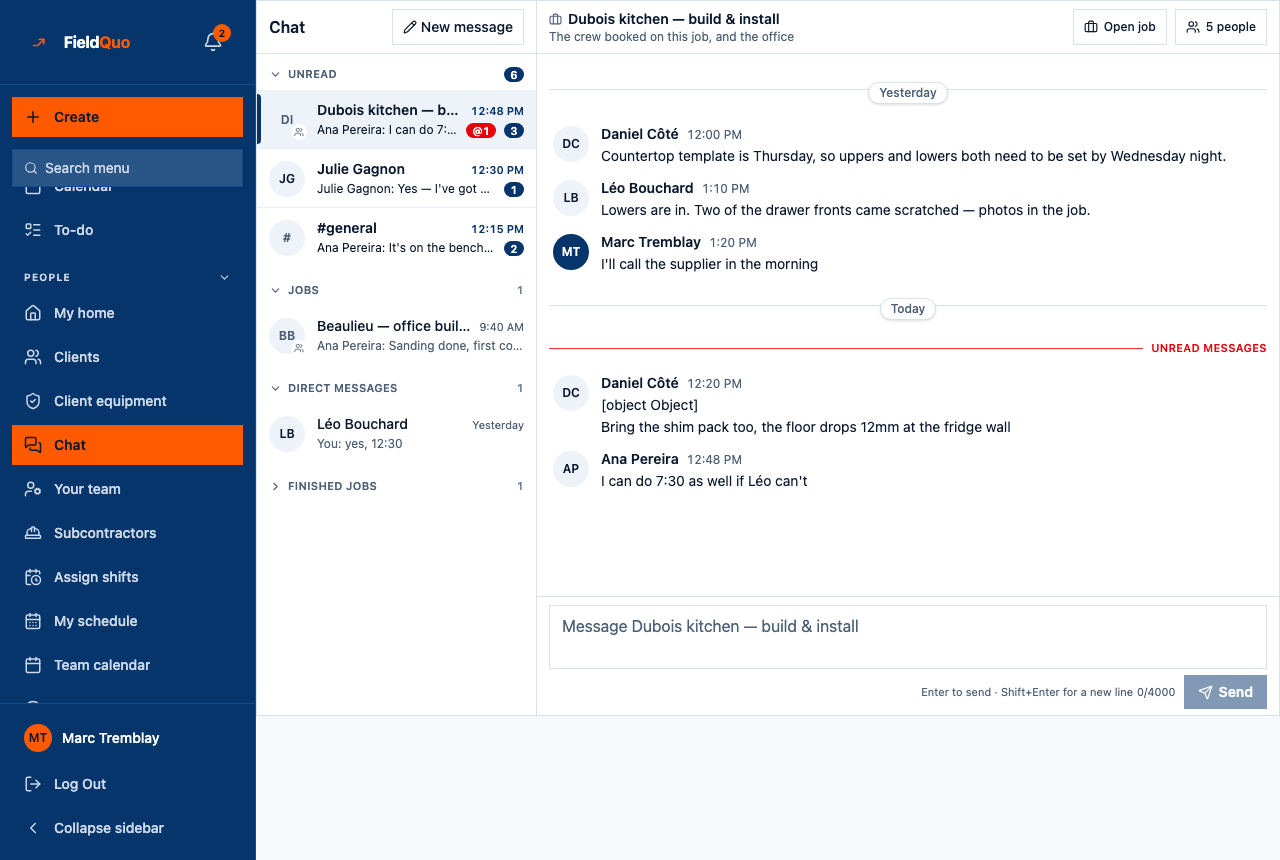
What is in a job room
- The header: the job's name, The crew booked on this job, and the office, an Open job button, and {count} people, which opens the Members bar.
- The Members bar explains itself: Whoever is booked on one of this job's visits, plus the owner, admins and managers. To add somebody, book them on a visit. There is no add or remove control, because the bar could not honour one.
- The thread, with Today and Yesterday dividers and a red Unread messages line where you left off.
- The composer — Message {name} — with *Enter to send · Shift+Enter for a new line*. Messages are text, up to 4,000 characters; photos go on the job, not in the chat.
How to get somebody into a job's room
- Open the job and book them on a visit — see Book a visit for a client.
- Open Chat. The room is under Jobs, and they are in it; the next time anyone opens the chat, the membership is brought up to date.
- Type @ in the composer to mention someone in the room — *↑↓ to choose · Tab to insert · Esc to close*.
A job with no visits has no crew and gets no room. Give it a visit and the room appears.
Mentions and notifications
A message in a job room notifies nobody by itself — the room's unread count goes up, and that is all. An @mention sends a push notification to the person named, on every device where they allowed it, and tapping it lands them in the room. A direct message pushes the other person the same way. The message is stored either way; a push that could not be delivered is not a message that was lost.
When the job ends
A job that is completed, cancelled or archived keeps its room, with every message, under Finished jobs, and the header says This job is finished. The room is kept for the record. No new room is made for a finished job. That is deliberate: *what did we agree about the Nguyen kitchen* is still answerable in March.
Only in FieldQuo
A crew chat whose job rooms follow the schedule is not listed on the pricing page of Jobber, Housecall Pro, ServiceTitan, QuoteIQ or Projul at any tier — the test FieldQuo's comparison pages apply. Nothing in it leaves the company: FieldQuo's own staff never see a customer's chat, and a support session viewing your account read-only can read it and cannot post.
Who can see it
Every access level has the Chat row and #general. A job room is visible to its members only — the crew booked on the job's visits, and the owner, administrators, Dispatchers and Managers. A Crew member sees the rooms of the jobs they are on, which is the same rule that decides which jobs they see.
ਅਕਸਰ ਪੁੱਛੇ ਜਾਂਦੇ ਸਵਾਲ
Can I add the electrician to a job room?
Only if they are on your team and booked on a visit. There is no guest access, and subcontractors are not members of your company.
Why is there no room for this job?
It is Needs a date, or it has no visits, or it is archived. Rooms exist for scheduled and in-progress jobs with at least one visit.
Can I delete a room or a message?
No. Rooms follow the job, and messages stay as the record.
ਕੀ ਇਹ ਮਦਦਗਾਰ ਸੀ?