

Connecting your Facebook Page and Instagram
The one connection under Settings → Meta Ads that lets FieldQuo post to your Page and Instagram and, once Meta approves it, answer their messages in your inbox.
ਇਹ ਲੇਖ ਫ਼ਿਲਹਾਲ ਅੰਗਰੇਜ਼ੀ, ਫ਼ਰਾਂਸੀਸੀ ਅਤੇ ਸਪੈਨਿਸ਼ ਵਿੱਚ ਉਪਲਬਧ ਹੈ। ਤੁਸੀਂ ਅੰਗਰੇਜ਼ੀ ਸੰਸਕਰਣ ਪੜ੍ਹ ਰਹੇ ਹੋ। Français · Español
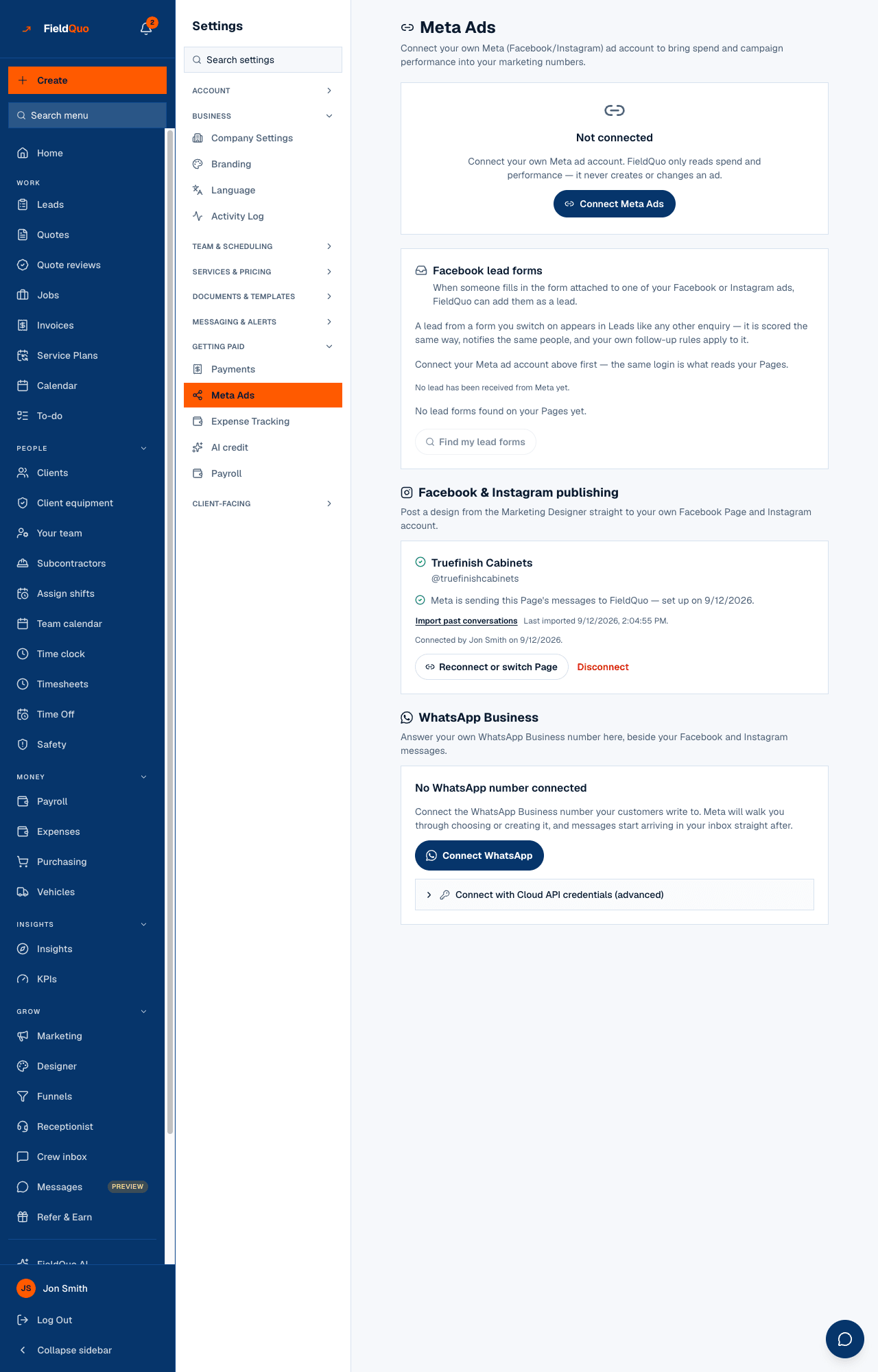
Your Facebook Page and the Instagram professional account linked to it are connected once, from the Facebook & Instagram publishing card on Settings → Meta Ads. One consent screen, one stored connection, and it feeds two things: posting a design from the Marketing Designer, and the Messages inbox. A contractor thinks “I connected my Page”, not “I connected it twice”, so FieldQuo does not ask twice.
The card is honest about what Meta has and has not approved for FieldQuo's app. While a permission is pending it says so and draws no button; a connection that is stored but cannot deliver messages says which permission is missing rather than looking healthy.
Overview
Settings → Meta Ads holds every Meta connection a company makes: the ad account (spend into your marketing numbers), Facebook lead forms (into Leads), Facebook & Instagram publishing, and WhatsApp Business. They are separate connections with separate permissions — connecting the ad account does not connect the Page. See Connect your Meta ad account and Facebook lead forms for the first two.
The Page connection stores an access token, encrypted, and the Page's id and name. The token is never shown on screen and never leaves the server.
What is on the card
- Waiting on Meta's approval — publishing or messaging needs permissions Meta has to grant FieldQuo first. No button; Nothing is missing on your side.
- No Page connected with Connect Facebook & Instagram — the flow is open and nothing is stored yet.
- Which Page? — Meta returned more than one Page for your login; pick one and press Connect this Page.
- Connected: the Page's name, then @username of the linked Instagram account, or No Instagram account linked to this Page — Facebook only.
- A line about messages: Meta is sending this Page's messages to FieldQuo — set up on …, or Messages from this Page aren't reaching FieldQuo with Try subscribing again, or a sentence naming the permissions Meta has not granted yet.
- Your inbox isn't switched on for this Page yet with Connect the inbox — only for a Page connected before the inbox existed.
- Import past conversations with Last imported …, then Connected by Jon Smith on …, Reconnect or switch Page and Disconnect.
How to connect
- Open Settings → Meta Ads (under Getting paid) and scroll to Facebook & Instagram publishing.
- If the card reads Waiting on Meta's approval, stop here — there is nothing to do until it changes. Otherwise press Connect Facebook & Instagram.
- Sign in to Facebook and tick every permission Meta shows. Un-ticking one leaves you a connection that looks fine and fails at the moment you post or receive a message; the card names the missing permission afterwards.
- If you administer several Pages, choose the one your business posts from under Which Page? and press Connect this Page.
- Back on the card, check the messages line. When it reads Meta is sending this Page's messages to FieldQuo, new conversations arrive in Messages on their own.
After connecting
- Import past conversations pulls what the Page already had, going back 30 days, and reports Imported 12 conversations · 3 new. The same pull is the Refresh from Facebook button in the inbox. It can run once every ten minutes; sooner reads Refreshed a moment ago — try again in a few minutes.
- Connect the inbox appears only when Meta has granted messaging for this Page but the inbox was never set up to receive it; one press fixes it.
- Try subscribing again re-asks Meta to send this Page's messages, without touching the rest of the connection. Posting to the Page keeps working while messages do not.
- A connection whose token stops working shows The connection to your Page stopped working. Reconnect it to keep receiving messages. at the top of Messages, with a link back to this card.
Disconnecting
Disconnect asks Disconnect Facebook & Instagram? and then deletes the stored access token straight away. FieldQuo can no longer publish or fire scheduled posts for the Page; posts already published stay on Facebook and Instagram, and conversations already in your inbox stay in FieldQuo.
If Meta does not confirm it has stopped sending the Page's messages, the card says so: remove FieldQuo under the Page's Business Integrations in Meta's own settings to be certain.
Who can see it
Settings → Meta Ads is on the same shelf as Payments: the owner and administrators only. A Manager or Dispatcher does not see the row, and every route behind it refuses them. Once a Page is connected, anyone with Requests at view only reads the inbox — see The Messages inbox.
ਅਕਸਰ ਪੁੱਛੇ ਜਾਂਦੇ ਸਵਾਲ
Do I need a Meta ad account to connect my Page?
No. The ad account and the Page are two separate cards with two separate consent screens.
My Instagram account is missing.
The card reads Facebook only when no Instagram professional account is linked to the Page in Meta's own settings. Link it there, then press Reconnect or switch Page.
Can a Manager connect the Page?
No. Meta Ads is owner and administrator only, like Payments.
ਕੀ ਇਹ ਮਦਦਗਾਰ ਸੀ?