

Change your plan
Upgrades apply today and are prorated; downgrades and monthly-yearly switches are booked for the end of the period with nothing charged until then — and you can undo a booking.
Sa ngayon, available ang artikulong ito sa Ingles, Pranses at Espanyol. Binabasa mo ang bersyong Ingles. Français · Español
You change plan from the Plans grid on Account & Billing. Which card you press and which way the cadence switch points decide one thing: whether the change happens now or at the end of what you have already paid for. The dialog tells you which before you confirm, in a sentence that comes from the same rule the server applies.
The rule in one line: up is now, down or sideways is later. A shop that just hired two estimators needs the seats today; a company stepping down keeps the seats it paid for until the period ends, and is never refunded or re-charged in between.
Overview
| The change | When it applies | What is charged |
|---|---|---|
| Up a tier (Solo → Crew, Crew → Shop …), on either cadence | Right away | The difference for the rest of this billing period, prorated today |
| Down a tier | At the end of the current period — after the year, on a yearly plan | Nothing today; the new price on the renewal date |
| Same tier, monthly → yearly or yearly → monthly | At the end of the current period | Nothing today; the new amount on the renewal date |
| Same tier, same cadence | Nothing happens — the button reads Current plan | — |
“Up” and “down” are decided by the ladder's order — Solo, Crew, Shop, Scale — not by the names, and a change of tier and cadence at once is judged on the tier: Solo monthly to Crew yearly is an upgrade and applies now.
How to upgrade
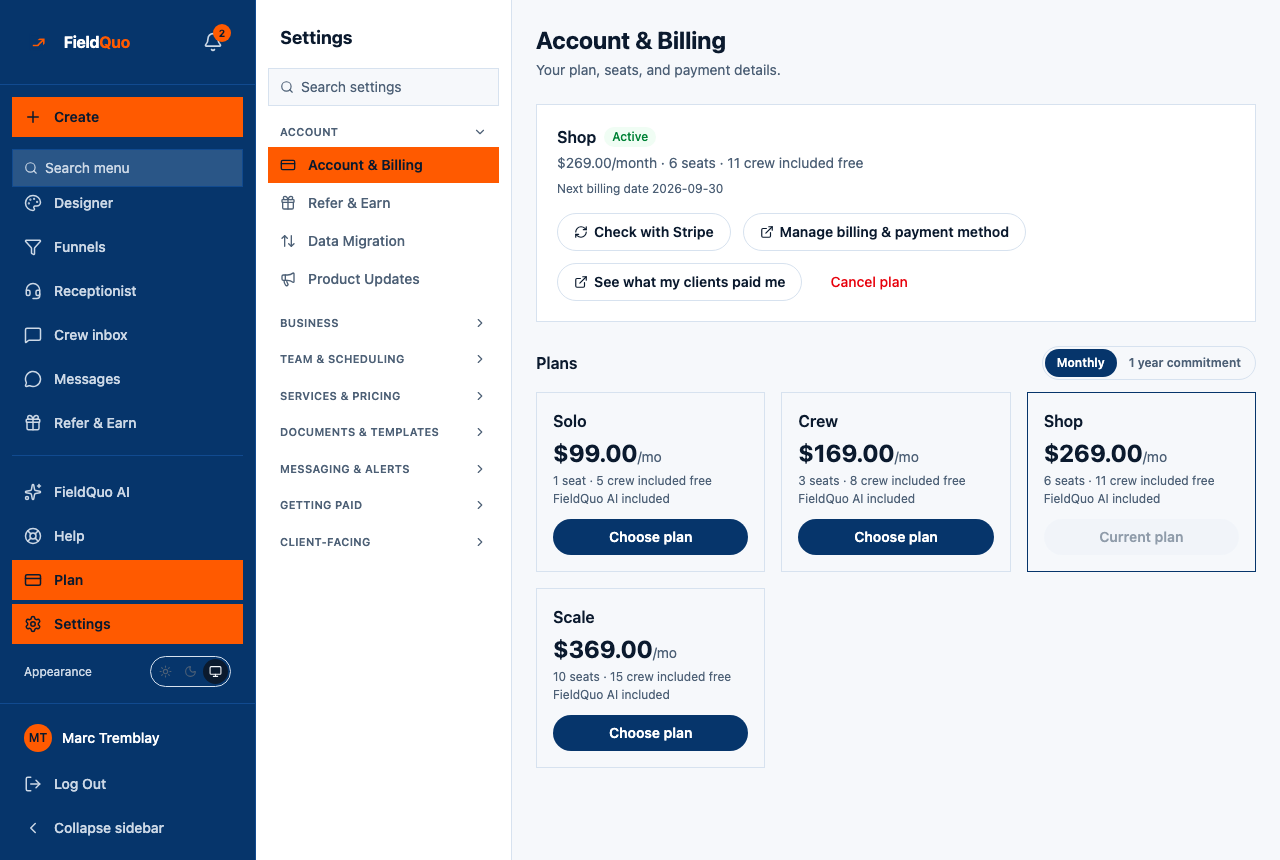
- Open Account & Billing. Check the Monthly / 1 year commitment switch reads the cadence you want; it starts on the one you are on.
- Press Choose plan on the higher tier.
- The dialog Change your plan reads: Your plan changes to Shop (billed monthly) right away. The difference for the rest of this billing period is prorated today. Press Change plan now.
- The page reloads and reads the new plan off Stripe. The extra seats and crew places are usable immediately on Manage Team.
During your free trial an upgrade also applies right away, and stays free: the trial is kept exactly where it was and the new price starts when it ends.
How to downgrade, or switch between monthly and yearly
- Press Choose plan on the lower tier, or flip the switch and press Switch to yearly on your own tier.
- The dialog reads: Your plan changes to Solo (billed monthly) on 2026-10-01. Until then you keep Crew (billed monthly). Nothing is charged today. Press Schedule the change.
- The page confirms Done — your plan changes on 2026-10-01. Nothing is charged until then. and an amber panel appears on the plan card: Switching to Solo (billed monthly) on 2026-10-01 with Keep my current plan under it.
- On that date Stripe makes the switch on its own clock and invoices the new amount. Your plan name on the card changes then, not before, and you get the plan-changed email at that moment.
- Keep my current plan releases the booking. The panel disappears and nothing about your subscription has moved.
- Booking a second change before the first lands replaces it — the later request is the one that stands.
- Upgrading while a downgrade is booked cancels the booking: the upgrade you chose today supersedes the step-down you had planned.
What happens to your people on a downgrade
Nobody is locked out. If the plan you step down to includes fewer seats than you are using, everyone keeps their login and keeps working; Manage Team shows At your plan's limit and the Add a seat button is disabled until you either upgrade again or move someone to Crew. The limit stops you adding a seat — it never takes one away.
Before stepping down, read the seat and crew counts on Manage Team against the target plan's seats · crew included free line. See Add a seat, or a free crew login.
Who can change it
Owners and administrators only. The routes behind Choose plan, Schedule the change and Keep my current plan all re-check that, so a Manager or Dispatcher who reaches the page by URL gets Only an owner or admin can change the plan or billing details. Every change is written to the Activity Log with who made it and when.
Mga madalas itanong
I upgraded by mistake. Can I go straight back?
You can book the step back down, and it lands at the end of the period; the prorated difference already charged for the upgrade is not refunded. Read the dialog before pressing Change plan now.
Why does my plan still say Crew after I chose Solo?
Because you still have Crew until the date in the amber panel. The card names the plan you have today; the panel names the one that is coming.
Does changing plan create a second subscription?
No. A company with a live subscription is moved in place. Checkout only opens for a company with no active plan — a new one, or one that cancelled and is coming back.
Nakatulong ba ito?
Mga kaugnay na artikulo
- Your plan and seatsBilling at ang iyong subscription
- The four plans: Solo, Crew, Shop, ScaleBilling at ang iyong subscription
- Your first 14 days are freeBilling at ang iyong subscription
- Monthly, or a one-year commitmentBilling at ang iyong subscription
- Add a seat, or a free crew loginBilling at ang iyong subscription