

Sa FieldQuo lang
The AI employee: drafts you approve
Hire an assistant for one job — closer, receptionist or tech support — that answers a customer's message from your own price book and material, writes a draft, and waits for you to send it.
Sa ngayon, available ang artikulong ito sa Ingles, Pranses at Espanyol. Binabasa mo ang bersyong Ingles. Français · Español
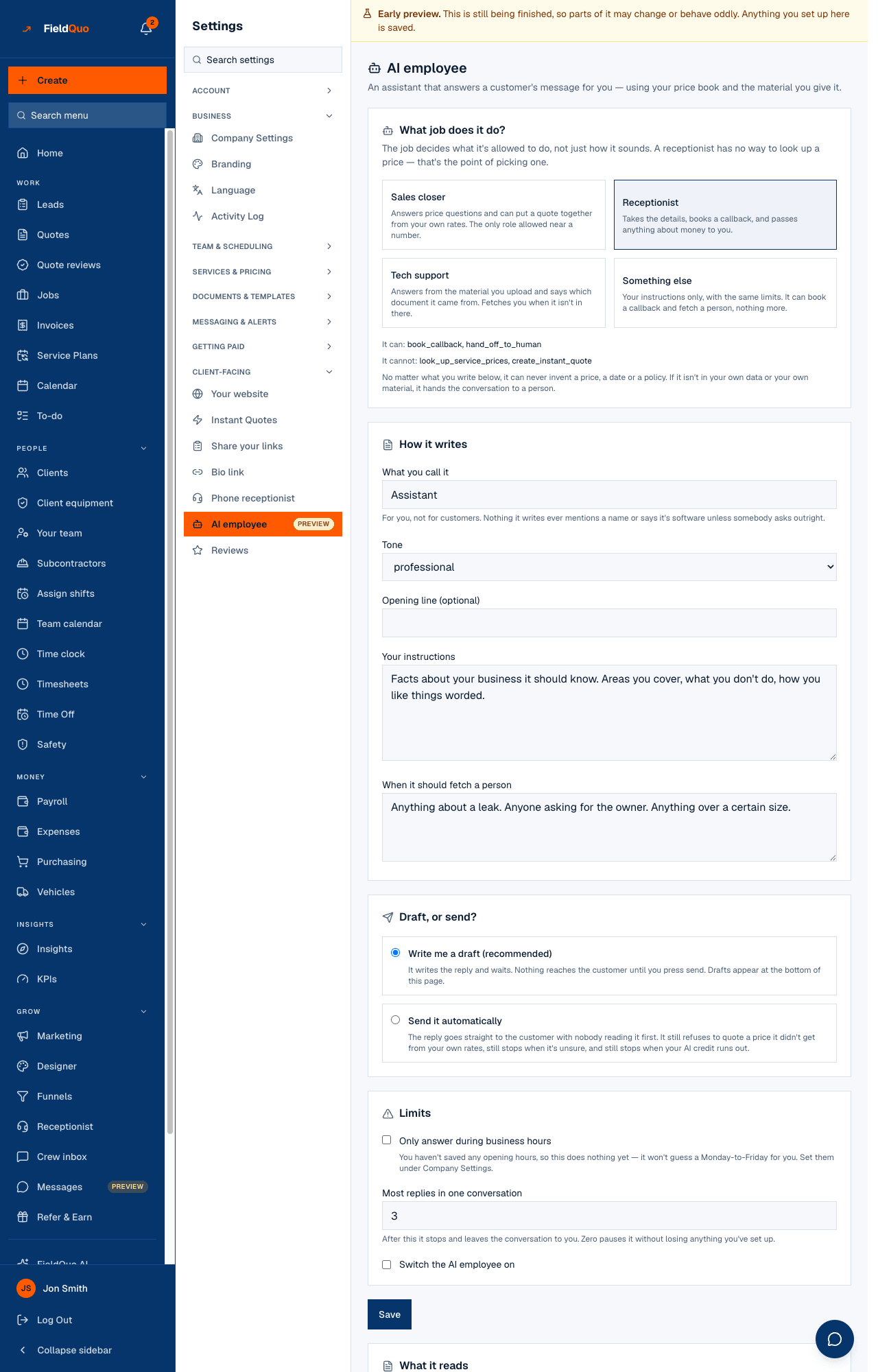
Settings → AI employee is where you hire an assistant that answers the messages arriving in Messages. You pick the job it does, how it writes, what it may read, and whether it drafts or sends. By default it drafts: It writes the reply and waits. Nothing reaches the customer until you press send.
The row carries a Preview badge, and the screen opens with the one thing it cannot do yet: Replies can't leave the building yet. The AI employee answers your Facebook and Instagram messages, and Meta hasn't approved messaging for FieldQuo. Everything here works — it drafts, and the drafts wait below for you to send. Configure it, feed it, test it against the real code; the sending waits on Meta.
Overview
The job is a set of abilities, not a personality. A Receptionist has no way to look up a price — not “told not to”, but not given the tool — so a homeowner asking three times cannot talk it into one. Every role shares the same never-rules: it can never invent a price, a date or a policy; if it is not in your own data or your own material, it hands the conversation to a person. It never claims to be a named person and, asked outright, says the reply is automatic and a member of the team will follow up.
What is on the screen
- What job does it do? — four cards: Sales closer, Receptionist, Tech support, Something else, each with It can: and It cannot: underneath.
- How it writes — What you call it (for you, never said to customers), Tone (professional, warm or brief), Opening line (optional), Your instructions, When it should fetch a person.
- Draft, or send? — Write me a draft (recommended) or Send it automatically.
- Limits — Only answer during business hours, Most replies in one conversation, Switch the AI employee on, then Save.
- What it reads — Upload a file or Paste text instead, and the list of what it has read.
- Try it — a test box that runs the real reply path, then Waiting for you (the drafts) and It stopped on these.
How to hire it
- Open Settings → AI employee and pick a job. Sales closer is the only role allowed near a number: it reads your price book and can put an instant estimate together from your own rates. Receptionist takes the details and books a callback. Tech support answers from the material you upload and names the document.
- Fill in Your instructions — areas you cover, what you do not do, how you like things worded — and When it should fetch a person (“anything about a leak, anyone asking for the owner”).
- Leave Write me a draft (recommended) selected. Set Most replies in one conversation — 3 by default; after that it stops and leaves the thread to you, and 0 pauses it without losing your setup.
- Under What it reads, upload your policy, your troubleshooting notes or a manual, or paste the text.
- Tick Switch the AI employee on and press Save. Then type a customer's message under Try it and press See the answer — it names the documents and tools it used, and what the test cost.
What each setting changes
| Setting | What it does |
|---|---|
| The job | Fixes the tools it may call. Closer: look up service prices, create an instant quote, book a callback, hand off to a person. Receptionist, Tech support and Something else: book a callback and hand off only. |
| Tone | Professional (plain, no exclamation marks or emoji), warm (one emoji at most, and only if they used one first), or brief (two sentences). |
| Write me a draft | The reply waits under Waiting for you with Send it and Not this one. Sending one sends it in the conversation exactly as if you had typed it. |
| Send it automatically | The reply goes straight to the customer with nobody reading it first. It still refuses to quote a price it did not get from your rates, still stops when unsure, and still stops when your AI credit runs out. Today the channel is blocked, so it drafts either way. |
| Only answer during business hours | Uses the opening hours saved under Company Settings; outside them the message waits for you. With no hours saved it does nothing — it will not guess a Monday-to-Friday. See Opening hours. |
| Most replies in one conversation | The cap per thread. When it is reached, the thread appears under It stopped on these with Let it answer again. |
A draft written before you changed a setting is marked written before your last change, so you know it reflects the old instructions.
What it reads
The screen says it before the click: We can read plain text: .txt, .md and .csv, or text you paste in. We cannot read a PDF or a Word file yet — if you upload one it'll show up below marked unread, and the fix is to paste the text or export it as .txt. A file that was read shows read, about 1,400 tokens. The material is fenced as evidence: an instruction hidden inside a manual is just text, never an order.
Every reply and every test spends AI credit, metered like everything else in FieldQuo AI. When the allowance is out the screen says so with a Top up AI credit link, and the employee stops rather than guessing. See AI credit and phone credit.
What the other tools do not do
The competitor pricing pages FieldQuo records offer AI phone receptionists and AI credit allowances; none lists an assistant that answers a Facebook, Instagram or WhatsApp message from the company's own price book and uploaded material. FieldQuo's own comparison pages leave this off too, on purpose, until Meta approves the channel — selling “an AI that replies to your Facebook messages” today would be selling the half that is blocked.
Who can see it
Settings → AI employee is for the owner, administrators, and the Manager and Dispatcher presets — the same rung as the phone receptionist, because it decides what is said to customers in the company's name and spends the company's AI allowance. Crew and Estimator do not see the row. Sending or dismissing a draft from this screen needs the same access as the screen itself.
Mga madalas itanong
Will customers know they are talking to software?
It never says it is software or a named person unless somebody asks directly; then it says plainly the reply is automatic and a person will follow up. The name you give it is for you.
Can it quote a price?
Only the Sales closer, and only a figure a FieldQuo tool computed from your own rates, which it repeats and attributes. It cannot add, discount, round or start from anything.
Why is there nothing under Waiting for you?
No message has arrived that it could answer — usually because no Page is connected or Meta has not approved messaging yet — or it is switched off, outside business hours, or over its cap.
Does it answer WhatsApp?
Inside WhatsApp's 24-hour window, yes, the same way. Outside it, it does not send a template on your behalf.
Nakatulong ba ito?