

Meta Ads
Connect your own Meta ad account so ad spend flows into your marketing numbers, plus the Facebook lead forms, Facebook & Instagram publishing and WhatsApp Business connections that live on the same screen.
Sa ngayon, available ang artikulong ito sa Ingles, Pranses at Espanyol. Binabasa mo ang bersyong Ingles. Français · Español
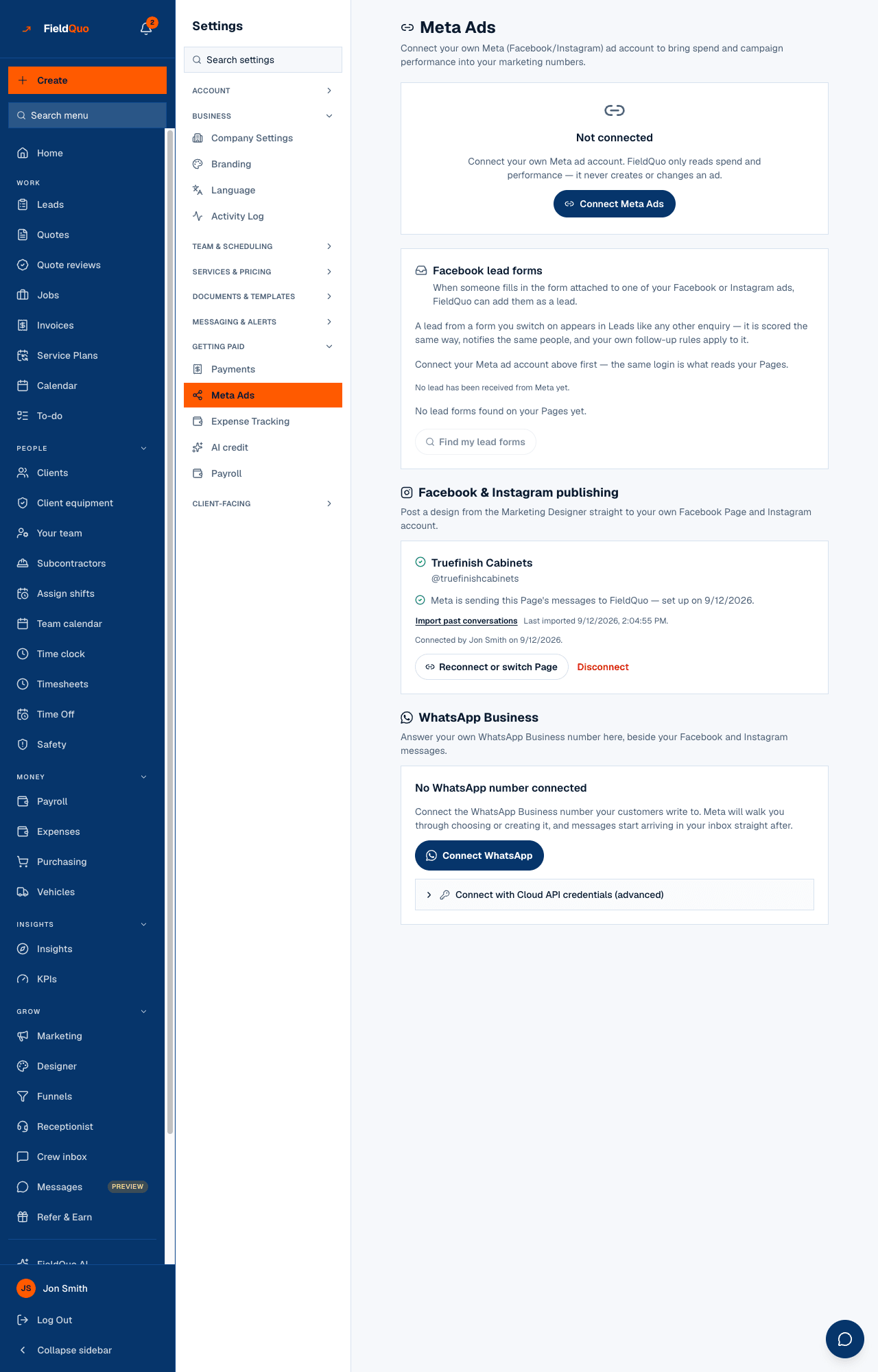
Settings → Meta Ads is where a company connects its own Meta (Facebook/Instagram) ad account. FieldQuo only reads spend and campaign performance — it never creates or changes an ad — and the rows it imports become marketing spend, so your cost per lead includes what you paid Meta. Three more Meta connections sit on the same screen because they are all “a Meta account this company connects”: Facebook lead forms, Facebook & Instagram publishing, and WhatsApp Business.
Overview
The connection card has four honest states. If the deployment has no Meta app credentials, or cannot store a token safely, the card says so in words and offers no button — that is a deploy setting, not something in your account. Otherwise you see Connect Meta Ads, and once connected: when it last synced, Sync now, See your campaigns →, Reconnect if Meta says the token expired, and Disconnect.
Per-campaign cost per lead covers leads that arrived through a Meta lead form. Every other channel — and a homeowner who saw the ad and phoned — is still blended across everything, because nothing links that spend to that lead. See Marketing spend.
What is on the screen
- Meta Ads — Connect your own Meta (Facebook/Instagram) ad account to bring spend and campaign performance into your marketing numbers.
- The connection card — Not connected with Connect Meta Ads, or the connected account with Last synced …, Sync now, See your campaigns → and Disconnect. After a sync: … new rows, … updated, plus any errors, possible duplicates or a currency mismatch.
- Facebook lead forms — the forms found on the connected Facebook Page, each with an On / Off switch, its lead count and last lead, Find my lead forms, and Which campaigns these leads came from.
- Facebook & Instagram publishing — the Facebook Page connection (Connect Facebook & Instagram, later Reconnect or switch Page) that lead forms are read through. WhatsApp Business — for now one sentence saying WhatsApp is coming soon, and no button, until Meta grants FieldQuo advanced access to its WhatsApp permissions.
How to connect your ad account
- Open Settings → Meta Ads and press Connect Meta Ads. You are sent to Meta to sign in and approve read access.
- If your login has more than one ad account, the card asks Which ad account? — pick one and press Connect this account.
- Back on the screen, press Sync now. The first sync imports the last 30 days of daily spend per campaign.
- Press See your campaigns → to read the rows in Marketing → Spend, where they are marked as imported from Meta.
- If the card ever says the token is no longer valid, press Reconnect — nothing else changes.
Disconnect stops future syncs. Rows already imported stay in your marketing spend history; nothing is deleted.
What a sync does
A sync asks Meta for each campaign's spend per day over the window (30 days by default, at most 90 at a time) and writes one marketing-spend row per campaign per day, updating rows it already wrote rather than duplicating them. The summary after a sync tells you how many rows were new and how many updated. Syncs are manual — there is no nightly import — so press Sync now when you want current numbers.
- Rows in a currency other than your company's are converted at a pinned exchange rate and marked ≈ approximate.
- A possible duplicate — a hand-entered spend row on the same day and channel — is counted and shown, never silently merged.
- Errors from Meta are shown on the card with Meta's own message.
Lead forms, publishing and WhatsApp
Facebook lead forms turns a form attached to one of your ads into a lead in Leads — scored like any other enquiry, notifying the same people, with your follow-up rules applied. Forms and leads are read through your Facebook Page connection — the Facebook & Instagram publishing card below — not through the ad account, which cannot see your Page's forms. You do not need the ad account connected to receive leads. If the panel shows Facebook lead forms need Meta's approval of one more permission; nothing is being received yet., every switch and Find my lead forms are disabled with that reason — shown, not hidden, so you know leads are not arriving and it is not your fault. See Facebook lead forms.
Facebook & Instagram publishing connects your Facebook Page and its Instagram account: designs from the Marketing Designer post there, and lead forms are read through it. When its permissions are not switched on for FieldQuo it reads Waiting on Meta's approval and offers no button. WhatsApp Business will answer your own WhatsApp number in Messages beside Facebook and Instagram conversations; until Meta grants FieldQuo advanced access to its WhatsApp permissions in App Review, the card is one sentence with no button. See Connecting your Facebook Page and Instagram and WhatsApp (coming soon).
Who can see it
Owners and administrators only. It is on the same shelf as Payments — a company's own external account with live Disconnect controls — and every route behind it refuses anyone else, so the row is hidden from the other levels.
Mga madalas itanong
Can FieldQuo create or edit my ads?
No. The connection is read-only: spend and performance come in, nothing goes out.
Does spend import on its own?
No. Press Sync now. Each sync covers the last 30 days by default and updates rows it already wrote.
I connected my ad account, so why are there no lead forms?
Lead forms are read through your Facebook Page connection, not the ad account. Connect your Page under Facebook & Instagram publishing, then press Find my lead forms. If the panel shows the amber notice about Meta's approval instead, the switches stay disabled until it goes away.
Nakatulong ba ito?