

Refer & Earn
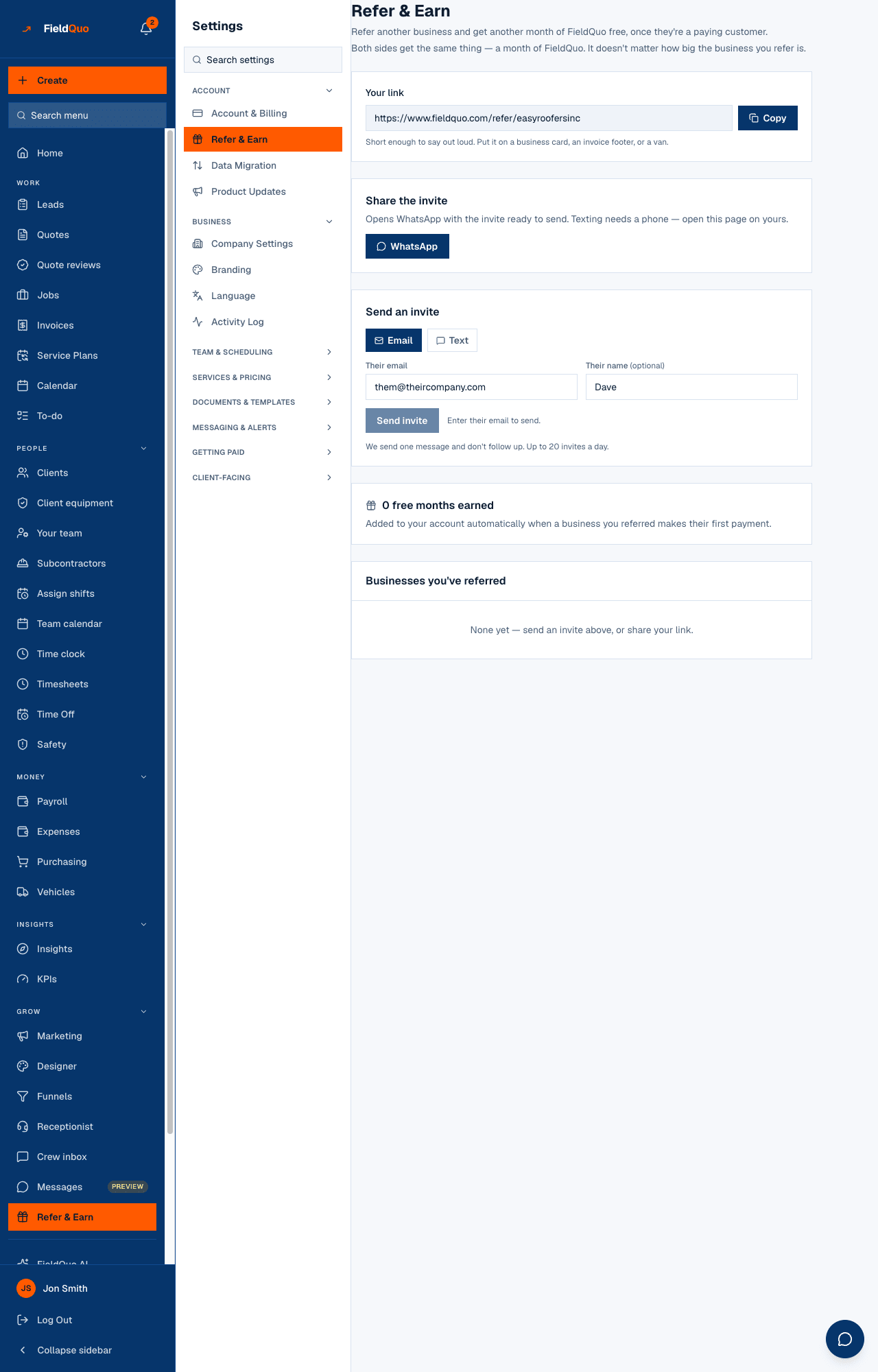
The Settings row that is the same page as Refer & Earn in the main sidebar: once you have chosen a plan, your referral link, WhatsApp and text sharing, an invite by email or text, the months you earned and the businesses you referred.
Sa ngayon, available ang artikulong ito sa Ingles, Pranses at Espanyol. Binabasa mo ang bersyong Ingles. Français · Español
Settings → Account → Refer & Earn is the same page as the Refer & Earn row of the main sidebar — “Refer another business and get another month of FieldQuo free, once they're a paying customer.” It opens once your company has chosen a plan. One free month for the business you refer, when it chooses a plan (its first charge moves a month later); one free month for you, when they make their first real payment. This is the short version; the full article is Refer another business, earn a free month.
What is on the screen
Before you choose a plan, the page shows one card — Refer & Earn opens once you choose a plan — with a button to Account & Billing, where a plan is chosen. There is no link to copy and invites cannot be sent. Any business that already signed up through a link you shared before 3 October 2026 is still listed below it, with its badge.
Once you have a plan, the page shows:
- Your link with Copy — “Short enough to say out loud. Put it on a business card, an invoice footer, or a van.”
- Share the invite — a WhatsApp button, and Text it on a phone, each opening your own app with the message ready.
- Send an invite — Email or Text, then Their email or Their mobile number, Their name, and Send invite. “We send one message and don't follow up. Up to 20 invites a day.”
- The months earned — “1 free month earned” — and “Added to your account automatically when a business you referred makes their first payment.”
- Businesses you've referred, each marked Credited or Signed up — not yet paying, and Invites sent with Signed up or Failed on each.
How the month works
| Who | What they get | When |
|---|---|---|
| The business you referred | One free month — its first charge moves a month later | When it chooses a plan, provided you had one when it signed up through your link — even if yours has ended since |
| You | One free month | When that business makes its first real payment |
Your month is a month of the product. You need a plan to refer, so it moves your next charge a month later. A second referral adds a second month. Referrals made before 3 October 2026 keep their old terms. How it lands on your subscription is in Referral months.
Who can see it
Owners and administrators only. The page lists which companies were referred and what was earned, and sending an invite is owner-and-administrator on the server, so the row is hidden from everyone else rather than shown read-only.
Mga madalas itanong
They signed up but I have no month yet.
Their badge reads Signed up — not yet paying. Your month arrives on their first real payment; a $0 trial invoice earns nothing.
Is there a cap?
20 invites a day from this screen.
Nakatulong ba ito?