

Deactivate a team member
How to switch off somebody's login with the Active checkbox, what changes and what stays, who may do it, and the rules that stop an account locking itself out.
Sa ngayon, available ang artikulong ito sa Ingles, Pranses at Espanyol. Binabasa mo ang bersyong Ingles. Français · Español
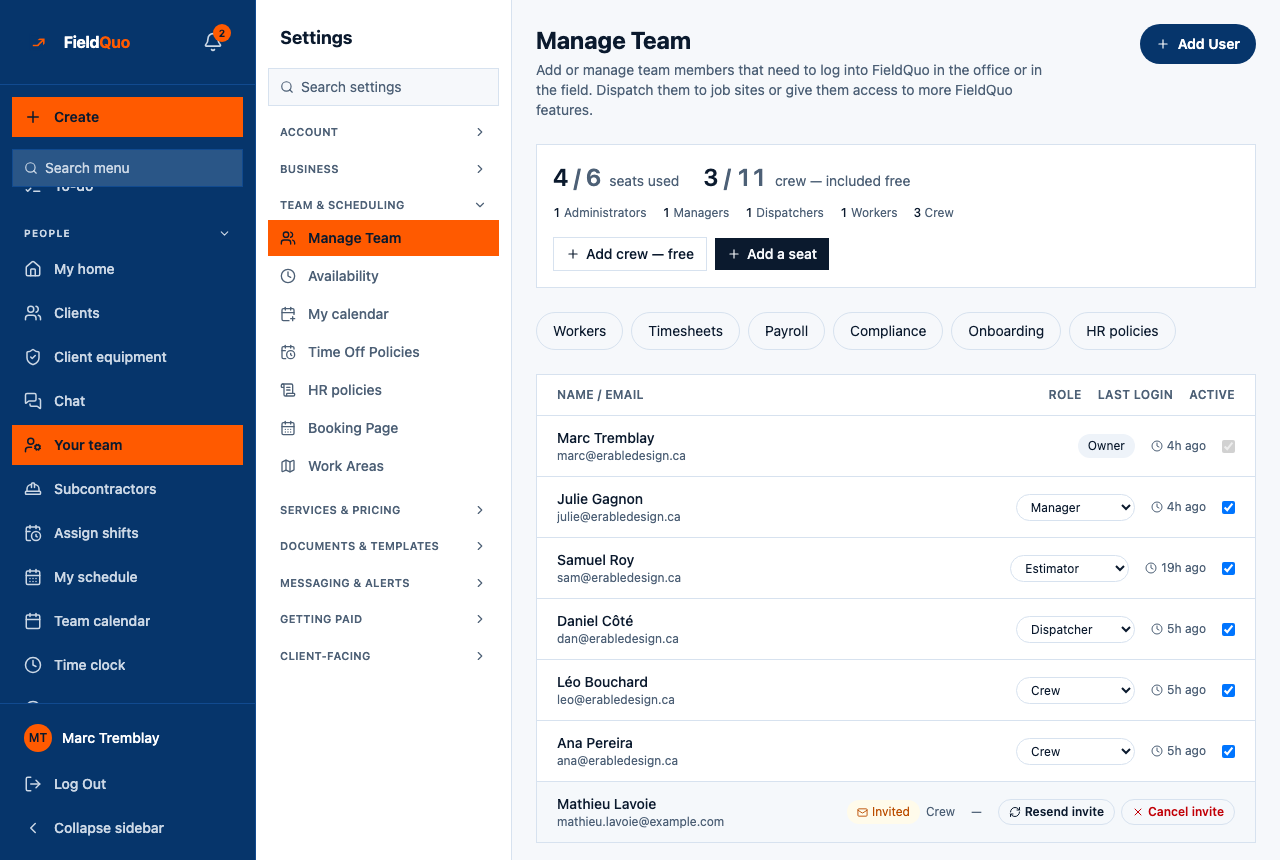
When somebody leaves, you deactivate them: untick Active on their row in Manage Team. Their login stops working for your company, their seat or crew place is freed, and everything they did stays on the books.
Deactivation is not deletion. FieldQuo has no control on this screen that erases a person, because their quotes, their hours and their pay history are your records, not theirs.
Overview
Every roster row ends in an Active checkbox. Ticked means the person can sign in; unticked means they cannot. The checkbox is live only for an owner or administrator and only on rows below their own rank; otherwise it is greyed out and its tooltip says why — “Only an owner or administrator can activate or deactivate a team member” or “You can only deactivate members below your own role”.
How to deactivate somebody
- Open Manage Team — Your team in the sidebar, or Settings → Manage Team.
- Find the person and untick Active. The change saves immediately; there is no confirmation step.
- Check the seat panel: their seat or crew place is free again on the next load.
To bring somebody back, tick Active again. They keep their login, their level and their grid, and they count against your plan again.
What changes, and what stays
- They can no longer sign in to your company: every screen and every request refuses a deactivated member. If they also belong to another company on FieldQuo, that company is unaffected.
- They stop counting against your plan — seat or crew place — at once.
- Everything stays: quotes, jobs, invoices, time entries, pay runs, safety reports, and their worker record on Workers, which can still be paid what it is owed.
- The change is written to the Activity Log as “Deactivated …”, with who did it and when; reactivation is logged the same way.
The rules
- Owner and administrator only. A Dispatcher or Manager can invite people and schedule them, but cannot switch anyone's login off — that is the owner's call, not the roster editor's.
- Only somebody below your own rank: an administrator cannot deactivate another administrator or the owner.
- Never yourself — “You can't deactivate your own account — you'd lock yourself out.”
- Never the last owner, and never the last active owner or administrator: somebody always has to be able to manage the account.
Somebody who never accepted
A person who was invited and never joined has no login to deactivate. Their row shows Invited; press Cancel invite and confirm. The link stops working and the place is freed. Any Dispatcher, Manager, administrator or owner can cancel an invitation.
Mga madalas itanong
Does deactivating delete their hours or their payslips?
No. Nothing is deleted. Their time entries, pay runs and documents stay exactly as they were.
Can a Manager deactivate a crew member who left?
No. Only an owner or administrator can untick Active. The Manager sees the checkbox greyed out with the reason.
I deactivated someone by mistake.
Tick Active again. Nothing was lost; they sign in as before with the same level.
Nakatulong ba ito?