

Sa FieldQuo lang
Vehicles and fleet
The vans: what is due, what is expiring, who has each one — insurance, registration and service by date or by mileage, a maintenance log, documents, and the running cost for those who may see it.
Sa ngayon, available ang artikulong ito sa Ingles, Pranses at Espanyol. Binabasa mo ang bersyong Ingles. Français · Español
Vehicles answers the three questions a company with three vans actually asks: what is due, what is expiring, and who has the van. It is deliberately not a telematics product — no live GPS, no route history. A browser cannot track a van in the background, so a “where is the van” map would be right only while somebody had the tab open.
Every vehicle here is also an asset in the register on Settings → Overhead — that is the row carrying what it cost and how it depreciates, which is what raises your minimum price. This screen adds the fleet facts to that row without touching the accounting. See Overhead and your minimum price.
Overview
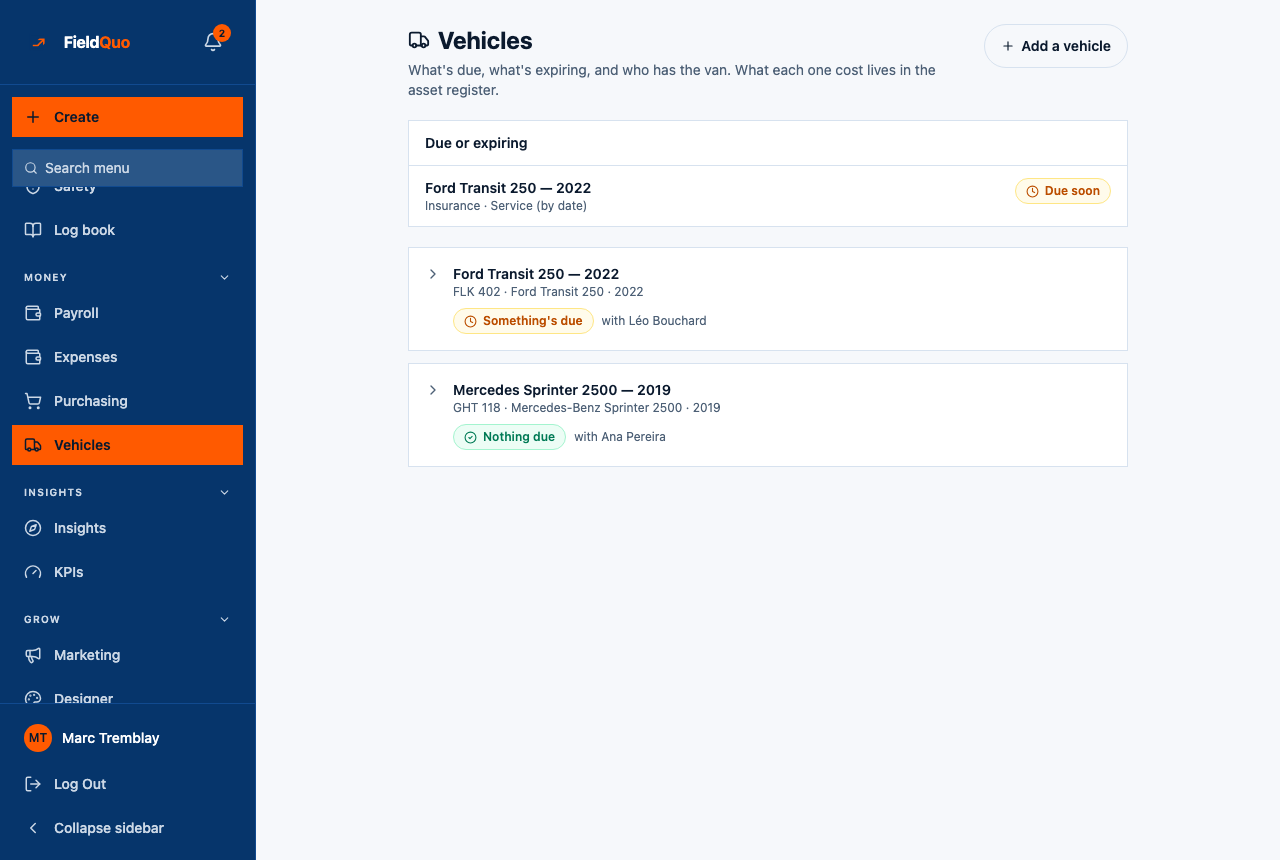
The screen is headed Vehicles — “What's due, what's expiring, and who has the van. What each one cost lives in the asset register.” A Due or expiring panel comes first, because an insurance certificate that lapsed is a van that should not be on the road, then one card per vehicle.
Only in FieldQuo: none of Jobber, Housecall Pro, ServiceTitan or Projul lists vehicle expiries, a maintenance log or a cost per kilometre on its pricing page at any tier. The proof is the screen itself — app/app/fleet — and it is in every plan.
What is on the screen
- Due or expiring — every vehicle with something Due soon or lapsed, naming which: Insurance, Registration, Service (by date), Service (by mileage).
- One card per van — “Ford Transit 250 — 2022”, its plate, a badge (Something's lapsed, Something's due, Nothing due, Nothing recorded) and “with Léo Bouchard”.
- The expanded card — the four expiries, Odometer (km), VIN, Cost and Book value now for those who may see them, Edit, then Maintenance, Documents, Expenses and Running costs.
- Add — attaches fleet details to a vehicle already in the asset register. With nothing in the register, the screen says so and links Add a vehicle to the register.
How to add a vehicle
- Put the van in the asset register first — Settings → Overhead, under Assets & depreciation — with what it cost. An owner or administrator does this.
- Open Vehicles (under Money) and press Add.
- Under Which vehicle, pick the asset.
- Fill in Plate, Make and model, VIN, Year, and the Odometer (km) — “Leave blank if you don't know”.
- Pick Who has it (or “Nobody in particular”), then the dates: Insurance expires, Registration expires, Next service due (date) and Next service due (km).
- Press Save. The card appears with its badge worked out from what you entered.
A service due at a mileage only counts down once the odometer is filled in; with no reading it shows Not enough recorded rather than a guess. A blank date is No date recorded — never treated as lapsed.
What each field changes
| Field | What it changes |
|---|---|
| Odometer (km) | The reading Service (by mileage) counts down from, and one of the two readings a cost per km needs. Logging maintenance with an odometer moves it: “The van's odometer was updated to match this entry.” |
| Who has it | The name on the card. A deactivated team member shows as “no longer active” until you change it. |
| Insurance expires / Registration expires | Dated expiries. Within 30 days: Due soon and listed in the panel; past: lapsed and listed first. Filing an Insurance policy or Registration document with an expiry date moves the matching date here. |
| Next service due (date) | The same 30-day window, for the garage. |
| Next service due (km) | Due soon within 500 km of the odometer reading; lapsed once passed. |
| Cost / Book value now | Read from the asset register — the purchase price and what depreciation has left. Not editable here. |
| Remove fleet record | Removes the plate, dates and log. “The asset itself, and its depreciation, stay exactly as they are.” |
Maintenance, documents and running costs
- Maintenance — Log work: the kind (Service, Repair, Tyres, Inspection, Other), What was done, the odometer then, and what it cost — “leave blank if unknown”. Deleting an entry keeps the odometer reading it set: “the van really did do those kilometres.”
- Documents — Add a document: Registration, Insurance policy, Bill of sale, Photo or Other, with an optional expiry. A bill of sale is money and is hidden from anyone who may not see cost: “2 more hidden by your access level”.
- Expenses — fuel, tolls and repairs recorded on Settings → Expense Tracking with this vehicle picked, and the month's total.
- Running costs — expenses and maintenance over the last 12 months, depreciation, Total cost of ownership, last 12 months and Cost per km, which needs two odometer readings at least 30 days apart and says so when it cannot be worked out.
Who can see it
The screen needs the team-management permission — owners, administrators, Managers and Dispatchers. A plate, an odometer and an insurance renewal are operations: the dispatcher deciding which van goes where needs to know one is off the road on Thursday. Crew and Estimators do not see the row.
What the van cost — Cost, Book value now, depreciation, the cost per km and the bill of sale — is the company's cost basis and needs the Job costing switch on top, the same gate as the asset register. A Dispatcher sees the expiries and not the truck loan.
Mga madalas itanong
Does FieldQuo track where the van is?
No. There is no GPS and no route history. The screen records who has it, when its paperwork expires and what it costs to run.
Somebody deleted the asset — is the van gone?
The fleet record stays, marked with a warning that the asset behind it was deleted. Its dates are still real; keep them, or remove the fleet record once the van is gone.
Why is Cost per km blank?
It needs two odometer readings at least 30 days apart — the van's current reading and one logged with a maintenance entry — and the asset record. The card says which is missing.
Nakatulong ba ito?