

Лише у FieldQuo
Client equipment and warranties
Record the furnace, the panel or the cabinets you installed at a client's property with its warranty date and service history — and get a call list of the warranties about to run out.
Поки що ця стаття доступна англійською, французькою та іспанською. Ви читаєте англійську версію. Français · Español
A serial number in a database earns nothing. Twelve households whose warranties end in April, with a phone number beside each one, is a morning's calls and a month's work. That is what this feature is for: an Equipment & warranties panel on every client record, and a Client equipment screen in the sidebar that lists whose cover has ended or is about to.
One rule runs through all of it. A blank warranty date means nobody recorded one — it is shown as “Warranty not recorded” and never as out of warranty. A renewal call to a customer whose cover is actually fine is an insult, so FieldQuo refuses to guess.
Overview
Each piece of equipment belongs to one client and, optionally, to the job that installed it. It carries a name, make and model, serial number, where it is if not at the main address, the install date, the date the warranty covers until, who is covering it, notes, and a service history — each visit with what was done, the date, an optional link to a job, and whether the visit was covered by the warranty.
This is the client's kit, not yours. Your own vans and tools live under Vehicles and in job costing; a homeowner's boiler is never treated as an asset of your company.
What is on the client record
- The Equipment & warranties panel, placed above the quotes, jobs and invoices — on a service call the first question is “what is in this house and is it covered”.
- A count of items, an Add button, and one row per item: its name, then make, model and serial, then a badge — In warranty, Warranty ending, Out of warranty or Warranty unknown — with “Covered until …”, “Cover ended …” or “Warranty not recorded”.
- Press a row to open it: the location, the notes, the Service history (“3 visits · 2 under warranty”, each visit dated with a covered tag where it applied), Log a service visit, Edit and Delete.
- An empty panel reads “Nothing recorded here yet. Add the furnace, the panel, the unit — whatever you'd want to know about on the next call.”
- Warranty ending means the date is within the next 60 days — the window a renewal quote, a conversation and a booking take.
- The panel is only drawn for members allowed to see full client info; a crew member on name-and-address-only gets no panel at all rather than an empty one.
How to record a piece of equipment
- Open the client record and press Add in the Equipment & warranties panel.
- Name it — “Furnace, panel, water heater…” — and add the Manufacturer, Model number and Serial number. Use Where it is (if not the main address) for a business client's site or a second property.
- Set Installed and Warranty covers until. Leave the warranty date blank if you do not know it: the form says so itself — it will show as “not recorded”, never as out of warranty.
- Add Who's covering it and, if this client has jobs, pick Installed on which job so the equipment traces back to the work.
- Press Save. The row appears with its badge computed from the date.
Edits are sent whole, blanks included, so clearing a mistyped warranty date really clears it. Delete asks for confirmation and removes the item and its service history for good.
How to log a service visit
- Open the item and press Log a service visit.
- Type What was done and check the date (today is pre-filled). Link it to a job with the picker if there is one.
- Tick This visit was covered by the warranty when it was. This is asked, not inferred from whether you invoiced — an unbilled visit and a covered one are different things.
- Press Log it. The service history and its “under warranty” tally update.
The call list: Warranties running out
Client equipment in the sidebar's People group opens Warranties running out — “Equipment you've installed whose cover has ended or is about to. This is a call list.” It reads across every client, so you never have to open records one by one to find the renewals.
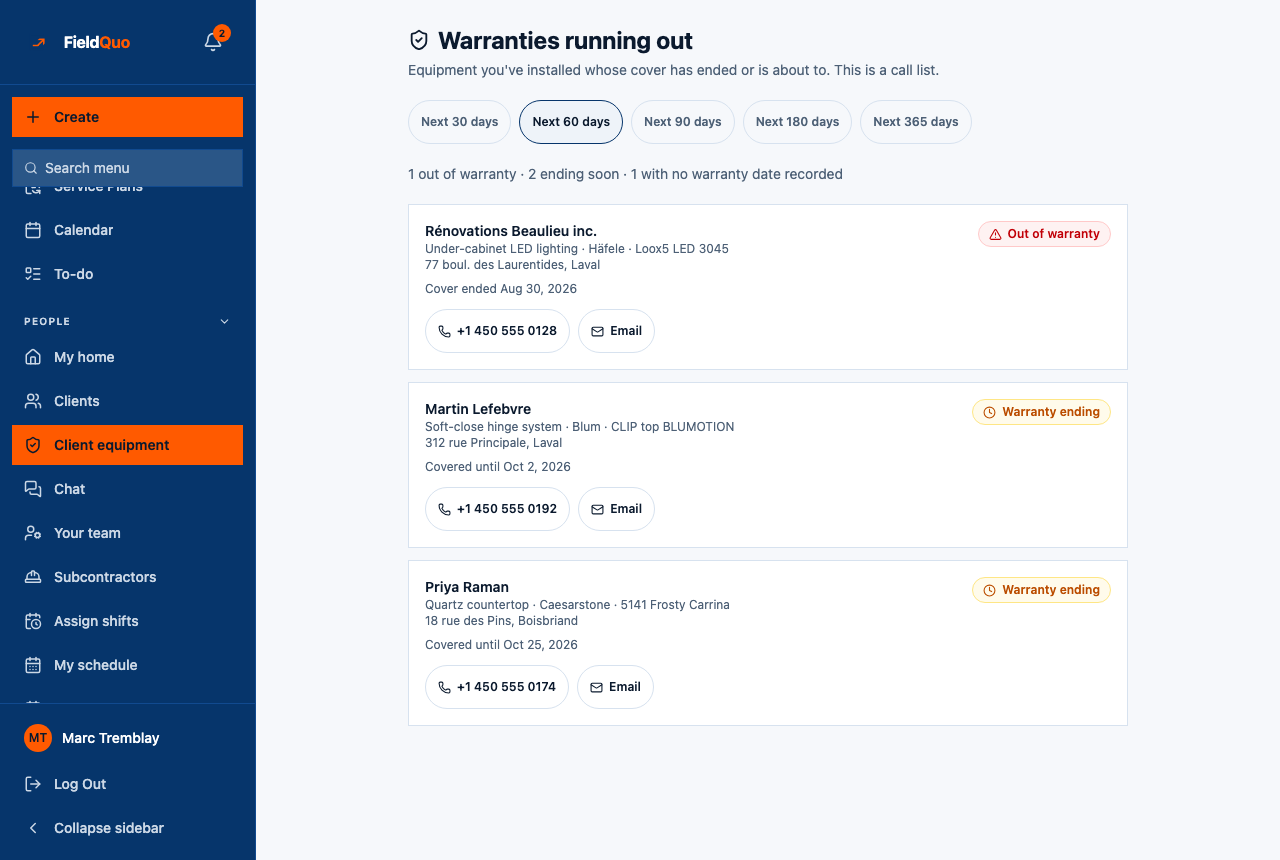
- Window chips — Next 30 days up to Next 365 days; 60 days is selected when you arrive. Every window also includes cover that has already ended, expired first, then soonest.
- The tally — “1 out of warranty · 2 ending soon · 1 with no warranty date recorded”. The third number is the honest one: those items are not on the list, and the count tells you there is data entry to do.
- One card per item — the client's name (a link to their record), the equipment, its address, “Cover ended …” or “Covered until …”, and a phone button that dials and an Email button that opens a message. Buttons only appear when the detail is on file.
Equipment with no warranty date is never on this list, in any window. If the list looks short, check the third number in the tally before concluding nothing is due.
Why this is listed under “Only in FieldQuo”
Of the five products FieldQuo compares itself with on its pricing pages — Housecall Pro, ServiceTitan, Projul, Jobber and QuoteIQ — only ServiceTitan lists equipment tracking on its pricing page, on its Essentials tier, and none lists a warranty call list. In FieldQuo the panel, the service history and the call list are on every plan, and the rule that a blank date is unknown rather than expired is written into the code that computes every badge.
Who can see it
| Clients and Properties level | Equipment |
|---|---|
| View client name and address only (Crew) | Nothing — no panel on the record, no Client equipment row in the sidebar. |
| View full client and property info | Sees the panel, the histories and the call list. Cannot add, edit or log a visit. |
| View and edit full client and property info (Estimator, Dispatcher) | Adds and edits equipment and logs visits. Only a Manager (View, edit, and delete …) can delete an item. |
Часті запитання
Can I put equipment on a job instead of a client?
Equipment belongs to the client. From the client record you can link it to the job that installed it, and each logged visit can be linked to a job too.
Does FieldQuo email the client when the warranty is ending?
No. The call list is for you to act on — the phone and Email buttons open a call or a message you write. Nothing is sent automatically.
What if I do not know the warranty date?
Leave it blank. The item shows Warranty unknown and stays off the call list, and the tally counts it under “no warranty date recorded” so you know to ask.
Чи була ця стаття корисною?