

Лише у FieldQuo
The Messages inbox
Where your Facebook Page, Instagram and WhatsApp Business conversations land, how they are grouped, and what every button on the screen does.
Поки що ця стаття доступна англійською, французькою та іспанською. Ви читаєте англійську версію. Français · Español
Messages is one inbox for the strangers who write to your business on Facebook, Instagram and WhatsApp. Every conversation is stored in FieldQuo, grouped by whether it is your turn to answer, and carries the two things the rest of the product cares about: whether it became a job, and how long the person waited. That is what makes the month-end review possible — see The monthly review of your inbox.
The row sits in the sidebar with a Preview badge, and the screen opens under an Early preview banner. The inbox itself is finished; what FieldQuo is waiting on is Meta's approval of Page messaging for its app. Until that lands for your company, the screen says so in one sentence and the reply box is switched off with the same reason printed on it. Nothing is invented in the meantime — an empty inbox reads No conversations yet, never a sample.
Overview
Business accounts only. FieldQuo reads the conversations of the Facebook Page and the Instagram professional account you connect, and of a WhatsApp Business number — never anybody's personal messages, and there is no code path to them. Connecting is done once, under Settings → Meta Ads; see Connecting your Facebook Page and Instagram and WhatsApp Business messages.
A conversation is never deleted from the inbox. It is answered, parked, marked done, and judged — Won, Lost, No reply or Not a job — so that the review at the end of the month has something true to count.
What is on the screen
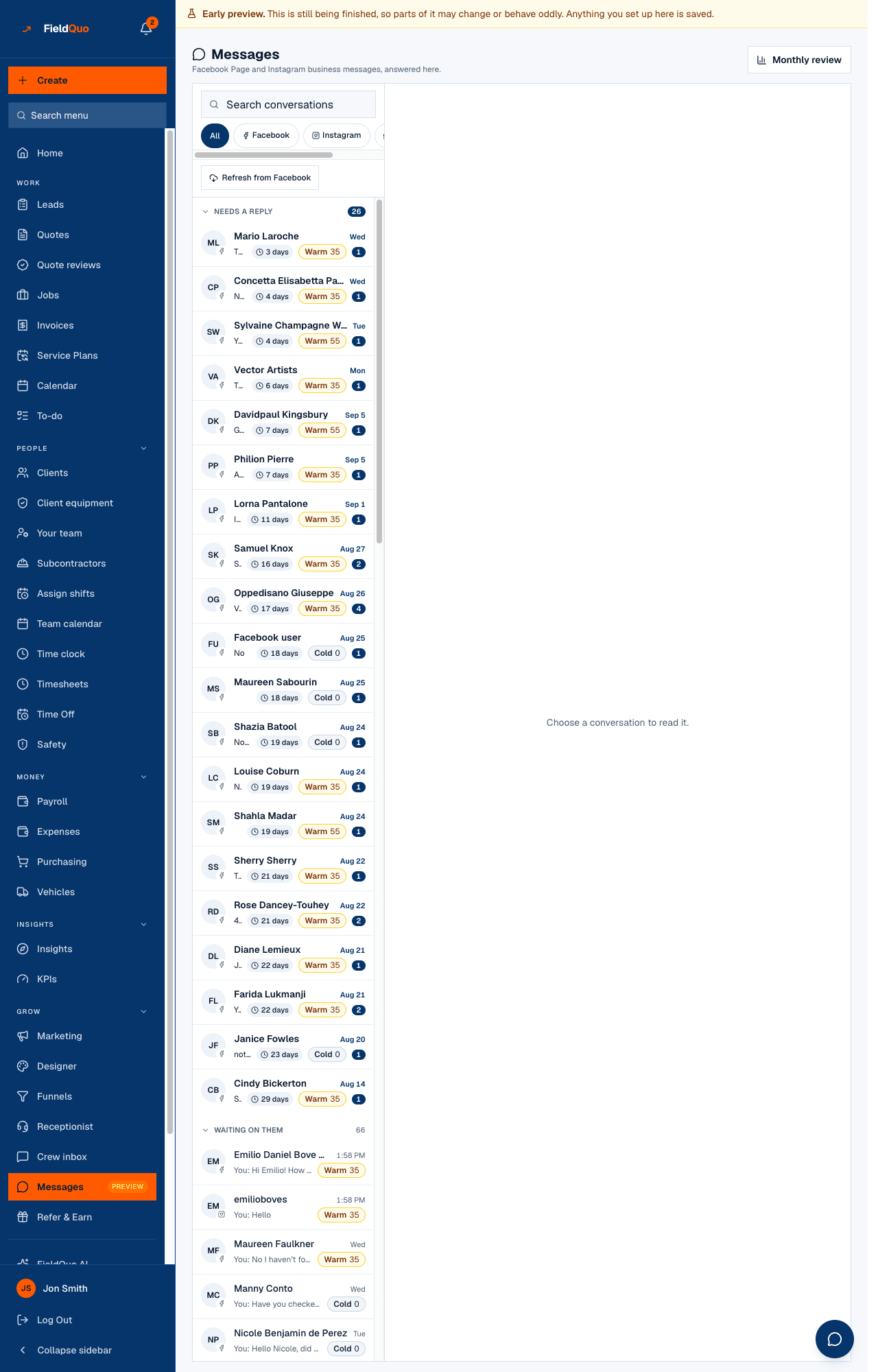
- Messages — Facebook Page and Instagram business messages, answered here. The Monthly review button sits top right.
- The left pane: Search conversations, then the channel chips All, Facebook, Instagram, WhatsApp. Both the search and the chips ask the server, so a search finds words inside messages the list has not loaded.
- Refresh from Facebook — pulls the conversations your Page already had before you connected (the last 30 days). Drawn only when Meta has granted the permission for it and you can write to the inbox.
- Four groups, in this order: Needs a reply, Waiting on them, Snoozed, Done. Done starts collapsed.
- Each row: the person's name, the channel glyph, the last message (You: … when it was yours), the time, an unread count, a Waiting 3 days badge while they wait on you, and the temperature chip — Warm 35, Hot 72, Cold 0. A red triangle means your last reply was Not delivered.
- The open conversation in the middle, with Conversation 41 (its number), the channel, the outcome chip, and a row of actions: Open client, Open lead, Open job, Open quote when one is linked, Mark done or Reopen, and Details.
- The right pane, Details · Outcome · History: name, channel, first contact, number, what it is linked to, What's happening with this? and Looking after this.
How to read and answer a conversation
- Open Messages and pick a row under Needs a reply. On a phone the list, the conversation and the details are three screens with a back arrow; on a wide screen they are three panes.
- Read the thread. Day dividers and a red unread line show where you had got to; grey system lines record what your team did to it (Marked won by Dave, Reopened).
- Type in Write a reply and press Send. The Reply and Note tabs above the box decide where the words go — a note stays inside your company.
- Judge it when you know: the outcome chip in the header, or the Outcome tab, records Won, Lost, No reply or Not a job. The moment you pick one, the conversation moves to Done.
The address bar carries the open conversation (?conversation=…), so a link from the review or a reload lands on the thread, not the list.
What each control changes
| Control | What it does |
|---|---|
| Reply tab | Sends through Meta to the person's Facebook, Instagram or WhatsApp. Off, with the reason printed on it, when no Page is connected, the connection needs reconnecting, or FieldQuo is still waiting on Meta's approval. |
| Note tab | Saves a private note in the thread. Only your team sees this. It is never sent. Never blocked by the connection. |
| Mark done / Reopen | Sets the status to Resolved (the row moves to Done) or back to Open. |
| Outcome chip | Won, Lost, No reply, Not a job, or back to Open, which clears the judgement. The review counts a cleared one as not judged. |
| What's happening with this? | Open, Waiting on them, Snoozed (asks for a date), Resolved — see Conversation status and who is looking after it. |
| Looking after this | Hands the conversation to one person on your team, or Nobody yet. |
| Open client and the other links | Jump to the client, lead, job or quote the conversation is linked to. A contact card a person sends can be added as a client with Add as a client. |
Knowing when someone writes back
While the tab is open the list re-reads itself once a minute. A reply that arrives shows as a toast in the tab you are in, or as a system notification when the inbox is in a background tab — New message from Maria Lopez with the first line of what they said. FieldQuo also pushes the same notice to the phones of everyone who can read the inbox, once browser notifications are switched on under Settings → Notifications; see Notifications for you: email and browser.
The Waiting 3 days badge is measured from the person's last message and clears when anyone at the company answers — from FieldQuo, from Meta's own inbox, or from a phone. Writing a note does not clear it: a note is not an answer.
What the other tools do not do
FieldQuo's comparison pages record what each competitor prints on its own pricing page, at every tier. None of the recorded pages names a Facebook Page, Instagram or WhatsApp inbox; Projul's Core+ tier lists “messaging” without saying which channel. What FieldQuo adds on top of an inbox is the outcome on every conversation and the monthly review built from it — which conversations became jobs, and how fast the won ones were answered.
FieldQuo's own comparison pages do not list this feature yet, on purpose: until Meta approves Page messaging for the app, a public page would be selling something a new company cannot switch on. This article says the same thing.
Who can see it
Reading the inbox needs Requests at view only or above in the access grid — an inbound message is a request from a stranger. The Estimator, Dispatcher and Manager presets and the owner and administrators all have it; the Crew preset (Requests: none) is refused. Replying, writing a note, changing the status, the outcome or who is looking after it needs Requests at view, create and edit — Estimator and above. Someone on view only sees You can read this conversation but not reply — your access to requests is view only. See Access levels.
Часті запитання
Why is the reply box greyed out?
Read the sentence on it. It is one of four: no Page is connected yet, the Page needs reconnecting, FieldQuo is waiting on Meta's approval for Page messaging, or this is a sample conversation. The Note tab works in every case.
Can I delete a conversation?
No. Mark it done, or judge it Not a job, and it leaves the working list. Nothing a client wrote is removed.
Does FieldQuo read my personal Messenger or Instagram?
No. Only the Page and the professional account you connected, and only their business conversations.
Where do these conversations go in the rest of FieldQuo?
Nowhere by themselves. Link one to a client, lead, job or quote from the Details tab and the thread carries the link; the monthly review files the conversation under the month it started.
Чи була ця стаття корисною?