

The crew tab bar
The bar along the bottom of the phone layout: which tabs it holds, why a crew member sees three, and where everything else went.
Поки що ця стаття доступна англійською, французькою та іспанською. Ви читаєте англійську версію. Français · Español
On a phone, the bar along the bottom of the screen is how you move around. It holds the four screens work flows through — Leads, Quotes, Jobs, Invoices — plus Chat, and a More button that opens the full menu. Tabs you cannot use are not drawn, so the bar a crew member sees is shorter than the owner's.
Overview
The bar appears whenever the screen is narrower than about 1,024 pixels — every phone, most tablets held upright. The current screen's tab is highlighted; the others show in a muted colour. Above that width the bar disappears and the sidebar takes over.
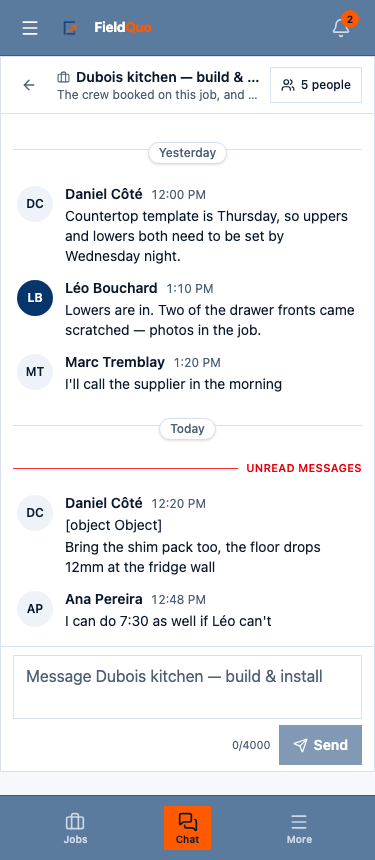
The tabs, and when each one appears
| Tab | Opens | Shown when |
|---|---|---|
| Leads | The leads board | Your access to Requests is at least View only |
| Quotes | The quotes list | Your access to Quotes is at least View only |
| Jobs | The jobs list | Your access to Jobs is at least View only |
| Invoices | The invoices list | Your access to Invoices is at least View only |
| Chat | The company chat | Always — as long as the crew chat feature is on for your company |
| More | The full menu, as a drawer | Always |
The same rules hide the same rows in the full menu, and the pages behind them refuse at the same level, so the bar is a shortcut, not the security.
What a crew member gets
The Crew level is set to No access on Leads, Quotes and Invoices, so none of the four document tabs are drawn. When that leaves the bar with nothing but Chat, FieldQuo swaps in the employee home's own five instead — Home · Schedule · Earnings · Messages · More — the same five every screen under My home shows. See Your home screen.
- Home — your next shift or visit, Clock in, Message and Find cover, today's hours, the shout-outs.
- Schedule — your shifts, visits and tasks by day. Earnings — your hours per pay period, and the money if your access allows it.
- Messages — #general, the room for each job you are on, and direct messages. More — requests, the team directory, notifications, settings, sign out.
The More drawer
More does not open a second menu. It opens the same drawer the menu button at the top opens — the full menu, grouped exactly as on a computer — so there is one list of screens, not two that could disagree. Home is not a tab: the FieldQuo logo in the top bar already takes you there.
If the bar shows nothing but More, every one of your document categories is set to No access. That is a valid grid, not a fault — everything you can use is in the drawer.
Часті запитання
Can I choose which tabs are in the bar?
No. The five are fixed — the four document screens and Chat, or the employee home's five when the document tabs all gate away or you are on a My home screen — and your access level decides which set you get.
Why is there no Time clock tab?
The bar is reserved for the screens work moves through and the chat. The time clock is one tap away under More, and the same for everyone regardless of level.
Чи була ця стаття корисною?