

Instant Quotes
The rate card behind your instant-estimate link — switch a trade on, set the rates and surcharges, choose what the homeowner sees, and put the estimator on your own website.
Поки що ця стаття доступна англійською, французькою та іспанською. Ви читаєте англійську версію. Français · Español
Settings → Instant Quotes is the rate card a stranger is quoted from. A homeowner opens your instant-estimate link, enters an address or traces an area on a map, answers a few questions, and gets a real starting range in seconds — priced from the numbers you save here and from nothing else. Every estimate lands in Estimate Reviews before it can be sent, and the public page never shows the rate card itself.
Overview
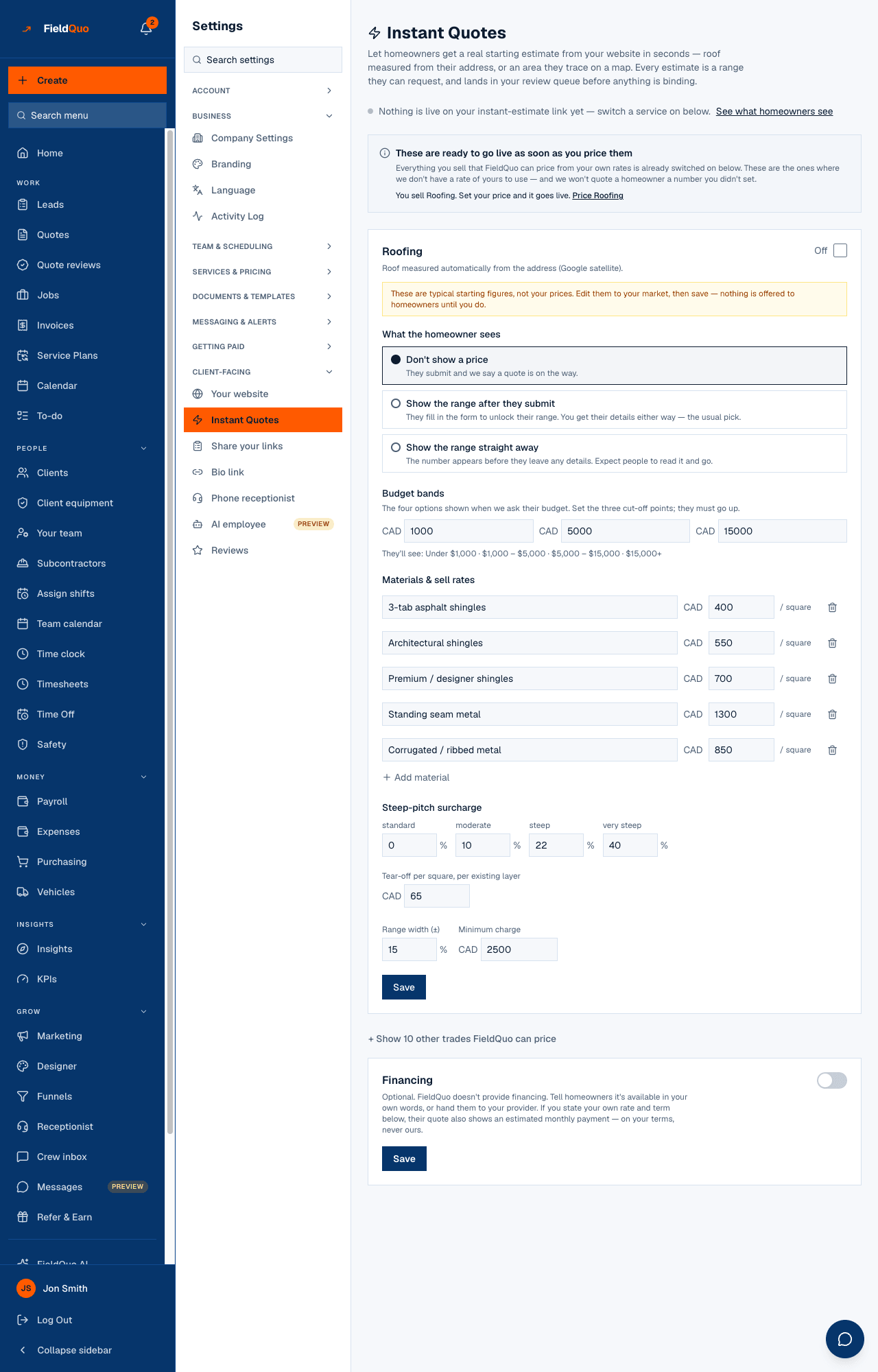
The screen is one card per trade FieldQuo can price — roofing, epoxy floors, parging, lawn mowing, cabinet refinishing and refacing, flooring, painting, stairs, countertops, junk removal — with an On / Off switch, the way that trade measures, editable material sell rates, the surcharges the estimate applies, a minimum charge and a range width. Saving a trade is what makes it live; until then it is off, so there is never a live button pricing off numbers nobody chose.
The cards start from your Services & Pricing rates where you have them (Started from your Services & Pricing rates), or from typical starting figures where you do not (These are typical starting figures, not your prices). Either way nothing is offered to homeowners until you edit and save. If your services rates change later, the card says so — Your Services & Pricing rates changed since this was saved — and offers Use my services pricing; it never changes your live rates on its own.
What is on the screen
- The live line — … live on your instant-estimate link. with See what homeowners see, or Nothing is live on your instant-estimate link yet — switch a service on below.
- Put the instant estimate on your website — an embed snippet with Copy code, shown only once something is live.
- These are ready to go live as soon as you price them — services you sell that have no rate of yours yet, each with Price …; and a banner if a live instant quote is not one of your services.
- One card per trade you sell: the switch, What the homeowner sees, Materials & sell rates, the surcharges, Minimum charge, Range width (±), Budget bands, and Save & enable. + Show … other trades FieldQuo can price lists the rest.
- Financing — optional, company-wide: your own wording and, if you state them, an annual rate and term.
How to switch a trade on
- Open Settings → Instant Quotes. If the trade is not one of your services, add it under Services & Pricing first — that is the list your quotes, your website and your receptionist all read.
- On the trade's card, read how it measures — for example Roof measured automatically from the address (Google satellite) or Homeowner enters the area and picks options.
- Set each material's sell rate under Materials & sell rates (per square, per sqft, per door, per tread… as the trade prices), and add or remove materials.
- Set the surcharges that trade applies, the Minimum charge and the Range width (±).
- Choose What the homeowner sees (below), then press Save & enable. The live line at the top counts it.
- Press See what homeowners see to open your public link, or Copy code to embed it on your own site.
For painting, homeowners are only asked interior or exterior when both Interior Painting and Exterior Painting are on under Services; with one on, every estimate is priced as that scope, and with neither, painting is not offered at all whatever is saved here.
What the homeowner sees
| Choice | What happens | Trade-off |
|---|---|---|
| Don't show a price | They submit and the page says a quote is on the way. | You get the details; they see no number until you review. |
| Show the range straight away | The range appears before they leave any details. | Expect people to read it and go. |
| Show the range after they submit | They fill in the form to unlock their range. | You get their details either way — the usual pick. |
What each control changes
- On / Off — whether the trade is offered on your link at all. Off keeps every rate saved.
- Materials & sell rates — the base price per unit for each material the homeowner can pick. The unit follows the trade: per square for roofing, per sqft for flooring and epoxy, per door and drawer for cabinets, per tread for stairs, per visit by lot size for lawn mowing.
- Surcharges — added on top of the base only when the homeowner's answers call for them: steep pitch and tear-off per layer for roofs, surface prep, access and condition elsewhere, the scope uplift for painting.
- Minimum charge — the floor of any estimate for that trade.
- Range width (±) — how wide the range shown is around the computed figure.
- Budget bands — the three cut-off points behind the four budget options the homeowner is asked; they must increase, or the standard bands are shown instead.
Financing
FieldQuo does not provide financing. The Financing card lets you tell homeowners it is available in your own words, or hand them to your provider. If you also fill in Annual rate (APR %) and Term (months) under Your stated terms (optional), the estimate shows a monthly payment labelled as an estimate on your stated terms. Leave either blank and no monthly figure is ever shown — FieldQuo has no default rate and no default term.
Do not promise a rate or a monthly amount you cannot honour. The wording and the figures are yours, and they are what the homeowner reads.
Who can see it
The row appears for anyone whose access includes See prices — the Estimator, Dispatcher and Manager levels, owners and administrators — because the rate card is prices. Editing and saving a trade is owner and administrator only; everyone else sees the cards read-only. The public estimator, by contrast, never shows a rate to anyone. See Instant quotes on your website.
Часті запитання
Can a homeowner see my rates?
No. The public page shows a range, never the rate card. Publishing a rate card openly would hand it to every competitor in town.
Is an instant estimate binding?
No. It is a range the homeowner can request. It lands in Estimate Reviews, and nothing is sent to them as a quote until someone approves it.
I switched a trade on but the link says nothing is available.
A trade is live only when it is on and priceable — saved with rates. The line at the top counts exactly those; the card of a trade that needs a price says so.
Чи була ця стаття корисною?