

Subcontractors and their insurance
The companies you hire per job — their trade and contact, whether their certificate of insurance and WSIB/WCB clearance are in date, what you agreed with them on each job, and what you paid them this year.
Per ora questo articolo è disponibile in inglese, francese e spagnolo. Stai leggendo la versione inglese. Français · Español
Subcontractors is the roster of other companies — the electrician, the countertop fabricator, the roofer — with the one fact that has a same-day consequence at the top: whether their paperwork is still valid. A lapsed certificate of insurance is a sub who must not step on site tomorrow, so the Insurance or clearance expiring panel comes before everything else.
This is not the roster of people you employ; that is Manage Team. And it is not a way to pay a sub: the feature FieldQuo does ship — paying a contractor from the app — pays a person on your own roster, for hours they clocked, at the rate you set. It cannot pay a fixed bid to another company. Payments to a subcontractor company are recorded here after the money has left.
Overview
The screen is headed Subcontractors — “The companies you hire per job — the electrician, the roofer. Their insurance and clearance dates, what you've agreed with them on each job, and what you've paid them this year.” Each sub has a record with documents, the jobs they are on and the payments recorded against them; the year total is the figure behind the T5018 year-end figures.
What a sub is owed and was paid is job cost. Job costing takes the agreed amount as the cost of that sub on the job — a $5,000 sub who has been paid $2,000 has cost the job $5,000 — and the payments are how it gets settled. See Job costing.
What is on the screen
- Insurance or clearance expiring — every sub whose insurance or clearance is Due soon (within 30 days) or Expired, worst first, each naming which of the two.
- Paid in with a year picker — this year and the two before it — shown only to someone who may see money.
- One card per sub — the company name, Inactive where it applies, then trade, contact and phone, a badge for the worse of the two expiries, and, for someone who may see money, “$6,840.00 paid in 2026 (3 payments)” with “No tax form” where the sub is excluded from the year-end form.
- Add — opens the new-subcontractor form.
How to add a subcontractor
- Open Subcontractors (under People) and press Add.
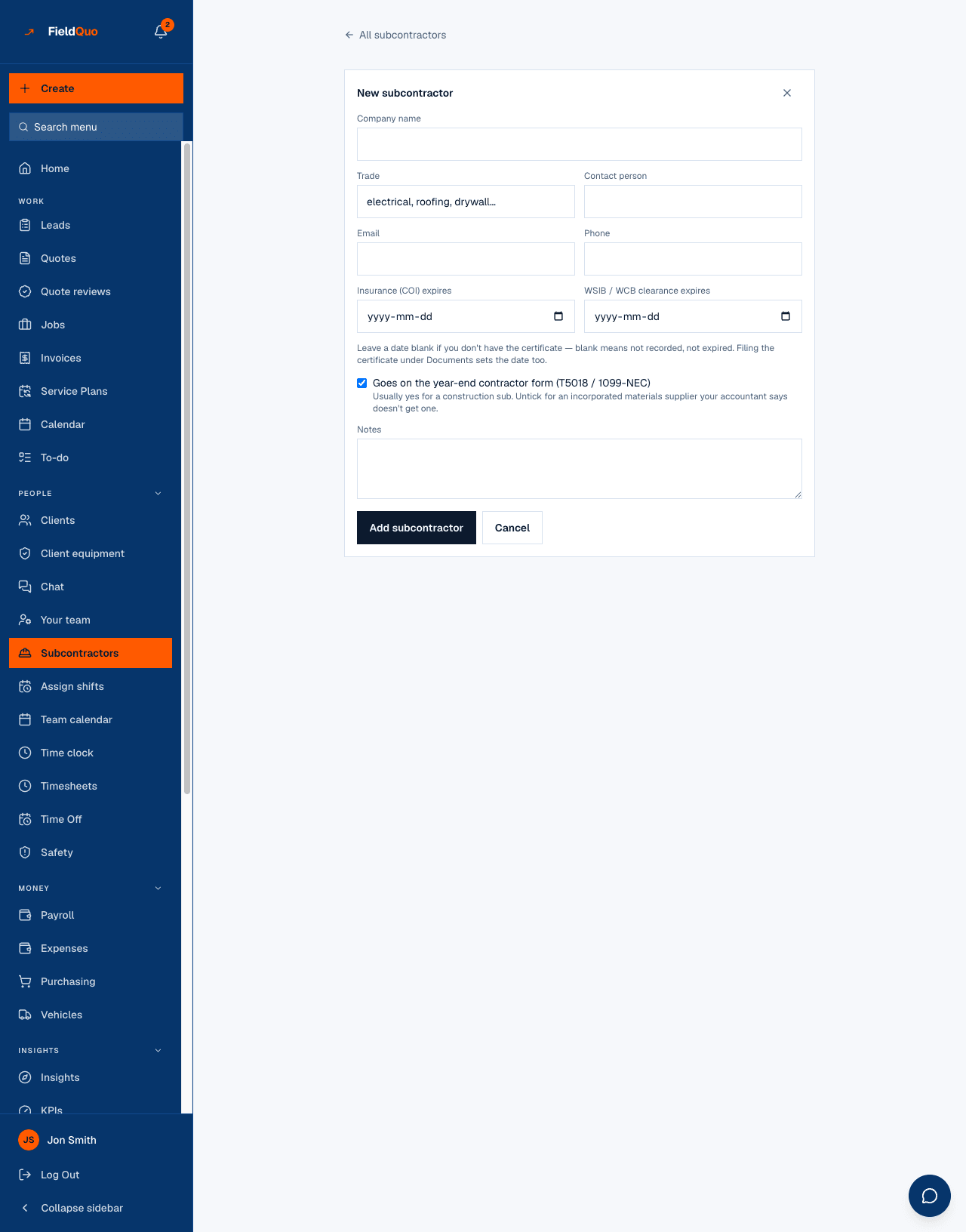
- Fill in the Company name and Trade (“electrical, roofing, drywall…”), then the Contact person, Email and Phone.
- Enter Insurance (COI) expires and WSIB / WCB clearance expires if you have the certificates. “Leave a date blank if you don't have the certificate — blank means not recorded, not expired.”
- Leave Goes on the year-end contractor form (T5018 / 1099-NEC) ticked for a construction sub; untick it for an incorporated materials supplier your accountant says does not get one.
- Press Add subcontractor.
- On the sub's page, upload the certificates under Documents — a Certificate of insurance or WSIB / WCB clearance with its expiry date sets the sub's date at the same time.
A sub you no longer use gets Mark inactive rather than a delete: they drop out of the “add a sub to a job” picker, keep their jobs and payments, and still appear with their total for the years you paid them.
Insurance and clearance
Two dated expiries, in the order they matter. Insurance first: a lapsed certificate makes you liable for the sub's damage the moment they are on site. Clearance second (WSIB in Ontario, CNESST in Quebec, WCB elsewhere): a lapsed clearance makes you liable for their premiums — a bill rather than a lawsuit. The badge on a card is the worse of the two.
| Badge | What it means |
|---|---|
| In date | The date is recorded and more than 30 days away. |
| Due soon | The date falls within the next 30 days. The sub is listed in the expiring panel. |
| Expired | The date has passed. The sub is listed in the expiring panel, first. |
| Not recorded | No date was entered. This is a gap in the paperwork, not an uninsured sub — it never counts as expired and never appears in the panel. |
FieldQuo does not stop you putting a sub with expired paperwork on a job. The job page shows “Insurance or clearance expired” beside them; deciding whether they go on site is yours.
Putting a sub on a job and paying them
Subs are attached from the job, not from this screen. The job page has a Subs on this job section: “Companies hired for a fixed price. The agreed amount is what this job costs, whatever you quoted the client; payments are how it gets settled.” Each line moves through Quoted, Agreed, Done and Paid.
- On the job, press Add a sub, pick the subcontractor, and optionally the visit and what they are doing.
- Enter the Agreed amount, or leave it blank until it is agreed — “No amount yet” is quoted, not cost.
- When you have paid them, press Record a payment: amount, Paid by (Cash, E-Transfer, Cheque), Paid on and a note. “This writes the payment and an expense against the job in one step. It records money that already left — it doesn't send any.”
- The line reads “$2,000.00 paid, $3,000.00 to go”, then Paid in full; a further payment shows as overpaid rather than being refused.
Who can see it
Opening the roster, adding a sub, editing one and filing documents need the team-management permission — owners, administrators, Managers and Dispatchers. A sub's name and whether their insurance is in date are operations: the dispatcher putting the electrician on Thursday's visit needs to know their clearance lapsed. Crew and Estimators do not see the row.
The money on the screen — agreed amounts, payments, the year totals and Paid in — needs the Job costing switch as well. A Dispatcher opens the roster, sees the lapsed insurance, and sees no figures; a Manager sees both. See The Custom access editor.
Domande frequenti
Can I pay a subcontractor through FieldQuo?
No. Recording a payment writes the payment and an expense against the job; the money moved through your bank, cheque or e-transfer first. The in-app payout feature pays a person on your own roster for clocked hours, not a company for a bid.
What happens if I leave an expiry date blank?
The sub shows Not recorded for that item and is never listed as expired. Blank means you have not entered the certificate, not that they are uninsured.
Can I import the sub's own quote?
Yes, onto your quote — see Import a subcontractor quote. When the quote becomes a job, that imported price can be adopted as the agreed amount on the job's Subs section.
È stato utile?