

Share your links
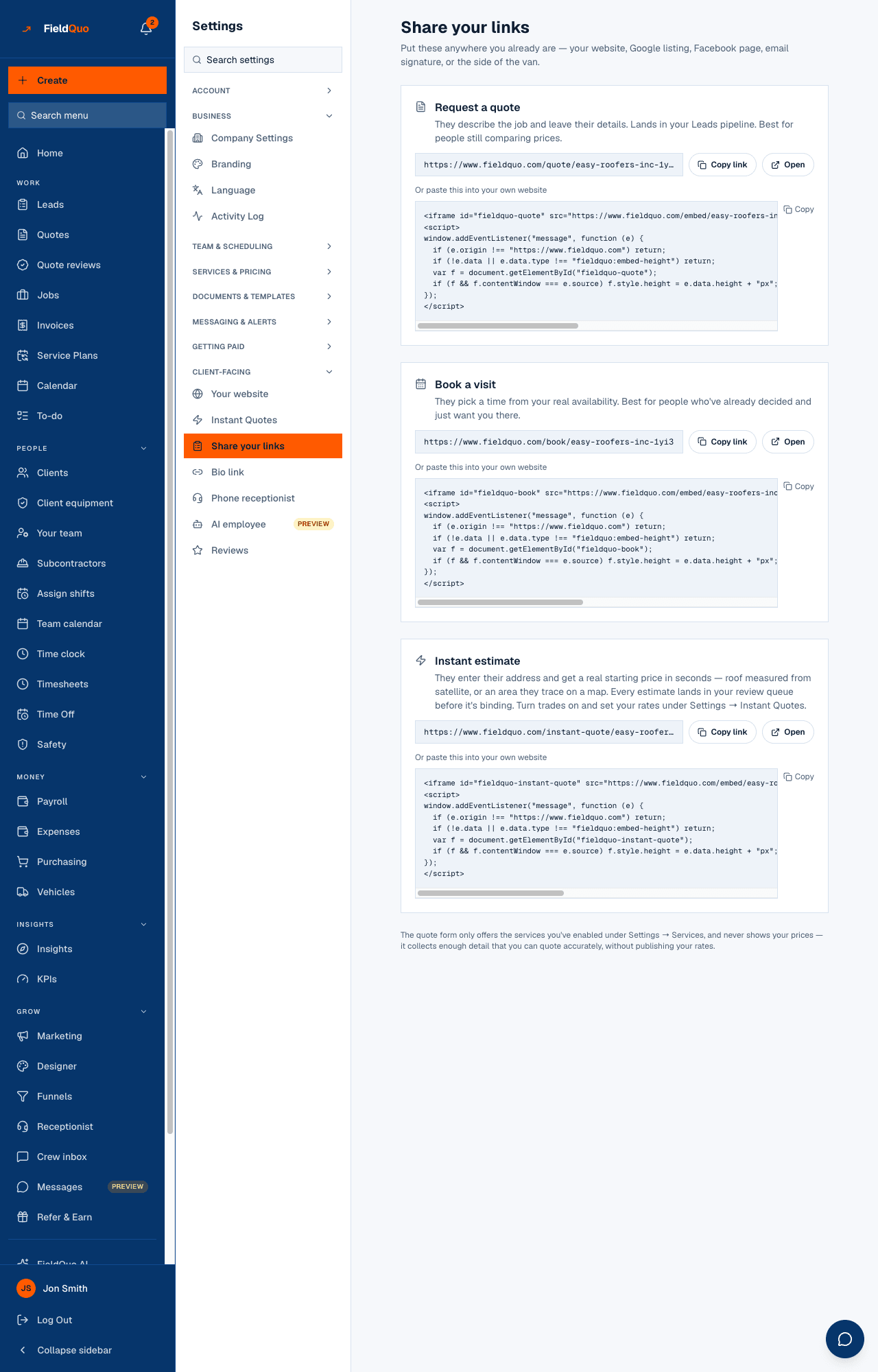
One screen with every public link your company has — Request a quote, Book a visit, Instant estimate and each published funnel — each with Copy link, Open and an embed snippet.
ਇਹ ਲੇਖ ਫ਼ਿਲਹਾਲ ਅੰਗਰੇਜ਼ੀ, ਫ਼ਰਾਂਸੀਸੀ ਅਤੇ ਸਪੈਨਿਸ਼ ਵਿੱਚ ਉਪਲਬਧ ਹੈ। ਤੁਸੀਂ ਅੰਗਰੇਜ਼ੀ ਸੰਸਕਰਣ ਪੜ੍ਹ ਰਹੇ ਹੋ। Français · Español
Settings → Share your links answers one question: what can I put on my Facebook page, my Google listing, my email signature or the side of the van? It lists the links a stranger can use to become a lead, each with a Copy link button, an Open button to try it yourself, and the code to paste into a website you already have.
Overview
Most contractors do not have a website to paste code into — they have a Facebook page, a Google listing and a phone. So the plain link comes first on every card and the embed second. Every link is public: no login, no app, works on a phone in a driveway. Everything that arrives through them lands on your Leads board or your calendar with your branding on the page the client saw.
What is on the screen
- Request a quote — “They describe the job and leave their details. Lands in your Leads pipeline. Best for people still comparing prices.”
- Book a visit — “They pick a time from your real availability. Best for people who've already decided and just want you there.”
- Instant estimate — the address-in, price-out page; every estimate lands in your review queue before it is binding. Trades and rates live under Settings → Instant Quotes.
- Design your kitchen — “A homeowner lays out their own kitchen — cabinets, finishes, the lot — and sends it to you as an enquiry with the drawing attached.” Shown only while the Kitchen Designer is on under Services (on by itself for Kitchen Design & New Installs, Remodeling, Renovation, General Contracting, New Construction and Cabinet Refacing; the company can switch it on or off there), and as a link only: there is no embed snippet for it.
- One card per published funnel, named as you named it — “A tap-through lead funnel — share the link on an ad, or put it on your site.” Draft funnels are not listed, because their link would not work yet.
- A closing line: the quote form only offers the services you enabled under Settings → Services, and never shows your prices.
How to copy a link
- Open Settings → Share your links.
- On the card you want, press Copy link. The button reads Copied for two seconds.
- Paste it where people already find you. Press Open first if you want to see what they will see.
- For a website you already run, press Copy under Or paste this into your own website instead, and hand the code to whoever edits the site — see Embed booking and quote forms on any site.
Where each link goes
| Link | What the client does | Where it lands |
|---|---|---|
| Request a quote | Picks a service, describes the job, adds photos, leaves their details | A scored lead on the Leads board — see The self-quote form |
| Book a visit | Chooses an event type and a slot from your real availability, pays a visit fee if you charge one | An appointment on your calendar and a lead — see The booking page |
| Instant estimate | Enters an address or traces an area, sees a starting price | Estimate Reviews, where you confirm the price before anything is sent — see Estimate Reviews |
| Design your kitchen | Draws their kitchen on a plan, picks finishes, leaves their details | A lead with the drawing attached and no price — you quote it; see The kitchen designer |
| A funnel | Taps through a short quiz and leaves their details | A scored lead tagged with the funnel's channel — see Lead funnels |
Who can see it
Owners, administrators, Dispatchers and Managers see the row and every card. The funnel cards read from the funnels list, which the same levels can open; someone below that would see the line Lead funnels are managed by an owner or admin — ask one of them for the link in place of the funnel cards, but they do not see this settings row at all.
ਅਕਸਰ ਪੁੱਛੇ ਜਾਂਦੇ ਸਵਾਲ
Why is my funnel not listed?
Only published funnels with an address appear. Open Funnels, open the funnel, and press Publish; it needs a contact step first.
Do these links show my prices?
No. The quote form collects enough detail to quote accurately without publishing a rate. The instant estimate shows a starting price only for trades you switched on, and only what you chose under “What the homeowner sees”.
Is there a QR code?
Not on this screen today. Copy the link and use any QR generator; the link does not change.
ਕੀ ਇਹ ਮਦਦਗਾਰ ਸੀ?