

The invoice email and pay page
What the client receives when you send an invoice — a short email with the amount, the due date and a Pay online button — and the page it opens, where they pay by card or from a bank account and see the invoice marked paid.
ਇਹ ਲੇਖ ਫ਼ਿਲਹਾਲ ਅੰਗਰੇਜ਼ੀ, ਫ਼ਰਾਂਸੀਸੀ ਅਤੇ ਸਪੈਨਿਸ਼ ਵਿੱਚ ਉਪਲਬਧ ਹੈ। ਤੁਸੀਂ ਅੰਗਰੇਜ਼ੀ ਸੰਸਕਰਣ ਪੜ੍ਹ ਰਹੇ ਹੋ। Français · Español
Pressing Send on an invoice emails the client one short message from your company, in the invoice's language: the amount due, the due date, and one button. The button opens the invoice in the client's portal, where the whole invoice is laid out in your colours and the money is taken on Stripe's page — in your company's name, into your own bank account.
The email is deliberately brief. Unlike the quote email, it carries no line items and no attachment: the invoice page is the document, and the email's one job is to get the client to it.
Overview
Sending needs a client with an email address, and it refuses two things rather than guess: an invoice entered as a past job (nothing is sent for those), and an invoice that says tax applies but has no rate for the client's address. The invoice is marked Sent only after the message is accepted for delivery, and a chase task is created for you a week out.
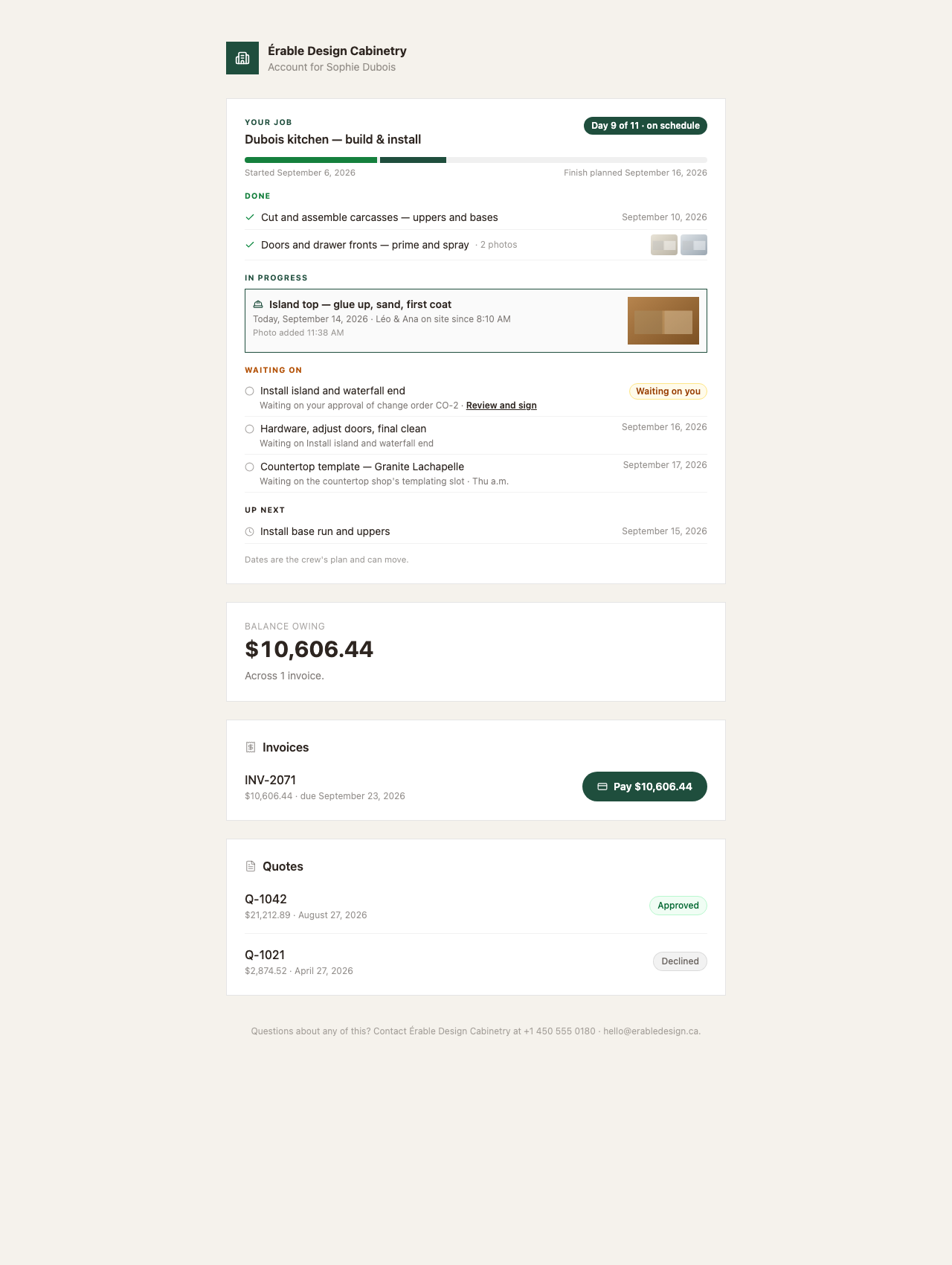
The link opens the invoice page in the client's portal — a page that needs no sign-in, tied to the client by a long random token, kept out of search engines. See The client portal for the account page behind it.
What the email says
- From: your company's name. Subject: “Invoice INV-2071 from [Your company] — $10,606.44 due”.
- The brand band in your colour with your logo, the word INVOICE and the number.
- “Hi [first name],” then “Here's invoice INV-2071 for the work completed.” — or, when something has already been paid, “Here's the balance on invoice INV-2071, after the $5,000.00 already received. Thank you for that.”
- A note when there is one: the message you typed on a payment request, or the stage name (“Deposit”) on a payment-schedule request.
- AMOUNT DUE (or BALANCE DUE) with the figure, then “Due [date]” — or “Was due [date]” in red once it is late.
- The button Pay online when your Stripe account can take payments; otherwise View your invoice, followed by “Please get in touch to arrange payment.”
- “Accepted: Cash, E Transfer, Cheque.” — only the methods you ticked under Settings → Payments, and only if you ticked any.
- “Or paste this into your browser:” with the link, then the footer: “Questions? Reply to this email or call [phone].”, your company's name, and your email, phone, website and tax number.
No PDF is attached, and the client cannot download one from the portal. The invoice PDF is yours to download from the invoice page and send by hand if a client asks for a file.
The invoice page
- Back to your account, then a white card with the brand rule, your logo, name, phone and tax number; INVOICE, the number, Date and Due (or Was due in red).
- The lines: description, quantity and amount, one per row — or “No itemised breakdown on this invoice.” Then Notes when the invoice has them.
- Subtotal, Discount, Tax (a figure, or To be confirmed, or None), Total, and Paid as a negative row when a payment has been recorded.
- A band in your colour with the one figure that matters: BALANCE DUE and the amount — or the stage name and the stage's share when the link came from a payment-schedule request — or Paid in full with the total.
- The action strip: the pay buttons described below, or “Please get in touch to arrange payment.” and the accepted methods when you cannot take cards, or a green Paid in full — thank you.
The portal page lists the invoice's lines flat. The scope groups, what's included and the process steps that make the invoice the quote's twin are on the PDF and on your own invoice screen — see Invoices mirror quotes.
How the client pays
- They press Pay $10,606.44 — or, once Stripe has activated bank payments on your account, Pay $10,606.44 by card or Pay $10,606.44 from bank account, with the note “Bank payments take 3–5 business days to clear. Until then the invoice shows as pending.”
- Stripe's hosted page opens in your company's name. The amount is worked out on the server from the invoice's real balance (or the requested stage's share) — the browser never sends an amount.
- By card, they come back to their account with a green “Payment received — thank you. It can take a minute to show below.”, the row reads Paid, and the invoice page reads Paid in full — thank you.
- From a bank account, they come back to an amber “Bank payment received — it takes 3–5 business days to clear. The invoice will show as paid once it has.” The row reads Bank payment pending until the money arrives; if the bank returns it, the page reads “Bank payment failed — [reason]. You can try again or pay by card.” and the buttons come back.
| Method | When it is offered |
|---|---|
| Card | Whenever your Stripe account can take payments (Settings → Payments reads Stripe connected · Active). |
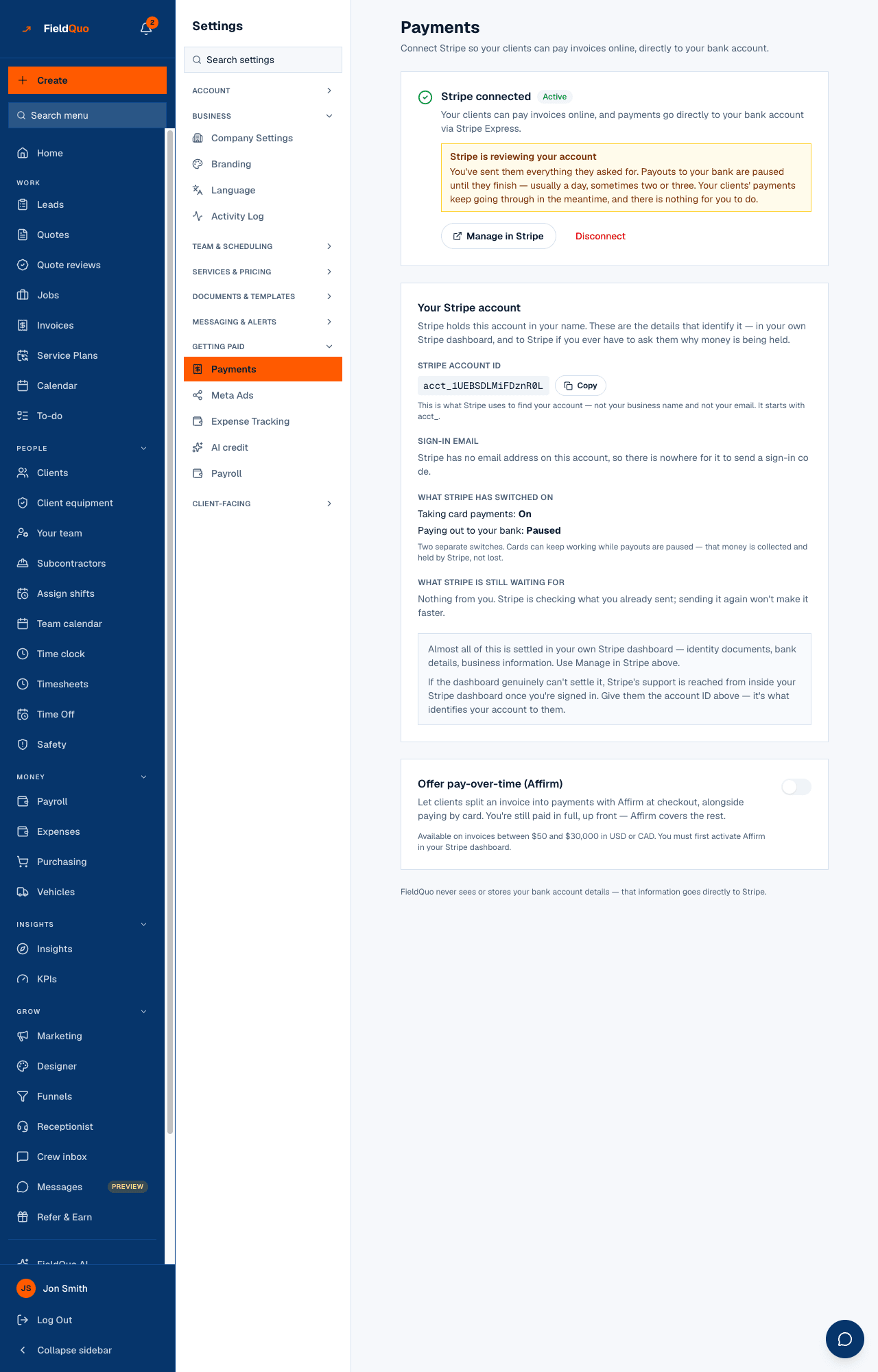
| Bank account — pre-authorized debit in Canada, ACH in the US | Once Stripe has activated the capability on your account and your billing currency matches (CAD for Canada, USD for the US). Settings → Payments says which it is. |
| Pay over time (Affirm) | On Stripe's page only, beside the card, when you have switched on Offer pay-over-time (Affirm), the invoice is between $50 and $30,000, and the currency is USD or CAD. |
The client never sees a processing fee. The fee comes off your side of the payment; the invoice total is what they pay. See Payment processing fees and payouts.
FieldQuo does not email the client a receipt after an ordinary invoice payment — the confirmation is the page itself. You are notified, the payment is recorded on the invoice, and Stripe may send its own receipt depending on your Stripe dashboard settings.
Reminders and payment requests
- Request payment on the invoice sends the same email as a reminder: subject “$10,606.44 due — invoice INV-2071”, “A reminder that invoice INV-2071 has a balance of $10,606.44.”, with your optional note and the same button.
- A payment-schedule stage (a deposit, a halfway payment) sends the same email with the stage name as its note and the stage's share as the amount; the page then headlines that share rather than the whole balance. See Progress payments by stage.
- An automatic overdue reminder is sent only if you created a follow-up rule for overdue invoices, using one of your own email templates — nothing is sent otherwise. See Invoice reminders and chasing.
What you control
| Where | What it changes for the client |
|---|---|
| Settings → Payments — Stripe | Whether the button reads Pay online or View your invoice, and whether the page offers card, bank account and Affirm. |
| Settings → Payments — Payment methods you accept | The “Accepted:” line — Cash, E-transfer, Cheque — on the email, the page and the PDF. |
| Settings → Branding | The logo, the brand band, the button colour and the balance band. |
| Settings → Company Settings — Payment schedule | The stage names the client sees as the headline on a deposit or instalment request. |
| The client's language | The email follows the invoice's language; the page follows the client's language on their record, then your company default. |
Who can send it
Sending an invoice or a payment request needs Invoices at view, create & edit or above. Settings → Payments is for owners and administrators only.
ਅਕਸਰ ਪੁੱਛੇ ਜਾਂਦੇ ਸਵਾਲ
Why does the email say View your invoice instead of Pay online?
Stripe has not enabled charges on your account yet. The page then shows “Please get in touch to arrange payment.” and your accepted methods. Settings → Payments says what Stripe is waiting for.
Why is the invoice still unpaid days after the client paid?
They paid from a bank account. A bank debit takes 3–5 business days to clear; the invoice reads Bank payment pending until the money arrives and is marked paid only then.
Can the client pay part of the balance?
Only what you ask for. A payment-schedule request asks for exactly that stage's share; otherwise the button asks for the whole balance.
Does the client get a receipt?
Not from FieldQuo. They see the page marked Paid in full — thank you, and the row in their account reads Paid. A receipt file is yours to send by hand.
ਕੀ ਇਹ ਮਦਦਗਾਰ ਸੀ?