

Time off policies
What kinds of time off exist in your company and how each builds up — fixed days, accrued per pay period, or vacation pay as a percentage — with country starter sets and a year-end carry-over you run yourself.
Sa ngayon, available ang artikulong ito sa Ingles, Pranses at Espanyol. Binabasa mo ang bersyong Ingles. Français · Español
Time Off Policies defines the *kinds* of leave your team can request — vacation, sick, personal, unpaid — and how entitlement accumulates. Requests, approvals and balances live elsewhere, on each person's Time off screen; this page is the rule book behind them.
It is the owner's and administrators' page, because a policy is an employment term: seeding a starter set writes balances against every worker immediately, which is why nothing here happens without a press.
Overview
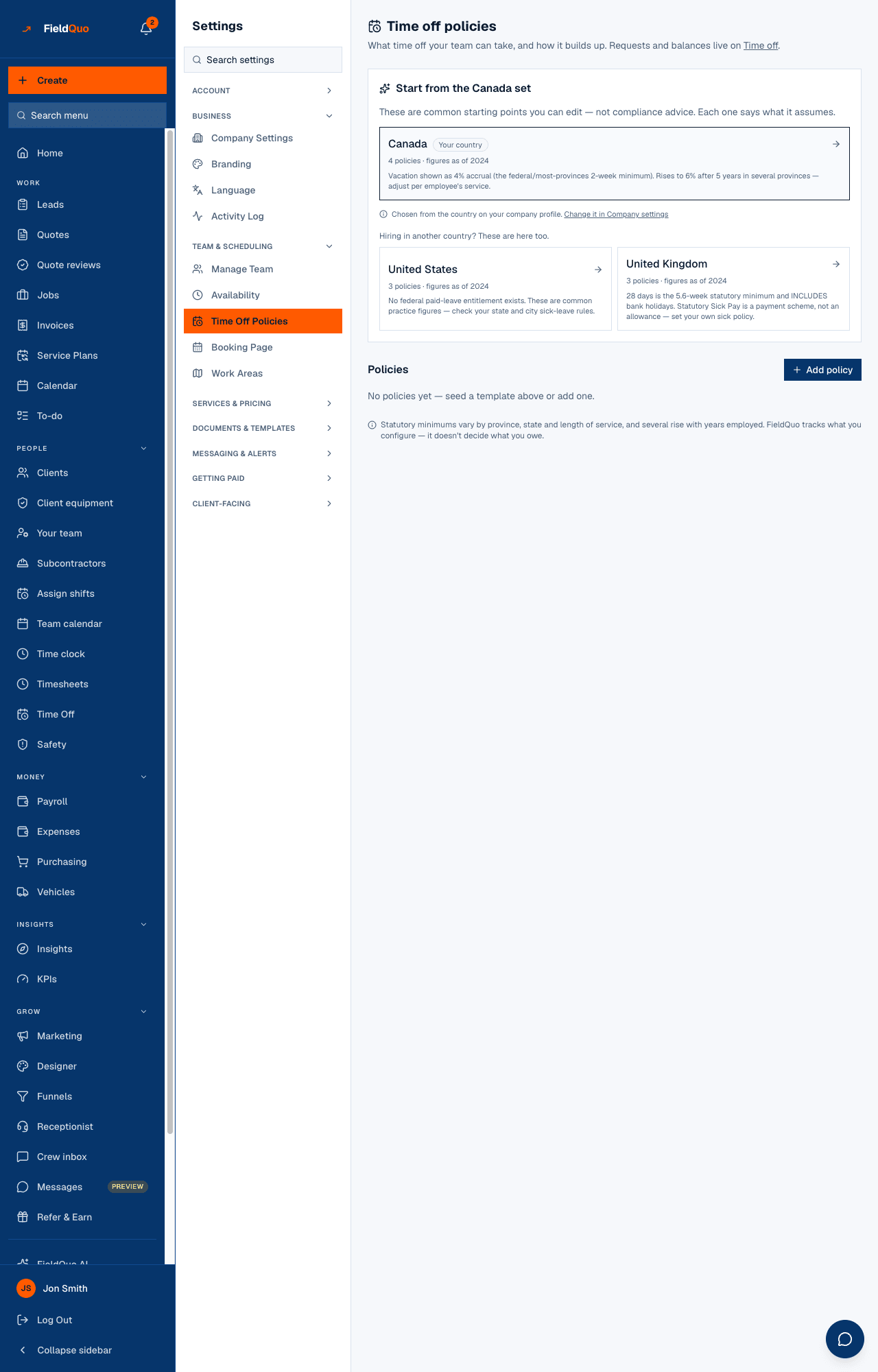
The heading reads Time off policies — What time off your team can take, and how it builds up. Requests and balances live on Time off. A note at the foot says what FieldQuo is and is not: Statutory minimums vary by province, state and length of service … FieldQuo tracks what you configure — it doesn't decide what you owe.
What is on the screen
Top to bottom:
- Start from the Canada set (or your own country's) — shown only while you have no active policy. The card leads with the set for the country on your company profile, badged Your country, and lists the others under Hiring in another country? These are here too. Starter sets exist for Canada, the United States and the United Kingdom, each saying what it assumes and the year its figures are from.
- Policies with Add policy — each active policy as a card: name, Fixed days per year / Accrues each pay period / Vacation pay (% of gross), the entitlement, carryover and its cap, an unpaid or auto-approved badge, Edit and a remove icon.
- Retired — policies removed after being used, listed as not bookable with their count of past requests.
- Year end — shown once a policy exists: Carry … balances into … for last year into this one.
How to add a policy
- Open Settings → Time Off Policies.
- To start from a set, press your country's card. FieldQuo adds its policies and tells you how many, skipping any that already exist by name.
- To write your own, press Add policy. Give it a Name and a Kind — Vacation, Sick, Personal, Unpaid, Other.
- Choose How it builds up: Fixed days per year (the whole allowance available now), Accrues each pay period (earned gradually, so lower in January) or Vacation pay (% of gross) (money, not days — the Canadian 4% model). Enter Days per year or Percent of gross.
- Set the Carryover cap (days) — Blank means unlimited. 0 means use it or lose it. — and tick Paid and Needs a manager's approval as they apply.
- Press Add policy (or Save changes on an existing one). Balances are accrued for every worker straight away.
Removing a policy that has ever been used does not delete it: it is retired, keeps its history, and can no longer be booked. A policy never used is removed entirely. The confirmation dialog says which will happen.
What each field changes
| Field | What it does |
|---|---|
| Kind | How the request is labelled and grouped on Time off. It does not change the maths. |
| Fixed days per year | The full Days per year is available from the start of the year. |
| Accrues each pay period | The same Days per year, earned a slice at a time on the payroll cadence — a request in January can be refused for insufficient balance. |
| Vacation pay (% of gross) | Accrues money on each payroll run instead of days; time off under it is not limited by a day balance. |
| Carryover cap (days) | How many unused days survive the year-end carry. Blank is unlimited; 0 wipes them. |
| Paid | Unticked, the policy holds no day balance — unpaid leave is always allowed and simply recorded — and the days are not paid through payroll. |
| Needs a manager's approval | Ticked, a request waits as pending for a manager. Unticked, it is approved the moment it is made and the log says auto-approved. |
Year end
Balances do not roll over on their own. When you consider last year closed, press Carry … balances into …: unused days move into the new year, capped by each policy's carryover limit, and the page reports how many balances it touched — or Nothing was eligible to carry over.
Run it once, after the last request of the old year is approved. Running it again finds nothing eligible and changes nothing.
Who can see it
The owner and administrators only. The row is not drawn for anyone else, and the route answers Only an owner or admin can manage leave policies. to every other member. A person's own requests and balances are on their Time off screen, which is untouched by this rule — see Time off policies under Team and access for the request side.
Mga madalas itanong
Does seeding the Canada set make me compliant?
No. The sets are common starting points with the year their figures are from, not compliance advice. Minimums rise with years of service in several provinces; adjust per person.
What is the difference between Fixed days and Accrues each pay period?
The same annual number, available all at once or earned gradually. With accrual, someone asking for two weeks in January may not have earned them yet.
A policy I removed still shows under Retired. Why?
It had requests against it. FieldQuo keeps the history and stops new bookings rather than deleting a record that past requests point at.
Nakatulong ba ito?