

The bio link page
The one page behind the single link Instagram and TikTok allow: your logo, a heading, your handles, and a button for everything you offer — with a small Made by FieldQuo line in the footer.
Поки що ця стаття доступна англійською, французькою та іспанською. Ви читаєте англійську версію. Français · Español
Your bio link is a short address — fieldquo.com/l/yourcompany — that opens one page listing everywhere you can send a visitor: get a price, book a visit, your website, call, email, leave a review. It is built for a phone screen and it follows the phone's light or dark setting.
Everything above the footer is yours: logo, colour, wording, order. The footer carries a muted Made by FieldQuo link beside the copyright line — the owner's decision, because a link menu is not a document the client reads as coming from you, and every menu of this kind carries its maker's name.
Overview
The page is off until you switch Page is live on under Settings → Bio link; until then the address shows a not-found page. It is deliberately not indexed by search engines — a search result showing fieldquo.com under your name would tell a homeowner which software you use, and the page's traffic comes from a bio, not from a search.
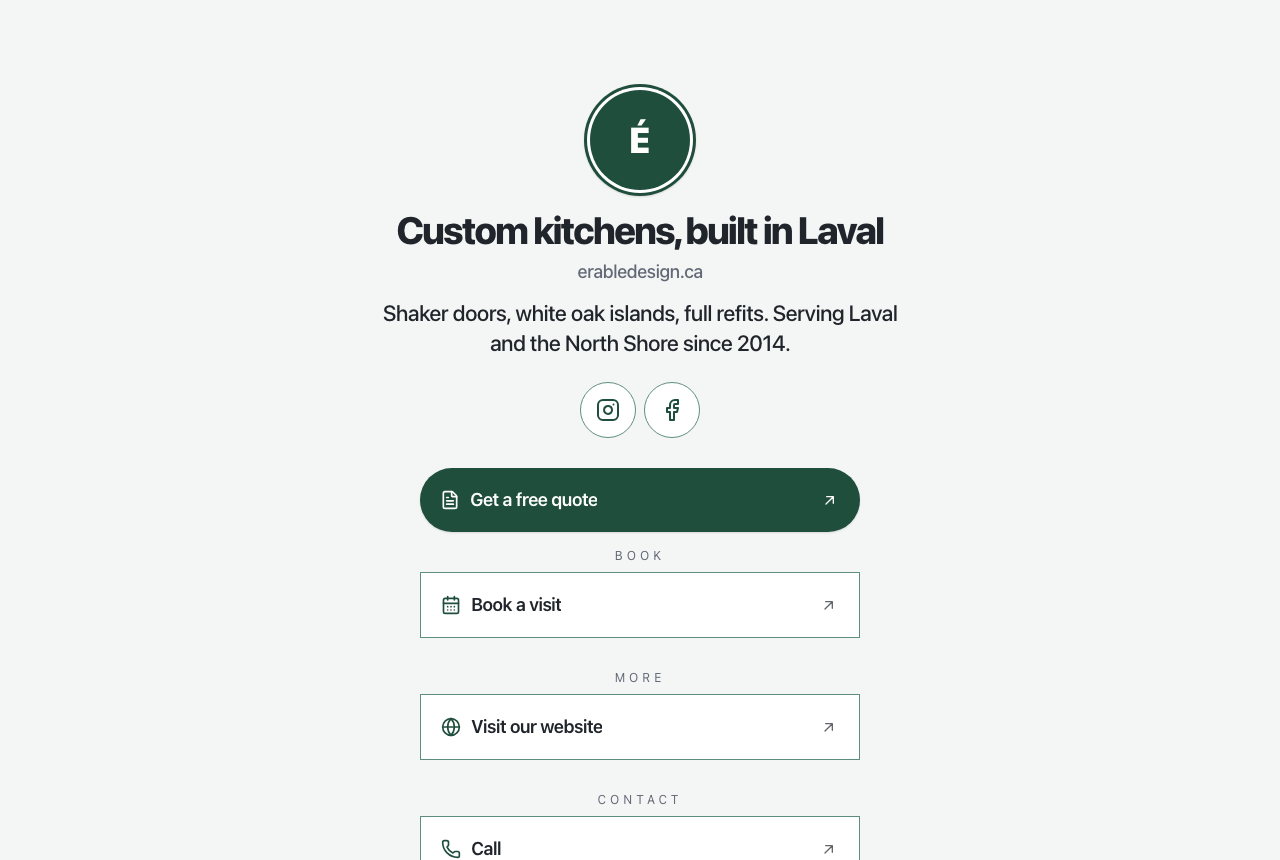
What is on the page
- Your logo, or your initial on your brand colour.
- The Heading — your company name unless you wrote one — and, under it, your own website domain as a caption when you entered one in Company Settings. (Your hosted fieldquo.com site is never printed there: that would be the leak the white-label rule exists to prevent.)
- One line under it — the bio, only if you wrote one. FieldQuo does not invent one.
- Follow us — a row of circular icons for the handles you entered: Instagram, Facebook, TikTok, YouTube, LinkedIn, X.
- The buttons, in your order, grouped under Get a price, Book, More and Contact, each opening in a new tab.
What you control
- Open Settings → Bio link. Your link sits at the top with Copy and Open — “Paste this into your Instagram or TikTok bio.”
- Write a Heading and One line under it, and fill in the Follow us handles you have.
- Under What's on the page, switch rows on or off with Show on the page, rename their button text, and reorder them by dragging or with Move up / Move down. Add your own with Add your own link.
- Check the phone-frame Preview in light and dark, switch Page is live on, and press Save — nothing is published until you do.
The page is written in your company's language. There is no language switcher on it.
Who can change it
The page is public once live. Settings → Bio link needs the Manager level or above — an owner, an administrator, a Manager or a Dispatcher.
Часті запитання
Can I remove Made by FieldQuo from the footer?
No. It is the one line on the page that is not yours, held to the same muted contrast as the copyright line. Everything above it is.
Why is there no Book a visit button?
You have no active event type. Create one on Settings → Booking Page and the row appears, switched on.
Does the page show my fieldquo.com website address?
Only as a Visit our website button, and only when you have not entered your own domain. The caption under the heading never prints a fieldquo.com address.
Чи була ця стаття корисною?