

Language
Two settings that look alike and mean different things: the language you read FieldQuo in, and the company default that teammates and clients inherit when they have chosen none.
Dieser Artikel ist vorerst auf Englisch, Französisch und Spanisch verfügbar. Sie lesen die englische Fassung. Français · Español
Language is one of the four Settings rows every member sees, Crew included, because half of it is personal: Your language is what *you* read the app in, and changing it touches nobody else. The other half, Company default, is what everyone who has not chosen inherits — and what a client's documents use when the client has no language of their own.
FieldQuo ships eight languages: English, Français, Español, Українська, ਪੰਜਾਬੀ, Tagalog, Deutsch and Italiano. Client documents and emails exist in all eight; the back-office interface is complete in some and partly English in others, and the page says which is which.
Overview
The subtitle reads What language your clients' quotes, invoices and emails go out in. — a reminder that the company default is the one that reaches clients. A document keeps the language it was created in: changing either setting never rewrites a quote that has already gone out.
What is on the screen
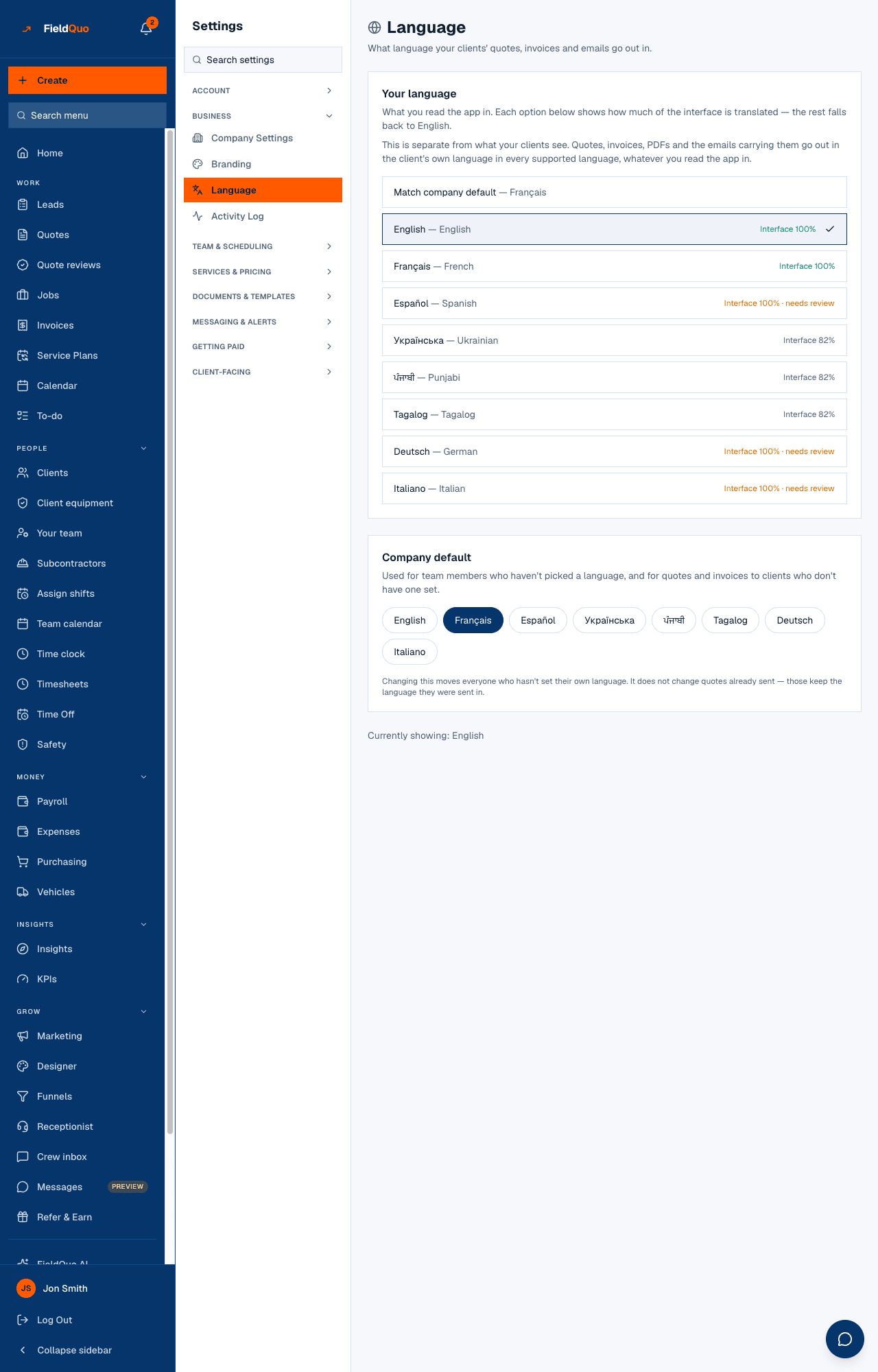
Two cards and a status line:
- Your language — a Match company default — … row naming the current default, then one row per language showing its native name and a coverage badge: Interface 100%, Interface 100% · needs review (complete but not yet checked by a fluent reviewer), Interface 84% (the rest falls back to English) or Interface in English. A tick marks your choice.
- Company default — a pill per language for people who may change it; for everyone else, the current default as text with a notice naming who can change it.
- Currently showing: — the language the app is using right now: your choice, or the company default when you match it.
How to change your language
- Open Settings → Language.
- Press the language you want under Your language, or Match company default to inherit.
- The app switches immediately — no reload, no separate save. A green Saved confirms it.
Every button on this card writes only your own preference. Nobody else's screen changes.
What the company default changes
Pressing a pill under Company default moves every teammate who has not set their own language, and becomes the fallback for clients. For anything FieldQuo sends a client, the language is chosen in this order, stopping at the first answer:
- The document's own language — a quote or invoice is fixed at creation and its covering email matches it.
- The client's saved language — for anything not tied to a document: a booking confirmation, a payment reminder.
- The company default — this setting.
- English — when nothing above is set.
Changing this moves everyone who hasn't set their own language. It does not change quotes already sent — those keep the language they were sent in. A signed PDF must keep saying what it said.
Who can see it
Everyone sees the row and can change Your language. Company default needs the user-management capability — the owner, administrators, Managers and Dispatchers; anyone else sees the value as text. The same rule is checked on the server, so a pill that is not drawn cannot be pressed by other means.
Häufige Fragen
My language shows Interface 84%. What does the other 16% look like?
Those labels appear in English. Everything a client receives is still fully in that language — the percentage is about your own screens only.
Can a client choose their language?
You set it on the client's record. FieldQuo does not ask the client; it uses the client's saved language, then the company default, then English.
Will changing the company default translate an old quote?
No. A document keeps the language it was created in, and nothing is machine-translated at send time.
War das hilfreich?