

Only in FieldQuo
The phone receptionist
An AI receptionist on a local number: what it does on a call, how to set it up in seven cards, what each control changes, what a minute costs, and what nobody else's pricing page lists.
The phone receptionist answers the calls you cannot, takes the caller's details, books a visit against your real availability, and leaves you the recording, the transcript and — where the caller said enough — a draft quote. It speaks your company's language (English, French or Spanish) and switches to the caller's if they speak another. It never gives a price, never promises a time it has not checked, and never claims to be a person.
This article is the Settings → Phone receptionist screen: the number, the credit, the words, the switch, and the end-to-end check. What it did with each call is the Receptionist screen in the main sidebar — see The receptionist's call log.
Overview
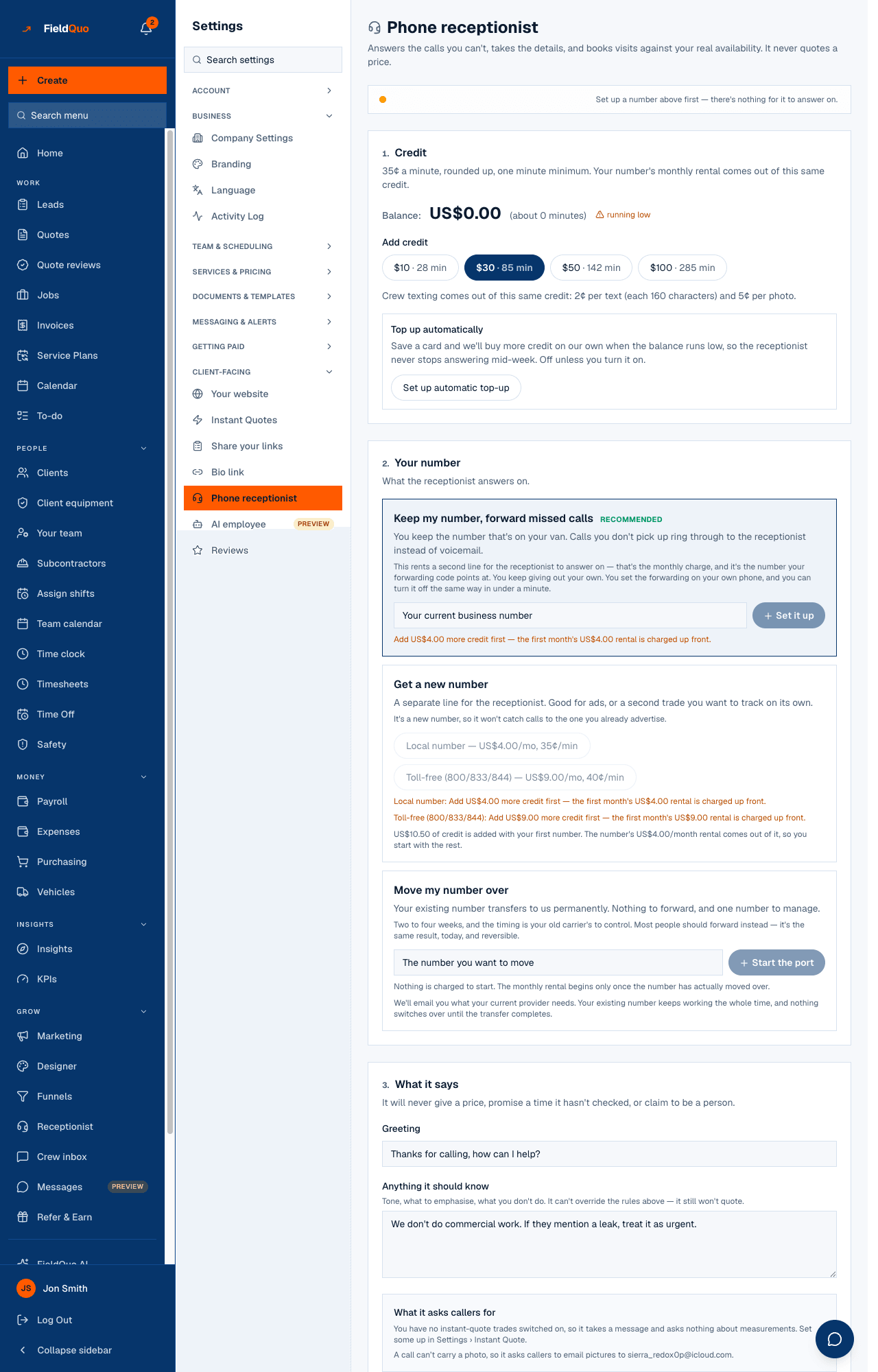
The screen is titled Phone receptionist — “Answers the calls you can't, takes the details, and books visits against your real availability. It never quotes a price.” It is laid out in the order of the decisions: credit, then a number, then what it says, then the switch. A new company sees the cards numbered 1 to 7; once the setup is done the numbers disappear and the same cards remain.
On a call, the receptionist reads your opening hours, your switched-on services and your service areas from your settings, plus the note you write for it. To book, it offers real free slots from your booking availability; if your visits carry a fee, or your line is set to callbacks, it says so and takes preferred times or reads out the booking link instead — it cannot text the link.
Everything the receptionist can spend is priced by the server and printed on this screen before you commit. The browser never sends an amount.
What is on the screen
- Credit — the balance, “35¢ a minute, rounded up, one minute minimum”, Add credit, the statement of where the credit went, and the Top up automatically card with a saved card and a threshold.
- Your number — three ways to get one: Keep my number, forward missed calls (recommended, two minutes), Get a new number, or Move my number over (two to four weeks, your old carrier's timing). A bought number shows Forwards to and a Release link.
- What it says — the Greeting, the knowledge note with Answer these in your own words and Draft this from my company profile, the Voice with Hear … previews, and How it sounds tuning.
- Answer my calls — the one switch: Start answering calls / It's answering — turn off. It refuses to turn on without a number and credit for at least one minute.
- Call clients back automatically — the outbound half: Turn on quote callbacks, then Which quotes get a call. Covered in Quote callbacks.
- Let the crew text in photos and updates — a link to the crew inbox, which uses a separate texting line. Covered in The crew inbox.
- Check it end to end — asks the phone service itself about every link between somebody dialling and a lead landing in FieldQuo.
How to set it up
- Open Settings → Phone receptionist. Under Credit, press Add credit if the balance is empty — your first number comes with 30 free minutes of credit, and the number's first month of rental is taken out of it.
- Under Your number, pick Keep my number, forward missed calls unless you have a reason not to. FieldQuo rents a line for the receptionist to answer on and shows you the forwarding code to dial from your own phone; your clients keep dialling the number on the van, and calls you do not pick up ring through to the receptionist instead of voicemail.
- Under What it says, write the Greeting (the placeholder is “Thanks for calling, how can I help?”), then press Draft this from my company profile — it reads your profile and lists the questions it cannot answer on its own (what you turn down, what counts as urgent, what to say when you are shut). Type over each bracket; a line left in brackets is skipped.
- Pick a Voice and listen to it with Hear …. Leave How it sounds on its defaults unless callers keep getting cut off.
- Press Start answering calls. The status bar at the top shows your number with a green dot, and the switch now reads It's answering — turn off.
- Press Check it end to end and then ring your own number. Every link should read as a pass; a call can be answered perfectly and still never reach FieldQuo, and this is the card that says so.
What each control changes
| Control | What it changes |
|---|---|
| Keep my number, forward missed calls | Rents a second line the receptionist answers on. Your own number is untouched; you set conditional forwarding on your phone with the code shown, and you can turn it off the same way — dial ##002# — in under a minute. |
| Get a new number / Choose the number yourself | Buys a separate line in an area code you pick. Good for ads or a second trade; it will not catch calls to the number you already advertise. Picking one buys it straight away and the first month comes out of your credit. |
| Move my number over | Starts a port. Nothing is charged to start and your number keeps working with your old carrier until the transfer completes; the receptionist cannot answer on it until then. |
| Greeting and the knowledge note | The first thing every caller hears, and the facts the receptionist may use beyond your settings. Opening hours, services and areas are read from your settings on every call and belong there, not in the note. |
| Voice and How it sounds | Which voice speaks, and four tuning choices: what it does if a caller talks over it, where your callers usually ring from, how quickly it answers, how it comes across. |
| Answer my calls | Whether the number is answered at all. Turning it off stops answering at once — if the number is on your van, forward it somewhere first, because a caller may hear a busy tone rather than ringing. |
| Top up automatically | Off unless you turn it on. Saves a card and, when the balance drops below the threshold, charges the amount shown and adds the credit — at most a set number of times a day. It switches itself off and tells you if the card is declined. |
| Release … | Gives a bought number back for good. It is deleted at the phone company and cannot be recovered; the monthly rental stops and the rest of the paid month is not refunded. |
What it costs
The receptionist runs on prepaid credit, in US dollars, and every charge is on the statement under Credit. Calls are metered per minute; numbers are rented per month; both come out of the same balance, and so does the crew texting line.
- 35¢ a minute, rounded up, one minute minimum — inbound and outbound alike. A toll-free number adds 5¢ a minute.
- $4 a month for a local number, $9 a month for a toll-free one (800/833/844). The first month is charged when the number is bought.
- 30 free minutes of credit with your first number, so the receptionist can start answering before you top up.
When the credit runs low the screen says so, and when it runs out the receptionist stops answering — which is what Top up automatically exists to prevent.
What is different here
Other field-service tools sell an AI receptionist too, so the answering itself is not the difference. On the pricing pages FieldQuo compares itself with — Jobber, Housecall Pro, QuoteIQ, ServiceTitan and Projul — two things the receptionist does here are not listed at any tier:
- A call that comes back as a draft quote. What the caller described is read off the transcript and, when it is enough for your instant-quote form, priced through your own settings and put in your review queue — never a figure invented on the call.
- The assistant ringing your clients back — after a quote goes out, the day before a visit, and on a new enquiry — within calling hours and only where the client asked to be contacted.
And it is priced by the minute against credit you can see, with the cost of every call printed beside the call, rather than as a flat monthly add-on.
Who can see it
The owner, administrators and anyone at the Dispatcher or Manager level can open Settings → Phone receptionist and change it — buying a number and topping up spend the company's money. Crew and Estimator logins do not see the row. The call log has its own rule: see The receptionist's call log.
Frequently asked questions
Does it answer in French or Spanish?
It holds the whole call in your company's language — English, French or Spanish — and switches to the caller's language if they speak another. Companies set to any other language get an English-speaking receptionist for now.
Will it quote a price on the phone?
Never. It will read back a booking fee you have published on your booking page, because that is your own figure, but it never prices the work. A draft quote lands in your review queue for a person to approve.
I called my own number and nothing appeared in FieldQuo.
Run Check it end to end on the settings screen — it asks the phone service about every link, and names the one that is broken. On the Receptionist screen, Recover missed calls pulls back any call of the last week that never reached us.
Was this helpful?