

Overhead
Everything the business costs to run in a month — fixed costs, salaries, debt, assets — and the minimum price a job must fetch to cover it.
Settings → Services & pricing → Overhead is where you write down what your company costs whether or not you win a job: the rent, the insurance, your own draw, the truck loan, the spray rig you will one day replace. Divided by how many jobs you can take on, that becomes the lowest price a job can go out at and still cover the business.
That number — Minimum price — is the one a contractor most wants and least often has. It is also fed into the Cost & Margin panel of every quote as real overhead per job, replacing a guessed percentage.
What is on the screen
Top to bottom: Your minimum price (two inputs and four tiles), Paid hours that never reached a job, then five registers — Fixed costs, Salaries, Debt, Assets & depreciation and Bills due.
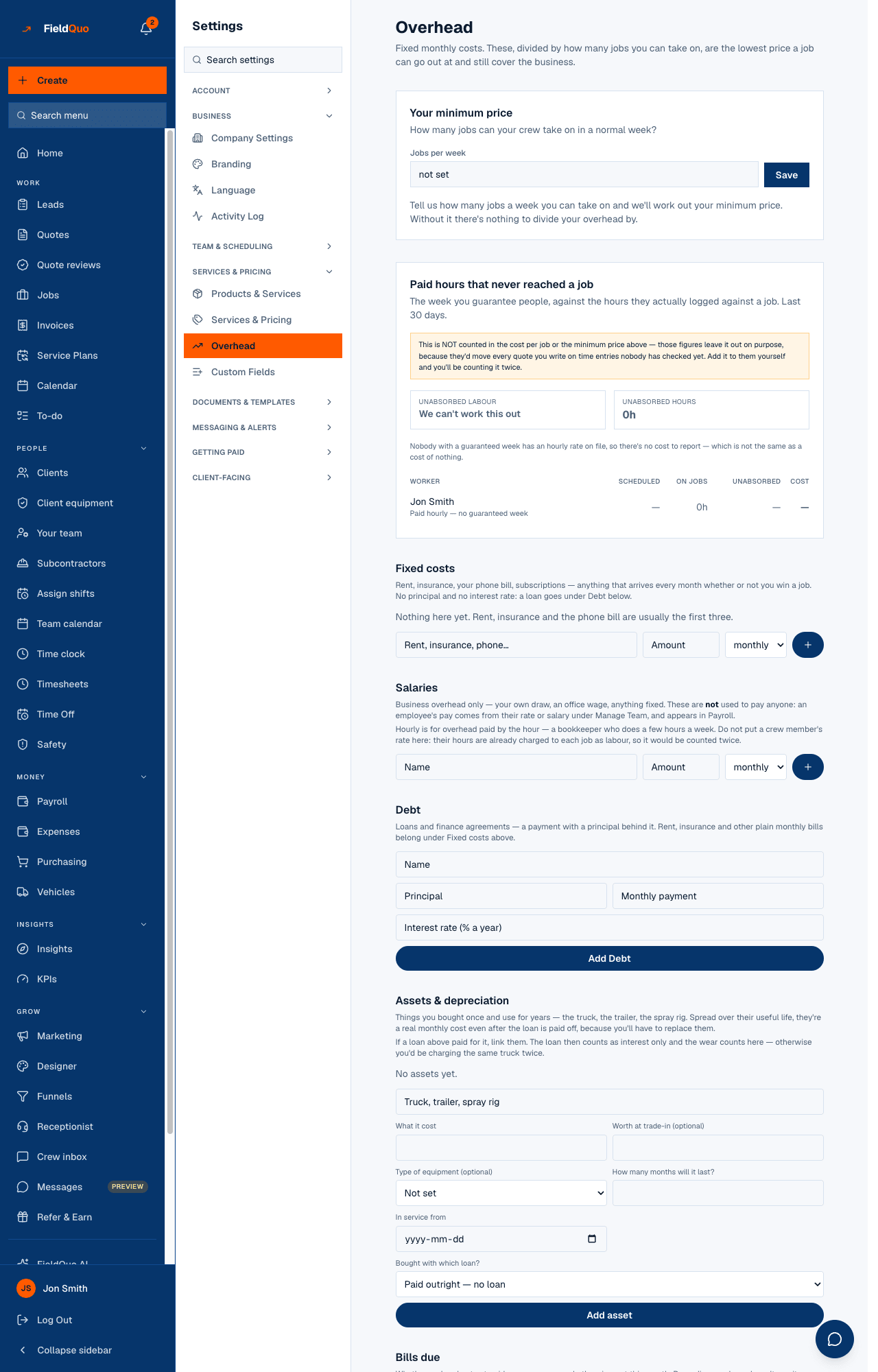
Your minimum price
- Enter Jobs per week — how many jobs your crew can take on in a normal week — and, if you want, Target margin % (blank means the default of 20).
- Press Save. The four tiles fill in: Monthly fixed costs, Jobs / month, Cost per job and Minimum price.
- Read the note under them: it says which registers the total includes, and adds the depreciation on your assets and the interest on your loans.
Jobs per month is jobs per week × 4.33; cost per job is the monthly total divided by that; the minimum price is cost per job divided by (1 − margin). The minimum covers overhead only — the materials and labour of the specific job are on top. Bills due do not change it: they are cash flow, not cost.
What goes in each register
| Register | What belongs there | What it changes |
|---|---|---|
| Fixed costs | Rent, insurance, the phone bill, subscriptions — an amount, weekly, monthly or yearly. | Counted in the monthly total. A one-off is saved but not counted; the row says so. |
| Salaries | Business overhead only: your own draw, an office wage, a bookkeeper by the hour. Not a crew member's rate — their hours are already charged to each job. | Counted in the total. These are never used to pay anyone; pay comes from Manage Team and Payroll. |
| Debt | Loans and finance agreements: principal, monthly payment, interest rate. | Counted in the total. Linked to an asset, only the interest counts, so the truck is not charged twice. |
| Assets & depreciation | Things bought once and used for years, with what they cost, trade-in value, useful life and in-service date. | Their monthly depreciation is added to the total. Sold or retired ones stop charging; use the dispose action rather than delete to keep the history. |
| Bills due | What is owed and not yet paid, with a due date, and Mark paid. | Outstanding, out this month and overdue. Nothing here touches the minimum price. |
Deleting a row asks first, because the price floor changes straight away and there is no undo. For an asset the confirmation suggests marking it disposed instead, which keeps what it already cost you.
Paid hours that never reached a job
This panel compares the week you guarantee people with the hours they actually logged against a job, over the last 30 days, and costs the gap at their hourly rate. It is deliberately not counted in the cost per job or the minimum price — those would move every quote you write on time entries nobody has checked yet. When a rate is missing it says the total is short rather than counting those hours as free.
Who can see it
The whole screen is the company's cost basis, so it needs the jobCosting toggle on top of user:manage: owners, admins and the Manager level see it; a Dispatcher does not. Salaries additionally need the payroll grid that lets you see everyone's pay, and Bills due needs company-wide expenses access. The floor it produces is explained in Overhead and your minimum price and The break-even price.
Frequently asked questions
Why is my minimum price “not set”?
Jobs per week is empty. The floor needs a capacity to divide by; enter one and press Save.
Should I put my painters' wages under Salaries?
No. Their hours are charged to each job as labour. Salaries is for overhead pay only — your draw, the office, a bookkeeper.
Does recording a bill here pay it?
No. Pay it your usual way, then press Mark paid.
Was this helpful?