

Expense tracking and your burn rate
The Expense Tracking screen: the month's four cards, what monthly burn rate is built from, why Runway shows a dash, the AI Summary, the breakdowns and the trend, how to add an expense and what each field changes, and who can see the company roll-up.
Dieser Artikel ist vorerst auf Englisch, Französisch und Spanisch verfügbar. Sie lesen die englische Fassung. Français · Español
Expense Tracking is “Where your money goes — by job, overhead, and category — plus your monthly burn rate.” It is the same screen whether you open Expenses under Money in the sidebar or Expense Tracking under Getting paid in Settings: one month at a time, four cards across the top, then the breakdowns, the six-month trend and the recent receipts.
This article is that screen and the Add Expense form. The bank-statement importer has its own article, Import expenses from a bank CSV. There is no export of expenses; for what an accountant can have, see What to hand your accountant.
Overview
An expense in FieldQuo is one dated amount with a category, optionally tied to a job, flagged as overhead, marked recurring, or attached to a vehicle. Those four choices decide where it shows up: on the job's costing and in estimate accuracy, in the burn rate, on the vehicle's running cost, or simply in the month's total. The screen is a month's worth of those rows, added up in the ways a contractor asks about them.
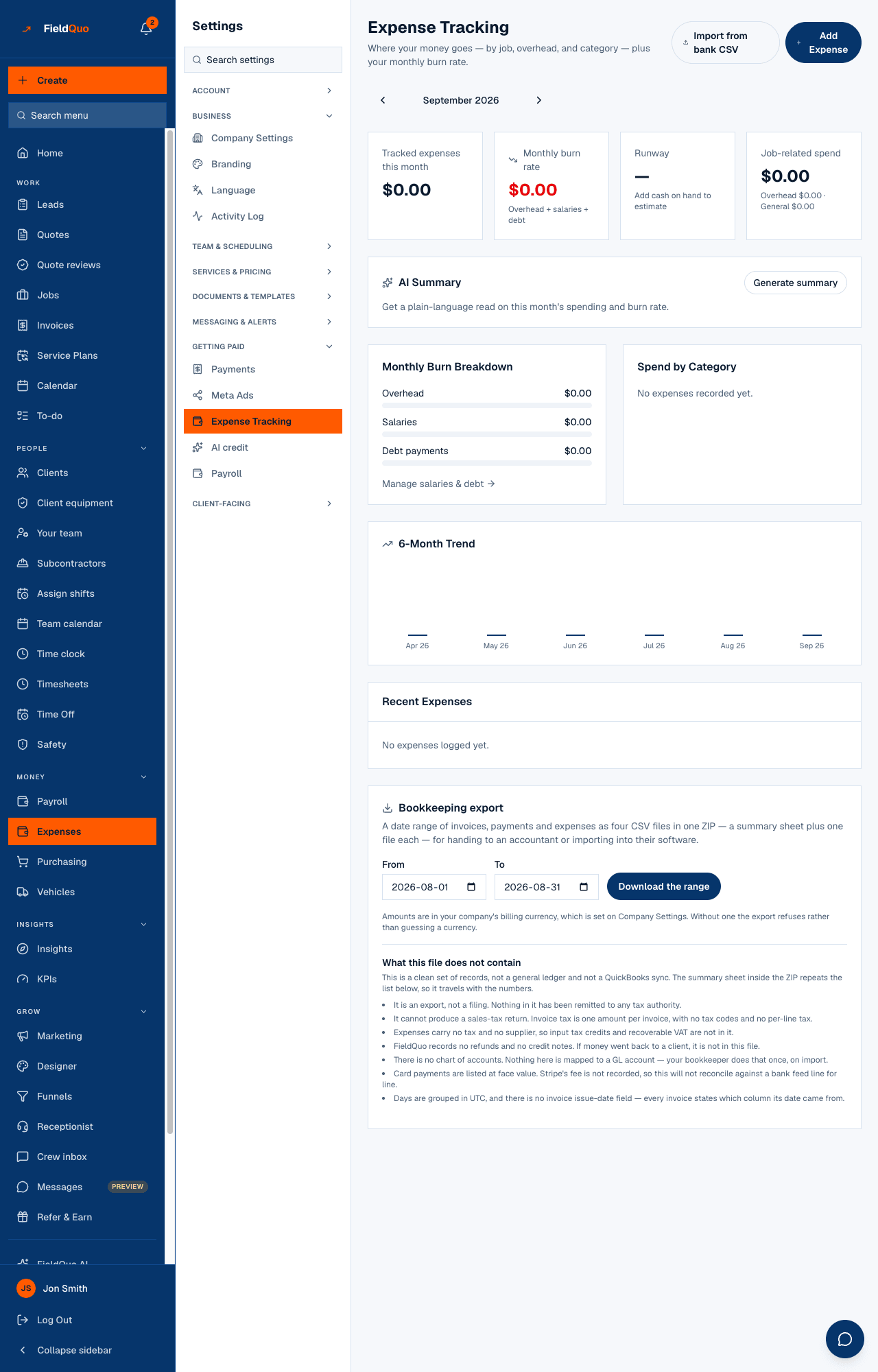
What is on the screen
- Receipts, Scan receipt, Import from bank CSV and Add Expense at the top right, and a month stepper (Previous month / Next month).
- Tracked expenses this month — every expense dated in the month, whatever its category or association.
- Monthly burn rate — “Overhead + salaries + debt”: what the business costs to run for a month, from the registers on Settings → Overhead. It does not change with the month you are viewing.
- Runway — months of cash at that burn rate. It reads — with Add cash on hand to estimate: today there is nowhere in FieldQuo to enter cash on hand, so the card stays a dash. FieldQuo holds no bank balance and no bank feed.
- Job-related spend — expenses tied to a job this month, with Overhead {amount} · General {amount} under it for the other two kinds.
- AI Summary — a button, Generate summary, that writes a plain-language paragraph about the month's spending in your language. See below.
- Monthly Burn Breakdown — Overhead, Salaries, Debt payments as bars, and Manage salaries & debt to the Overhead page.
- Spend by Category — this month's categories, largest first, with each one's share.
- 6-Month Trend — a bar per month, this month last.
- Recent Expenses — the twenty newest rows across all months, each tagged Overhead or Job-linked, with a delete icon.
How to add an expense
- Press Add Expense.
- Pick a Category — Materials, Fuel & Vehicle, Tools & Equipment, Insurance, Rent & Utilities, Software & Subscriptions, Marketing, Permits & Licensing, Office Supplies, Meals & Travel, or Other with a Custom category name. Categories are free text underneath; anything already in your data shows in the breakdown even if it is not on the list.
- Enter the Amount and the Date.
- Choose Associate with: General, A job (then Select a job…), or Overhead.
- Tick Recurring (feeds burn rate below) if it is a standing cost, and pick Weekly, Monthly or Yearly.
- Optionally pick a Vehicle and add Notes, then press Add Expense.
What each control changes
| Control | What it changes |
|---|---|
| Associate with → A job | The amount lands on that job's costing and in Estimate accuracy's materials comparison, and is counted in Job-related spend. Job costing reads expense rows only — a purchase ticked off the job's buy-list and never entered here is invisible to it. |
| Associate with → Overhead | The row is tagged Overhead, counted in the Overhead figure under Job-related spend, and, when also recurring, feeds the burn rate. |
| Recurring + frequency | The row is treated as a standing monthly cost: weekly × 4.33, yearly ÷ 12. It appears in the burn rate, in cost per job on Settings → Overhead, and in the Fixed costs register there — they are the same rows. It is still dated once, so the statements and the month's total count it in one month only. |
| Vehicle | The amount is charged to that vehicle's running cost on Vehicles. |
| Delete (the bin icon) | Removes the row at once, with no confirmation, and every figure built from it changes straight away. |
The burn rate and the AI Summary
The burn rate is cash: recurring overhead expenses at their monthly equivalent, plus the Salaries rows on Settings → Overhead (an hourly overhead wage needs hours per week or it contributes nothing), plus every active loan's full Monthly payment. Depreciation is not in it, because it moves no money. The cost figure the minimum price uses is different — see Overhead and your minimum price.
Generate summary sends the month's figures — the total, the category and association breakdowns, the burn rate and its parts, the runway, the six-month trend — to FieldQuo AI with the instruction to use only those numbers, and prints three or four sentences in your language. Under them, flags the code raised on its own: runway under three months (never, while cash on hand cannot be entered), one category at 40% or more of the month, or a month 15% or more above or below the one before. It is written on demand, not stored, and it is cleared when you change month.
The button counts against the company's monthly FieldQuo AI allowance and is refused, with the allowance message, once that is used up. Only owners, administrators and Managers can press it.
Who can see it
The roll-up — the cards, the breakdowns, the trend — needs company-wide Expenses access (“everyone's”): Manager, administrators and the owner. The Expenses row and the Settings row are both hidden from anyone below that. Crew, Estimator and Dispatcher can still record their own expenses on their own screens and see only their own rows; they are not shown this page.
Häufige Fragen
How do I fill in Runway?
You cannot today. The card asks for cash on hand and no screen in FieldQuo accepts it, so Runway stays a dash. Monthly burn rate is the number that is real.
I added rent as a normal expense. Why is the burn rate still $0?
Only rows marked Recurring with a frequency, and flagged Overhead, feed the burn rate. Add rent once as Recurring / Monthly / Overhead — or under Fixed costs on Settings → Overhead, which writes the same row.
Why does the burn rate not change when I step to another month?
It is built from the standing registers, not from that month's receipts. Tracked expenses this month and the breakdowns follow the month; the burn rate is what the business costs every month.
Is the AI summary saved anywhere?
No. It is generated when you press the button and shown on the page; the monthly digest is the write-up that is stored and emailed.
War das hilfreich?