

Create an invoice
Three ways an invoice comes into being — automatically when a quote is approved, by hand from an approved quote, or standalone from New Invoice — and what the New Invoice screen asks for.
Most invoices in FieldQuo are never typed. When a client approves a quote, the invoice is built from that quote in the same moment, with the same line items, the same tax decision and the same number. New Invoice exists for the rest: the callout nobody quoted, the extra visit, the one-off.
Overview
There is one invoice per job. An approved quote produces exactly one invoice, and a second approval (or a second press of the button) returns the one that already exists rather than making a duplicate the client would dispute. Stage payments — a deposit, a balance on installation — are requested in shares against that one invoice, never as several; see Deposits and payment schedules.
The number follows the quote: Q-2026-0008 bills as INV-2026-0008, so the pair reads at a glance. An invoice raised on its own has no number to borrow and takes the next in the sequence.
From an approved quote
- When the client approves online, nothing to do: the job, the draft invoice and the follow-up task are created for you. Open Quotes, then the quote — a blue line reads Already converted to invoice with the invoice number as a link.
- If the client said yes on the phone instead, open the quote, press Get approved, then They approved it. The same things are set in motion, invoice included, and the Activity Log records “invoice INV-… drafted”.
- An accepted quote that somehow has no invoice — accepted before this existed, or a hiccup on the day — shows Convert to Invoice on the quote page. It builds the same invoice; pressing it twice returns the one that exists.
- The new invoice lands as a Draft. Open it, check it, and send it — see Send an invoice.
The invoice copies the quote's line items (grouped by room or scope, with any add-ons the client ticked), its subtotal, discount, tax, total, photos and language at the moment of approval. Editing the quote afterwards does not change the invoice — a signed document must keep saying what it said.
A standalone invoice
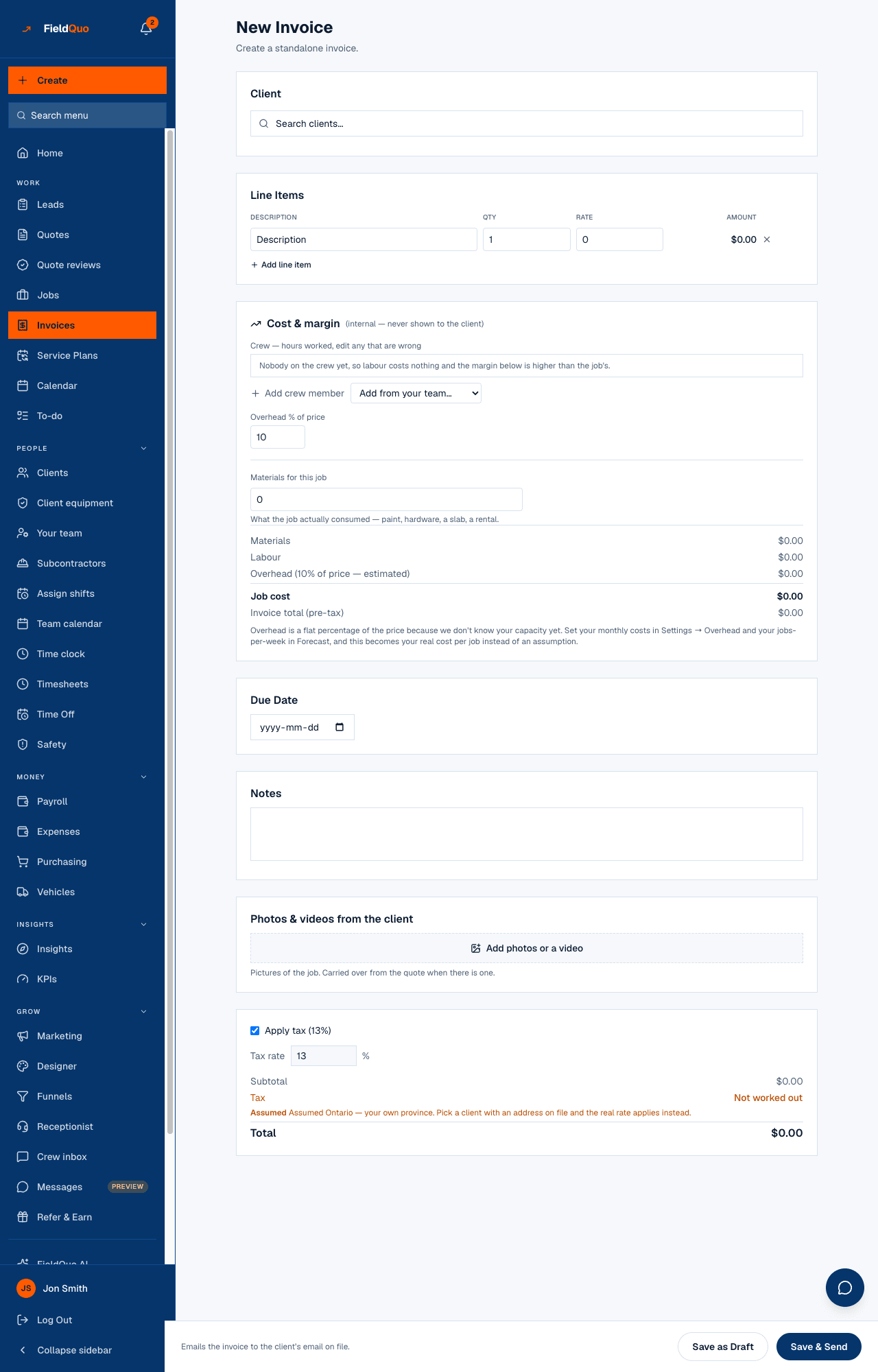
- Press New Invoice on the Invoices list, or Create → Invoice in the sidebar. The heading reads New Invoice — Create a standalone invoice.
- Under Client, type into Search clients... and pick one.
- Under Line Items, fill Description, Qty and Rate; the Amount is computed. Add line item adds a row, the × removes one.
- Set a Due Date. Without one the invoice can never show as overdue and no reminder rule can fire on it.
- Add Notes and, if useful, Photos & videos from the client — carried over automatically when there is a quote.
- Check the Apply tax box and the Tax rate, then press Save as Draft or Save & Send.
What each control changes
- Apply tax on or off is stored as a decision. Off writes “no tax” onto the document; on with a rate charges it. On with nothing worked out prints Not worked out in amber, and the send is refused until you fix the client's address or say there is genuinely no tax.
- Tax rate is seeded from the client's province or state. When the client's record cannot answer, the page assumes your own province and says so in amber — pick a client with an address on file and the real rate applies instead. Typing in the box overrides the guess.
- Cost & margin (internal — never shown to the client) — crew hours, materials and overhead against this invoice. It only renders for people with the Job costing switch, and nothing in it reaches the document. See Job costing.
- Save as Draft creates the invoice and stops. Save & Send creates it, then emails it; if the email fails (no address on file, no plan yet) the invoice is still saved as a draft and the page tells you why.
Who can do it
Creating an invoice needs invoices at View, create & edit and the See prices switch: the Dispatcher and Manager presets, administrators and the owner. Convert to Invoice additionally needs the same level on quotes. An Estimator sees invoices but cannot raise one; Crew never sees them.
Frequently asked questions
The quote is approved but there is no invoice. Why?
Open the quote and look for Convert to Invoice — it only appears on an accepted quote without one, and it builds the invoice on the spot. A past job entered through the import is the one exception: it arrives already invoiced and paid, and nothing is sent about it.
Can I invoice a job in two halves?
Not as two invoices — FieldQuo raises one per job. Set a payment schedule in Company Settings and the deposit and balance are requested in stages against that single invoice.
Where does the invoice number come from?
From the quote it bills, when there is one: Q-2026-0008 becomes INV-2026-0008. A standalone invoice takes the next free number in the year's sequence. A revised invoice keeps its number and gains a version.
Was this helpful?