

Facebook lead forms
What happens when a homeowner fills in the form on one of your Facebook or Instagram ads: which connection reads it, how it becomes a lead, and what each control changes. The full setup is its own guide.
You run an ad — “Get a free painting estimate” — and a homeowner taps it. Meta shows its own form, pre-filled with the name and email on their Facebook account, and they press Submit. The Facebook lead forms card on Settings → Meta Ads is where you tell FieldQuo which of those forms to turn into leads.
This page is the short version: what the card reads, what arrives, and what each control does. The setup, step by step — with the checklist on the card, what every message means and how to send a test lead — is in its own guide.
Which connection reads your leads
Lead forms and leads are read through your Facebook Page connection — the Facebook & Instagram publishing card further down Settings → Meta Ads, connected with Connect Facebook & Instagram and changed with Reconnect or switch Page. They are not read through the Meta ad account at the top of the screen: that connection brings in what you spend, and it cannot see your Page's forms. You do not need the ad account connected to receive leads.
FieldQuo reads one Page: the one connected, and the card names it — Lead forms and leads are read through your Facebook Page connection: …. If your ads run from another Page, switch the connection to that Page.
Meta delivers a submission two ways and FieldQuo listens to both: an instant notice the moment the form is submitted, and a re-read of every switched-on form at twenty past each hour. The two overlap on purpose — an instant notice can be missed — and cannot double-count, because a lead is keyed on Meta's own id.
Setting it up, in short
- Connect your Facebook Page under Facebook & Instagram publishing, allowing every permission Meta asks for.
- In the Facebook lead forms card, press Find my lead forms. It lists the forms on the connected Page.
- Turn the switch to On for each form whose submissions should become leads. A form you have just found starts Off.
- Send a test lead with Meta's Lead Ads Testing Tool and watch Last lead received … appear.
Each step, and what to do when one does not tick, is in Get your Facebook and Instagram lead ads into FieldQuo — the article the card's Step-by-step guide link opens.
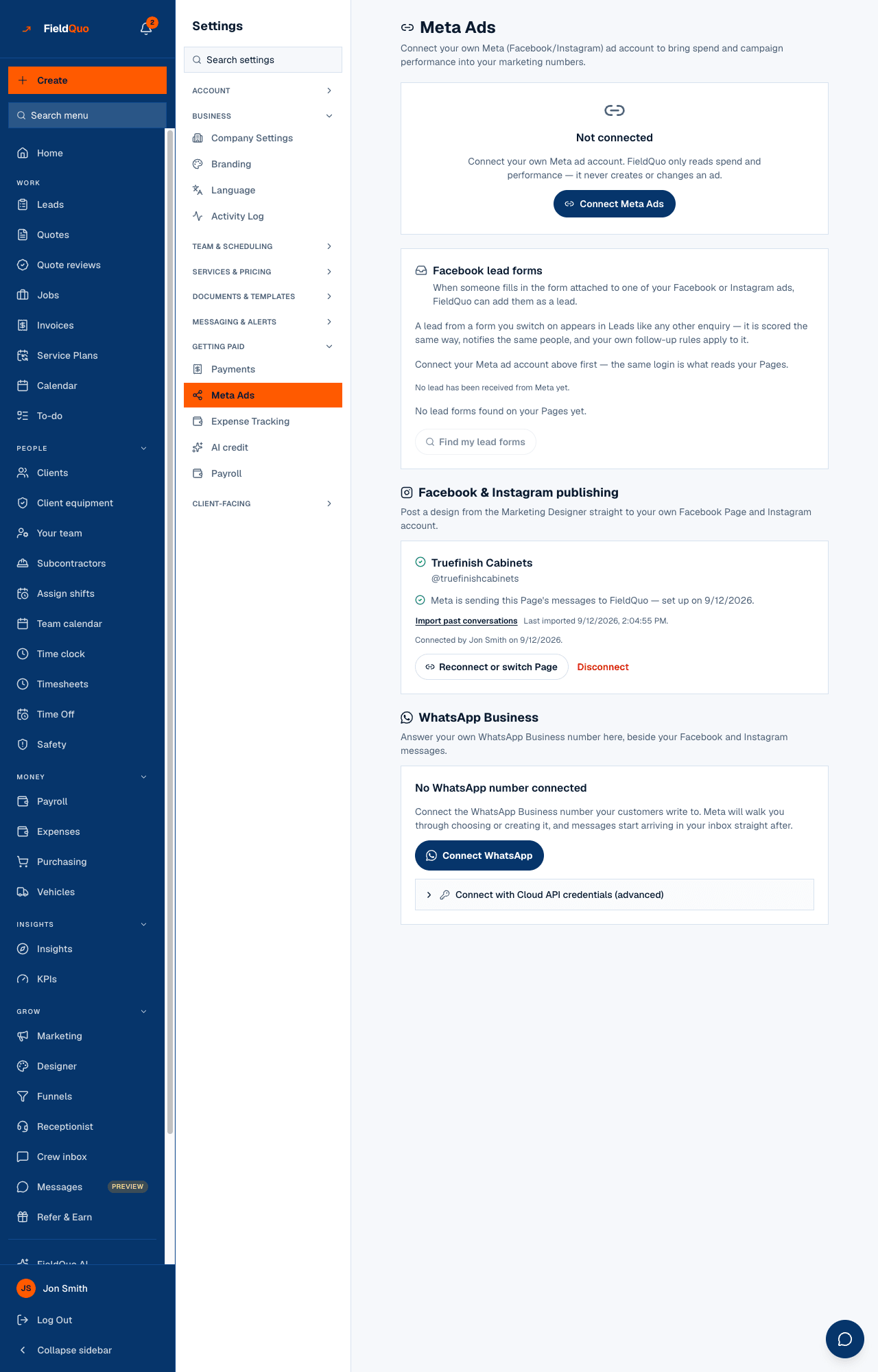
If the card shows an amber notice — Facebook lead forms need Meta's approval of one more permission; nothing is being received yet. — every switch and Find my lead forms are disabled and nothing is arriving. That is Meta's review of FieldQuo, not your setup.
How a lead arrives
Nothing is invented. Meta's standard fields map to the lead's columns; every custom question you wrote on the form is kept word for word under What they told us.
- Name, email and phone come from Meta's standard fields. Address, city, province, country and postal code go with them when the form asked.
- No budget band, no timeline and no language are set, because Meta's form does not ask them unless you wrote those questions yourself — in which case the answers are on the lead in your words, not squeezed into FieldQuo's bands. The panel reads Not stated.
- The lead is scored on what it has — a phone and an email are worth 12 points — and notified to whoever your notification rules name.
- A submission with no name, email or phone at all is skipped rather than put on your board as an unnameable card.
A Facebook lead form does not record consent to be called, because the person saw Meta's wording and your privacy policy, never FieldQuo's. The receptionist will not dial them automatically; a person can.
What each control changes
| Control | What it does |
|---|---|
| On / Off per form | On: the instant notice and the hourly re-read import that form's submissions. Off: nothing is imported from it; leads already on your board stay. |
| Find my lead forms | Reads the connected Page and adds newly created forms to the list, switched Off. It does not import anything by itself, and never switches back on a form you turned off. |
| Reconnect or switch Page | Changes which Page FieldQuo reads, or re-grants a permission Meta held back. Press Find my lead forms afterwards to list that Page's forms. |
| Disconnect under Facebook & Instagram publishing | Ends the Page connection the forms are read through. Switched-on forms stop receiving until you connect a Page again. |
| Disconnect on the Meta ad account | Stops the ad spend sync. Leads keep arriving through the Page connection. |
Cost per lead
A Meta lead carries the id of the ad it came from, and FieldQuo looks up that ad's campaign when Meta allows it — through the ad account when one is connected, otherwise through the Page. When the ad account is also connected, its synced spend carries the same campaign id, so FieldQuo can show cost per lead per campaign for this one path. Every other channel — and a homeowner who saw the ad and phoned — is still blended across everything, because nothing links that spend to that lead. See Connect your Meta ad account and Marketing spend.
Give each ad its own form. One form shared by five campaigns still attributes each lead to the campaign that produced it, but a form per ad makes the list on this card readable at a glance.
Who can see it
Meta Ads is an owner-and-administrator screen: it holds connections to your Page and to an account that spends your money. A Manager, Dispatcher, Estimator or Crew member does not see the row, and the API refuses them.
Frequently asked questions
Do I need the Meta ad account connected?
Not for the leads — they are read through the Facebook Page connection. The ad account adds your ad spend, which is what cost per lead is calculated from.
Find my lead forms found none, but my ad has a form. Why?
The message names the Page it looked at. If that is not the Page your ad runs from, press Reconnect or switch Page, choose the right one, and press Find my lead forms again.
A submission arrived twice on Facebook. Will I get two leads?
No. A lead is keyed on Meta's own id, and both delivery paths check it. The second delivery is recorded as a duplicate and creates nothing.
Can FieldQuo change my ads?
No. FieldQuo never creates or edits an ad. The ad-account connection reads spend and performance; the Page connection reads your lead forms and leads.
Was this helpful?