

Choose your language, and your company's
Your language is what you read the app in; the company default is what teammates and clients inherit. Documents keep the language they were created in.
Per ora questo articolo è disponibile in inglese, francese e spagnolo. Stai leggendo la versione inglese. Français · Español
There are two settings on the Language screen, and they mean different things. Your language is personal — what you read the back office in. Company default is what everyone who has not chosen inherits, and the language a quote or invoice goes out in when the client has none of their own.
Neither touches a document that already exists. A quote keeps the language it was created in, forever — a signed PDF must keep saying what it said.
Overview
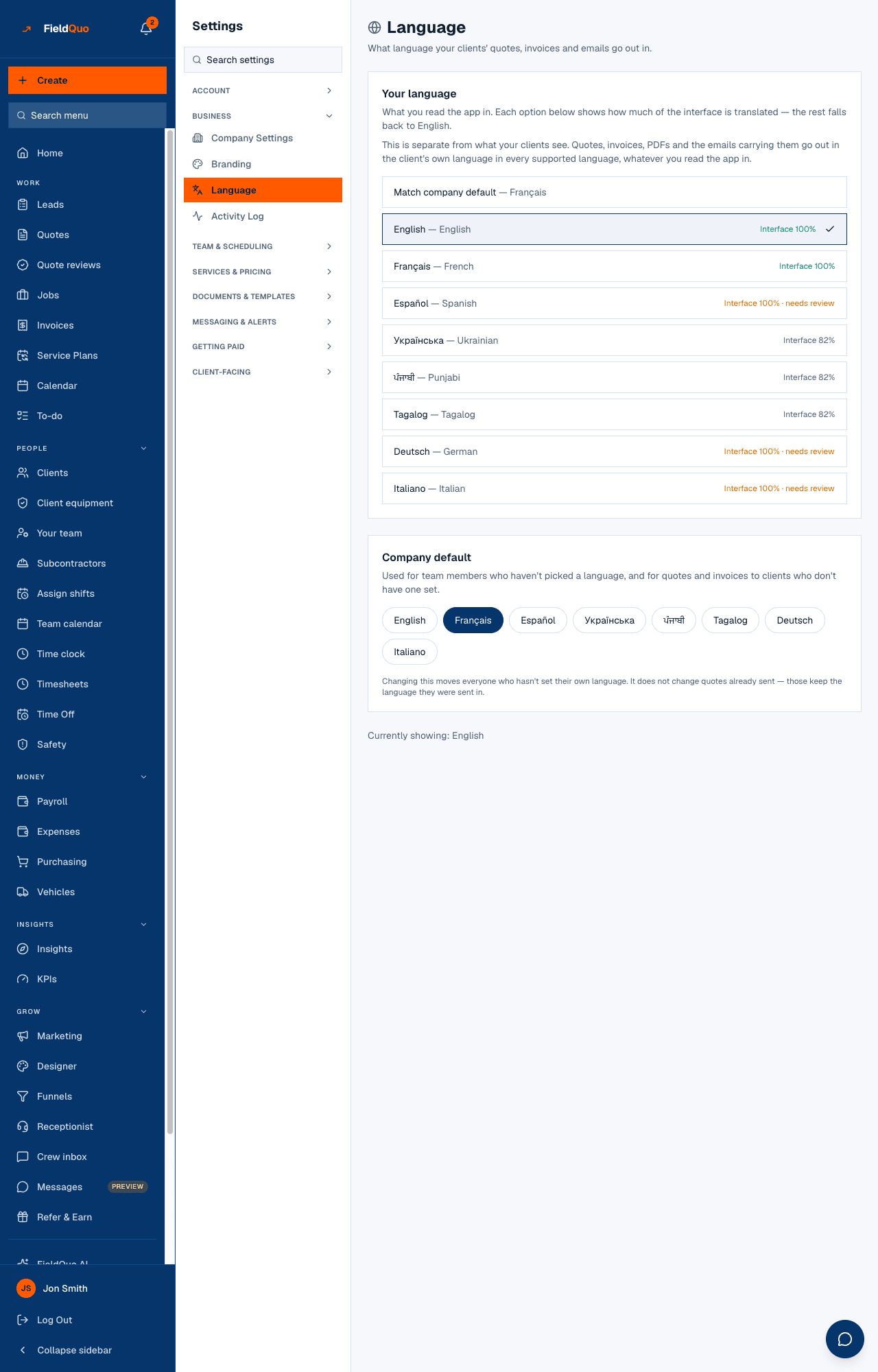
Eight languages are offered: English, French, Spanish, Ukrainian, Punjabi, Tagalog, German and Italian. Each row shows how much of the interface is translated; the rest falls back to English. A document, a PDF or an email to a client is translated per document, so every one of the eight is complete there.
Your language
- Open Settings → Language.
- Under Your language, press a language — or Match company default to follow whatever the company uses.
- It saves the moment you press it; the interface switches, and Currently showing: names the language in force.
Company default
The second card, Company default, is used for team members who haven't picked a language, and for quotes and invoices to clients who don't have one set. Owners, administrators, dispatchers and managers can press a language here; everyone else sees it as a fact, headed This is the language new team members and clients without one of their own receive.
Changing this moves everyone who hasn't set their own language. It does not change quotes already sent — those keep the language they were sent in.
What the coverage labels mean
| Label | Meaning |
|---|---|
| Interface 100% | Every screen is translated and a fluent speaker has reviewed it. English and French today. |
| Interface 100% · needs review | Every string is translated but no native speaker has checked it yet. Spanish, German and Italian today. |
| Interface N% | Part of the interface is translated; the rest shows in English. Ukrainian, Punjabi and Tagalog today. |
What your clients get
A client's language lives on the client record and drives everything they receive: the quote, the invoice, the PDF, the covering email, the texts. When a client has none, the company default applies. Set it once on the client — see A client's language — and read A quote keeps its language for what happens to a document after it is sent. The wording of your own services in another language is drafted and reviewed on Translations.
Domande frequenti
I switched to Spanish and some screens are still in English.
Spanish is fully translated but marked needs review; a string that is missing falls back to English rather than showing a blank. The label on the row is the honest coverage.
If I change the company default, will old quotes change?
No. A document keeps the language it was created in. Only new documents, and teammates who never chose, follow the new default.
Can a crew member change their own language?
Yes. Your language is personal and open to every member; only the company default is restricted.
È stato utile?