

WhatsApp Business
Your own WhatsApp Business number answered in the Messages inbox, the 24-hour rule WhatsApp imposes on replies, and why the panel says coming soon instead of offering a Connect button.
Per ora questo articolo è disponibile in inglese, francese e spagnolo. Stai leggendo la versione inglese. Français · Español
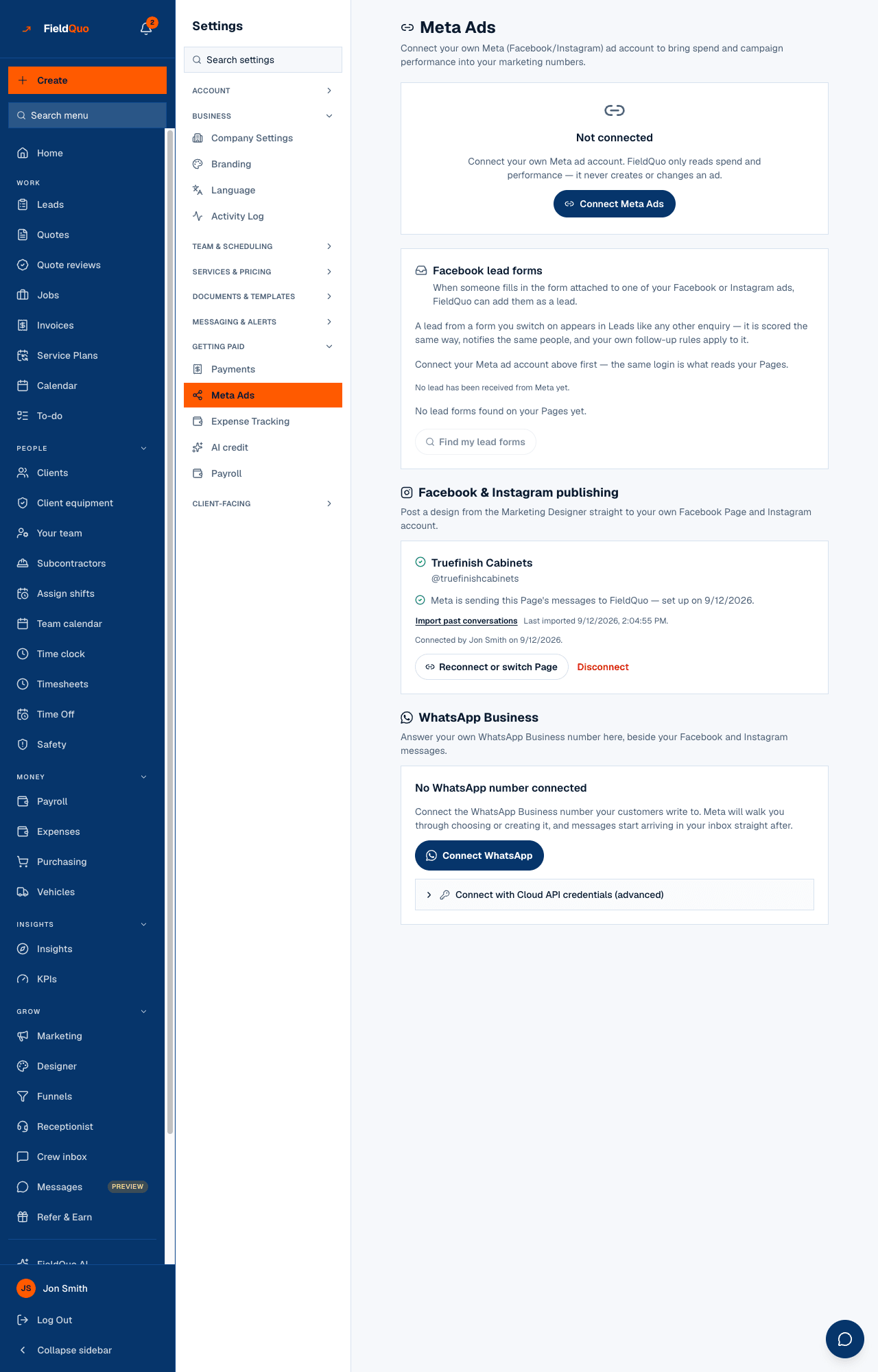
The WhatsApp Business panel on Settings → Meta Ads connects the WhatsApp Business number your clients write to, so their messages arrive in Messages beside your Facebook and Instagram conversations and are answered from there. It is a business number, not anyone's personal WhatsApp.
Today the panel reads WhatsApp is coming soon. We're waiting on Meta to approve FieldQuo for WhatsApp, and we'll tell you the day it's ready., with no button: Meta has not yet granted FieldQuo Advanced Access to the WhatsApp permissions a business's number needs, and until it does Meta's sign-up refuses every business but FieldQuo's own. That review is with Meta. Nothing is missing on your side — see WhatsApp (coming soon) — and this article says what the feature does the day it switches on, including the one rule that surprises everybody.
Overview
When the connection is offered, Connect WhatsApp sends you through Meta's own sign-up, where you choose or create a WhatsApp Business Account and a phone number; FieldQuo subscribes to that number's messages, and a conversation appears in Messages the moment a client writes. Replies go out from your number. The panel then shows the number with its verified name, the templates read from Meta, and a Disconnect button.
A second, collapsed door — Connect with Cloud API credentials (advanced) — is drawn only for FieldQuo's own staff, labelled Visible to FieldQuo staff only — for testing and Meta's review, and stays staff-only after Meta approves: it needs a token from FieldQuo's own Meta app. Your company does not see it; the sign-up button is the door for every business.
The 24-hour rule
The panel carries this in a card of its own, because it is the thing a painter who has used WhatsApp personally for ten years has never met: WhatsApp only carries a typed message for 24 hours after the customer last wrote to you. After that you can still reach them, but only with a template Meta approved in advance. FieldQuo says which of the two applies on every conversation, and refuses a free-typed message outside the window by name rather than letting WhatsApp reject it silently.
- Create your templates in Meta's WhatsApp Manager — a “your quote is ready” or “confirming tomorrow's visit”, for example — and wait for Meta to approve them.
- On the panel, press Refresh templates. It reads {count} templates read from Meta, or No templates yet. Create them in Meta's WhatsApp Manager, then refresh.
- In a conversation older than 24 hours, the composer offers those templates instead of a text box.
The AI employee follows the same rule: outside the window it does not draft a reply at all, because there is no free text it could send.
What each control changes
- Connect WhatsApp — starts Meta's sign-up. If you cancel part-way, nothing is connected; if the account has no phone number yet, the panel says so and asks you to add one with Meta.
- Refresh templates — re-reads your approved templates from Meta. New templates do not appear until you press it.
- Disconnect — FieldQuo stops receiving that number's messages. Nothing is deleted: conversations already in Messages stay, and connecting the same number again brings its threads back.
- The panel's badge — Connected via Meta sign-up or Connected via API credentials — records which door was used.
What leaves the building
Your client's messages come from Meta to FieldQuo and are stored as conversations; your replies go from FieldQuo to Meta and on to the client. Meta holds the number and the templates, so a template's wording is what Meta approved, not what FieldQuo would like to send. Media a client sends is fetched from Meta and kept with the conversation.
Who can see it
Connecting or disconnecting a number is for the owner and administrators — the same rule as the rest of Settings → Meta Ads, enforced by the routes as well as by the sidebar. Answering conversations follows the Messages inbox's own access; see The Messages inbox.
Domande frequenti
Can I use my personal WhatsApp?
No. The connection is to a WhatsApp Business Account and its number, through Meta. A personal number has no such account.
Why can't I reply to a message from last week?
WhatsApp's rule, not FieldQuo's: more than 24 hours after the client last wrote, only a template Meta approved in advance can be sent. Create templates in WhatsApp Manager and press Refresh templates.
When will the Connect button appear?
When Meta grants FieldQuo Advanced Access to its WhatsApp permissions. Meta sets the timing, not FieldQuo; the panel changes the day it is approved, and there is nothing to request from your side.
È stato utile?