

Refer another business, earn a free month
Send another contractor your link or an invite; they get a free month when they sign up, and you get one added to your account once they are a paying customer.
Per ora questo articolo è disponibile in inglese, francese e spagnolo. Stai leggendo la versione inglese. Français · Español
Refer & Earn — a row in the sidebar and again under Settings → Account — is FieldQuo's own referral programme, one contractor telling another. Both sides get the same thing: a month of FieldQuo. The newcomer's month lands the day they sign up; yours lands the day they make their first real payment. The screen keeps the two apart deliberately, so “I referred three people, where are my months?” has a visible answer: Signed up — not yet paying.
Overview
The page opens with “Refer another business and get another month of FieldQuo free, once they're a paying customer.” Then Your link with Copy — “Short enough to say out loud. Put it on a business card, an invoice footer, or a van.” — a WhatsApp button, Text it on a phone, and Send an invite by Email or Text. Below: how many free months you have earned, Businesses you've referred with a Credited or Signed up — not yet paying badge on each, and Invites sent.
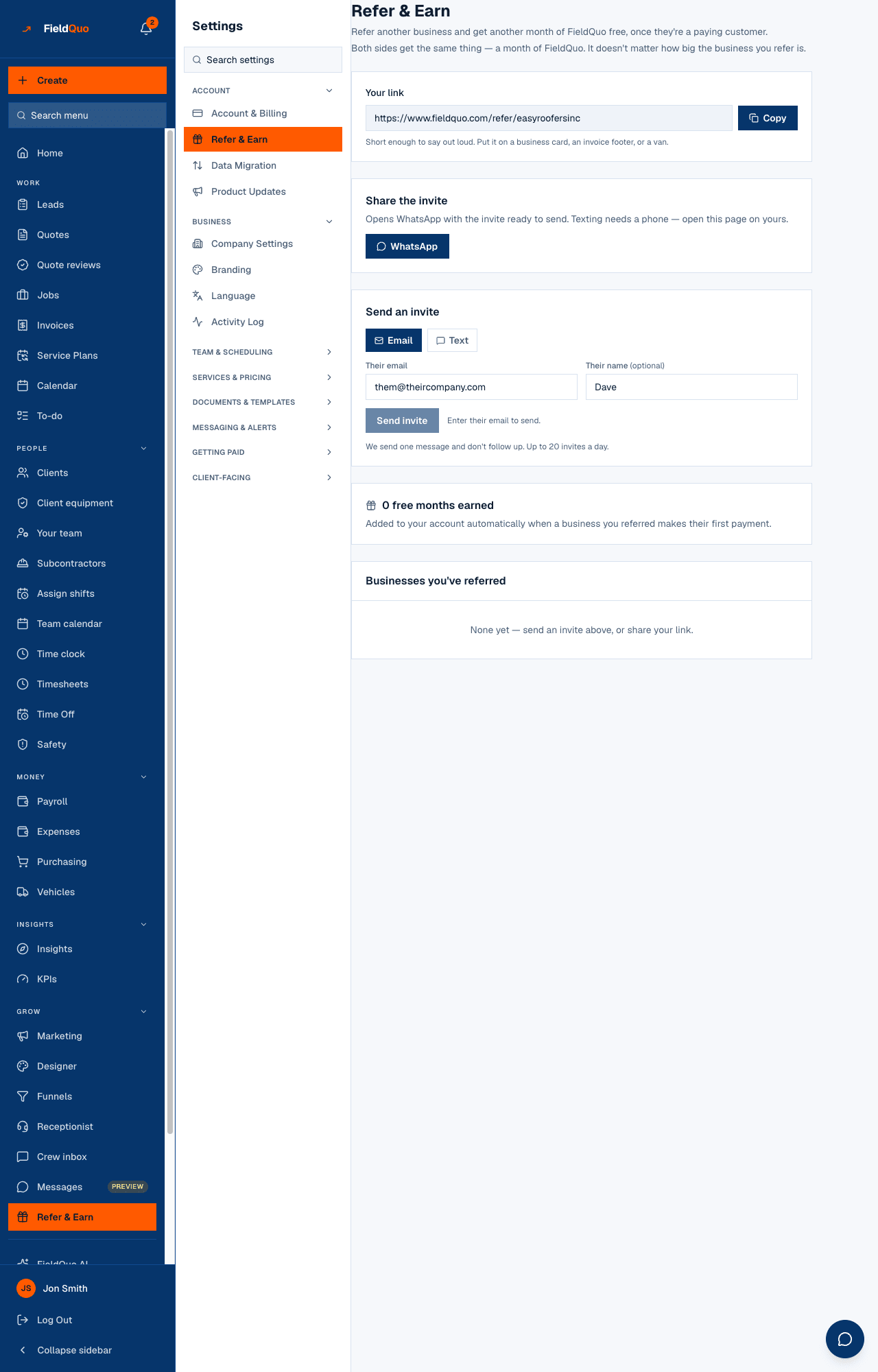
How to send an invite
- Open Refer & Earn.
- To share it yourself, press Copy and paste the link anywhere, or WhatsApp / Text it to open your own messaging app with the message ready and you choosing who it goes to.
- To have FieldQuo send it, choose Email or Text under Send an invite, enter Their email or Their mobile number, optionally Their name, and press Send invite.
- The invite appears under Invites sent with its channel and date; it changes to Signed up when they do, or Failed if it could not be delivered.
FieldQuo sends one message and does not follow up. Up to 20 invites a day. A person who has asked FieldQuo not to contact them is not sent one, and the screen tells you so.
How the free months work
| Who | What they get | When |
|---|---|---|
| The business you referred | One extra free month of trial | At signup through your link or invite |
| You | One free month | When that business makes its first real payment, has finished setup and has verified payments — “Added to your account automatically when a business you referred makes their first payment.” |
Your month is a month of the product, not a dollar figure: if you are still on trial it pushes your trial end out; if you are paying it moves your next charge a month later, on monthly and annual plans alike. Nothing is ever shortened, and a second referral adds a second month. The reward is the same whatever size the business you refer is.
The limits, all anti-abuse: you cannot refer yourself, a company that already exists cannot redeem a link, and a referrer is credited for at most 50 qualifying referrals in a calendar month.
Who can see it
Owners and administrators only. The page lists which companies were referred and what was earned, and sending an invite is owner-and-administrator on the server, so the row is hidden from everyone else rather than shown read-only. Client referrals — a homeowner sending you a neighbour — are a different thing: Referrals from clients.
Domande frequenti
They signed up but I have no month yet — why?
Their badge reads Signed up — not yet paying. Your month arrives on their first real payment, once their setup is complete and their payments are verified; a $0 trial invoice earns nothing.
Where does the invite come from?
From FieldQuo — it is FieldQuo inviting a business on your behalf, not a message to one of your clients. Your name is in it.
Is there a cap?
20 invites a day, and credit for up to 50 qualifying referrals a month.
È stato utile?