

Solo in FieldQuo
The crew inbox: photos and updates by text
Your crew text photos and notes to one number and they file themselves to the right job — no app, no login. The setup panel, the queue of photos that need a person, what each text costs, and who sees what.
Per ora questo articolo è disponibile in inglese, francese e spagnolo. Stai leggendo la versione inglese. Français · Español
A crew member on a ladder is not going to install an app. With the crew inbox they text a photo, or a one-line update, to a number, and FieldQuo files it against the job they are on that day. When the day has more than one job it asks which — by text, as a numbered list — rather than guess. A photo filed to the wrong client is the one mistake this feature is built never to make.
The Crew inbox screen in the main sidebar is where you set the number up and where the exceptions land: a photo nobody answered the question for, and texts from numbers that are not on your team.
Overview
The crew texting line is its own number — a texting line, separate from the one the receptionist answers calls on, because the receptionist's number cannot receive a text. It is rented monthly and its texts are metered against the same credit as the receptionist. Crew are matched by the phone number on their profile under Team → Workers; a text from an unknown number is logged but not filed, and — during your first few texts — answered with a note saying which number to add.
What is on the screen
- Crew texting — the green setup panel: Your crew text this number, the number, whether it is really wired (asked of the phone provider, not assumed), Credit: $12.40, the rates line “2¢ per text (each 160 characters), 5¢ a photo — drawn from the same credit as your phone agent”, and Send me a test text, Add credit, See every charge, Turn off crew texting.
- Needs you — pick the job (2) — a photo the system could not file: the picture, who sent it, when, Where it was taken when the phone sent coordinates, then Which job is this for? with a chip per candidate job and File it here.
- From numbers not on your team (1) — texts from strangers, with “Add this number to a crew member in Team and their texts will file automatically.”
- Filed — everything that landed, each reading Filed to Nguyen kitchen. The photo itself lives on the job.
How to set it up
- Open Crew inbox. If the panel reads “Your crew don't have a number to text yet”, press Buy your crew a number of their own, pick an Area code (it defaults to the one on your company profile), press Show me numbers and choose one. It costs $4 a month from your credit, the first month up front, and the panel confirms “Done — your crew's number is …”.
- Or, to try it first, press Use the FieldQuo test line — a shared line lent to your company until the date shown.
- Add your own mobile to your staff profile under Team → Workers, so the inbox recognises your texts, and do the same for every crew member.
- Press Send me a test text, then reply to it from your phone with a photo. It should land under Filed against a job on your schedule for today — or under Needs you if you have none, which is also a pass.
- Give the crew the number. That is the whole rollout: nothing to install and nobody to invite.
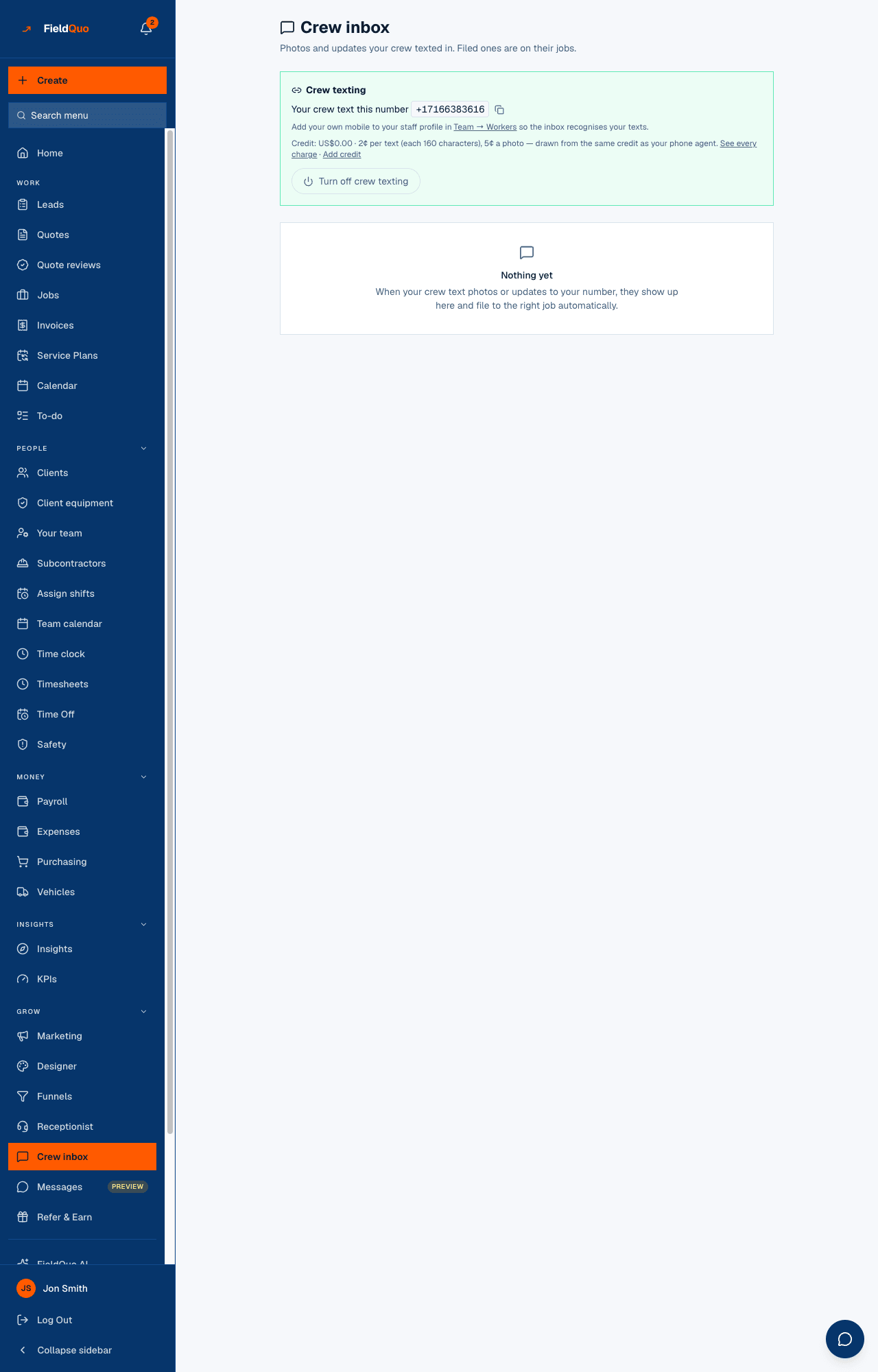
The panel never reports success it has not verified: it asks the phone provider whether the number is switched on and can take photos. If it reads “This number takes texts but not photos”, tell FieldQuo and the number is swapped.
How a photo finds its job
The candidates are the sender's scheduled visits for that day. Among them, FieldQuo files without asking only when it is sure, in one of three ways; anything else becomes a question.
- Named — the text mentions one job's client, title or street number (“123 Oak done”).
- On site — the photo's coordinates sit within 250 m of one job and clearly nearer to it than to any other.
- Only one — the person has exactly one job that day. Filed silently.
- Ask — anything else. The crew member gets “Which job is this for? 1. Nguyen 2. Patel — Reply with the number.” and the photo waits under Needs you until they, or you, answer.
A filed photo lands on the job's visit with the text as its caption and a stage (before, during, after) inferred from the words; the crew member gets a short “Filed to Nguyen. 👍” when there was a choice, and nothing when there was not — a line that chirps at every photo gets muted. If nothing landed, it says “Couldn't file that one — it's waiting in the office inbox.” rather than pretending.
Teach the crew one habit: put the client's name or the street number in the text. A named photo files itself every time.
What it costs
| Item | Cost |
|---|---|
| A text from the crew | 2¢ per 160 characters — a long text is two charges. |
| A photo from the crew | 5¢, however much text rides along with it. |
| A reply from FieldQuo (the question, the confirmation, an @mention notice) | The same rates, and only sent when the balance covers it. |
| The number | $4 a month from your credit, the first month up front. The line stays connected up to $2 in the red so a crew mid-job is not cut off; past that it is paused at the provider until you top up. |
The balance is the receptionist's balance, in US dollars; See every charge opens the statement, and the panel warns when about twenty photos' worth is left.
Who can see it
Everyone on the team sees the Crew inbox row, but two rules narrow it. Setting up the line — buying, testing, turning it off — is for the owner, administrators and the Manager level, because it spends the company's credit; a Dispatcher is refused with that reason. Reading follows the Schedule dial: Crew and Estimator logins see only their own texts; Dispatcher, Manager, owner and administrators see everyone's, including the unknown-number queue.
What is different here
On the pricing pages FieldQuo compares itself with, the nearest bullets are two-way SMS with customers and in-app calling and texting between people who have the app. None of them names a number your crew text a photo to that files it against the job without an app or a login, asks by text when it cannot tell, and holds the photo for a person rather than guess.
Domande frequenti
Can I just use the receptionist's number?
No — it answers calls and cannot receive a text, and a forwarded number forwards calls, never texts. The crew line is a separate texting number, which is why setup lives on this page and not on the phone screen.
A subcontractor works for two companies. Where do their photos go?
To whichever company's number they texted. The number that was texted decides the company; the sender's number only decides who, within it. Their phone can be on both rosters.
Do the photos get tags?
A texted photo lands with a stage inferred from the words (before, during, after) and no company tags; add tags on the job afterwards. A wrong tag is a person's mistake to make, not the system's.
È stato utile?