

Ask for time off from your phone
Request a day off, see what you have left, withdraw a request, and know who it is waiting on.
Per ora questo articolo è disponibile in inglese, francese e spagnolo. Stai leggendo la versione inglese. Français · Español
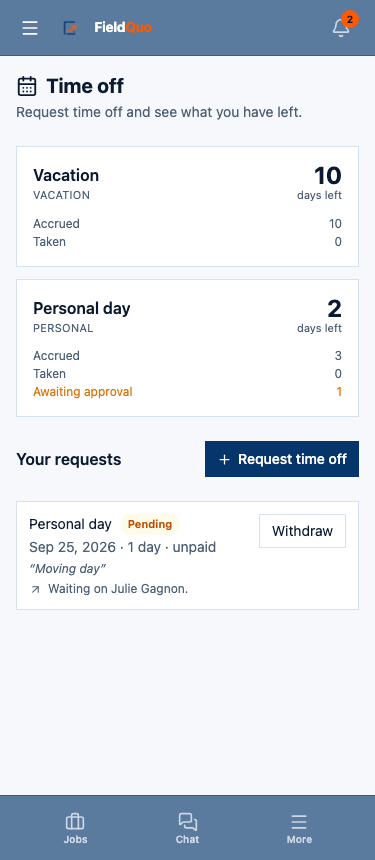
Time Off is one screen with two jobs: what you have left, and your requests. A request goes to the person you report to; some types are approved automatically the moment you submit; and until it is taken you can withdraw it yourself.
Overview
At the top, a card per leave type your company set up — Vacation, Sick days, Personal day, whatever the owner named — with Accrued, Taken, what is awaiting approval, and days Left. Under it, Your requests with the Request time off button, each request with its status pill and, while it is pending, a line saying who it is waiting on. If no leave policies exist yet, the screen says so and names the settings page an owner uses to add them.
How to request time off
- Open More → Time Off.
- Tap Request time off.
- Choose the Type. An unpaid type is not limited by a balance; a paid one shows the days you have available.
- Set First day and Last day, or tick Half day only for a half day.
- Add a Note (optional) — anything your manager should know.
- Tap Submit request. If the type is approved automatically the screen has already told you: submitting books it.
What happens next
- The request appears under Your requests as Pending, with the line saying who it is waiting on — the person you report to, or an owner or administrator if none is set or your manager is away today. The routing is recomputed every time the screen loads, so it follows your manager back from their own holiday.
- The people who can act on it get a notification in their bell — and on their phone if they turned notifications on.
- They Approve or Decline on their Team tab. Your request's pill changes, and the balance card moves the days from awaiting approval to Taken.
- Changed your mind? Tap Withdraw on a pending or approved request you have not taken yet.
The days-left figure is information, not authorisation. The server checks your balance when you submit and again when the manager approves, because other requests can be approved in between.
How balances work
Balances build up on their own from the policy the owner set — a number of days per year, accruing as the year goes — and the card shows this year's figures. A pending request counts against what you have available so that you cannot ask for the same days twice. Vacation pay, where your company accrues it, shows as an amount on the card.
Sick days are usually on an auto-approving policy: submitting books the day and simply tells your manager. Do it from the phone before the shift starts so the schedule knows.
Who can see it
Everyone sees their own balances and requests and can withdraw their own. Approving and declining, the Team tab, everyone's balances and who is off next are for whoever can run a crew — the Dispatcher level and above. The policies themselves are owner and administrator only, under Settings; see Time off policies and, for the manager's side, Time off requests.
Domande frequenti
Who approves my request?
The person you report to. If nobody is set, or your manager is away today, it goes to an owner or administrator instead, and the line under the request says which.
Can I ask for more days than I have?
Not for a paid type — the server refuses on submit. Unpaid leave has no balance and is not limited.
My request was approved but I no longer need it.
Tap Withdraw on it. That works on pending and approved requests you have not taken yet.
È stato utile?