

Solo in FieldQuo
Nothing says FieldQuo
Every quote, invoice, page and email a homeowner sees carries your logo, your colour and your name — where that comes from, how one colour becomes a readable document, and the short list of places FieldQuo's own name can appear.
Per ora questo articolo è disponibile in inglese, francese e spagnolo. Stai leggendo la versione inglese. Français · Español
A homeowner comparing three contractors should not be able to tell that two of them use the same software. That is the rule every client-facing surface in FieldQuo is built to: the quote email arrives from your company, the approval page is on your letterhead, the invoice page and the portal are in your colour, the booking page carries your logo, and the texts open with your name. There is no FieldQuo logo, no “powered by” line and no account a client is asked to create.
This article is the white-label rule in one place — what carries your name, how one brand colour becomes a whole palette that still reads on a phone in a driveway, and the exceptions, so you know exactly where the name FieldQuo can show up.
Overview
Everything starts from two things you set once under Settings → Branding: a logo and a Primary colour. The documents and pages a client opens read those two fields and nothing else — there is no per-document theme to keep in step, so a quote cannot look like FieldQuo's while an invoice looks like yours. The name on the brand band, in the email's From line, in the footer and in the “Questions?” line is your company's name from Settings → Company Settings.
The pages a client opens sit outside the app entirely: no navigation, no sign-in, nothing suggesting they have an account somewhere. A quote link opens a document; a portal link opens an account statement; a booking link opens a calendar. Each is written in the client's language, and each ends with your phone number, not ours.
What carries your name
| Surface | What is yours on it |
|---|---|
| The quote email and the invoice email | The From line in your company's name, your logo on a brand band in your colour, your colour on the button, your phone, email, website and tax number in the footer. |
| The quote approval page and the quote PDF | The brand rule across the top, your logo and name, your colour on every heading, section and the total band. |
| The invoice page and the client portal | Your logo, “Account for [client]”, your invoices and quotes, the Pay buttons in your colour, and a “Questions?” line with your phone and email. |
| The booking page and the visit page | Your logo and name at the top, your colour on the chosen day and the buttons; your name in the subject and body of the confirmation email. |
| The instant estimate, the self-quote form and funnels | Your logo, your colour, your services only — and never a rate card. |
| Your website and bio link page | Your subdomain, your pages, your photos, your hours; the one footer line is described below. |
| Texts (reminders, On my way) | Your company's name at the start of the message, and your phone number to call back on the On my way text. Replies to these texts are not read by anyone — only STOP is acted on. |
The wording of the fixed parts — “View & approve your quote”, “Approve this quote”, “Balance owing”, “Change the time” — is FieldQuo's, translated into every language a document can be written in. You cannot edit those sentences, and none of them names the software.
The From line, and where replies go
Every email a client receives is sent as Your Company Name in the From line. The address behind the name depends on one thing: whether you have verified your own domain under Settings → Email Domain. With a verified domain the address is yours — quotes@yourdomain.com unless you chose another word before the @. Without one, the address is FieldQuo's shared sending address, still under your company's name.
Replies always come to you. The reply-to is your company's email address from Settings → Company Settings; if that field is blank, it falls back to the account owner's login email, so a client's reply can never vanish into a mailbox nobody reads.
Verify your domain if you can. It is the one visible difference between “your name on FieldQuo's address” and “your name on your address”, and it helps the email land in the inbox rather than in promotions. See Send from your own domain.
How one colour becomes a document
You pick one hex. From it FieldQuo derives every colour on the page — the rule across the top, the section headings, the wash behind a summary card, the total band and the button — and measures each pairing of text and background for contrast before using it. That matters because contractors pick yellow, white, black and mid-grey, and the naive rule “dark colour, white text” fails on exactly those. A white brand still gets a visible total band; a pale yellow still gets readable headings; a logo always sits on a white plate inside the brand band, so a navy wordmark never vanishes into a navy bar.
- Open Settings → Branding.
- Under Logo, press Upload logo (PNG, JPG, WebP or SVG, up to 8 MB).
- Under Brand Colors, set Primary — buttons, progress bars and your name in the email header. Secondary and Neutral are optional and follow sensible defaults.
- Check How your documents will look, in Light and Dark. That preview is the same maths the quote, the invoice and the emails use.
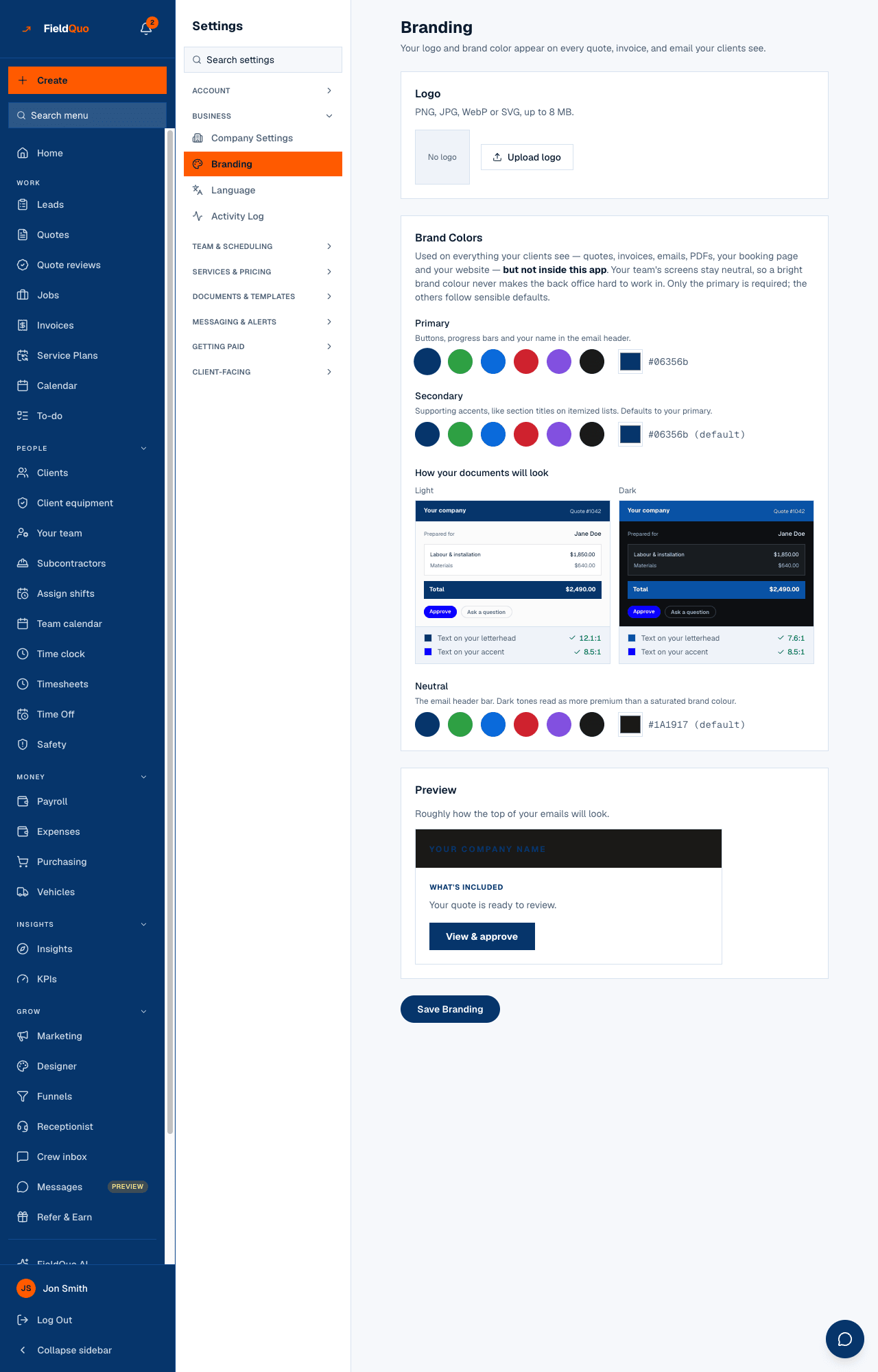
The brand colour is used on everything your clients see and not inside the app: your team's screens stay neutral so a bright brand never makes the back office hard to work in. A company that has set no colour gets FieldQuo's default navy on its documents — the only case where the colour is ours. The booking confirmation email is the one letter with a fixed dark header rather than your colour; your name is still in its subject and its first line.
Where FieldQuo's name does appear
The exceptions are short and each has a reason:
- The footer of a free website. A site on a company that is not on a paid plan carries a small Site by FieldQuo line under the copyright. Paid plans do not. See The Site by FieldQuo footer.
- The referral page. Your Refer & Earn link opens a page addressed to another business owner that says you use FieldQuo — its whole purpose is to recommend the software. See The referral page.
- Web addresses. Quote, portal, booking and visit links open on FieldQuo's domain, and your website lives at yourcompany.fieldquo.com. The page itself is yours; the address bar is not.
- The sending address when you have not verified your own domain, as above. The name is yours; the part after the @ is not.
- Stripe's payment page. A client paying by card or bank account is taken to Stripe's hosted page for your connected account, in your company's name — that page is Stripe's, and says so.
Why this is listed under Only in FieldQuo
Of the five pricing pages FieldQuo checks itself against — Jobber, Housecall Pro, ServiceTitan, Projul and QuoteIQ — none lists, at any tier, that the documents and pages a client receives carry the contractor's brand rather than the software's. Jobber's page lists “Customize quotes with rich visuals and reviews”, which FieldQuo reads as document layouts, not as white-labelling. That is the whole claim: not listed on their pricing page, never “they cannot do it”.
Domande frequenti
Does the client ever have to create an account?
No. Every link is a token in the address — the quote, the portal, the visit page. There is no password, no sign-up and no FieldQuo account for a homeowner.
Can I turn off the Site by FieldQuo line?
It is shown only on a company that is not on a paid plan. On a paid plan it is not rendered; there is no separate switch.
My brand colour is white. What happens?
Every foreground is measured against it, and where the pairing fails the page substitutes a neutral chip or darkens the accent for text. The document stays readable; it simply carries less colour. Check the Branding preview.
Does the language of the page depend on the client or on me?
On the client. A quote keeps the language it was created in, and everything else a client receives follows their own language on their record, then your company default. See A client's language.
È stato utile?