

Your plan and seats
The Account & Billing screen: which plan you are on, what it costs, how many seats and crew logins it includes, when the next charge lands, and the four buttons under it.
ਇਹ ਲੇਖ ਫ਼ਿਲਹਾਲ ਅੰਗਰੇਜ਼ੀ, ਫ਼ਰਾਂਸੀਸੀ ਅਤੇ ਸਪੈਨਿਸ਼ ਵਿੱਚ ਉਪਲਬਧ ਹੈ। ਤੁਸੀਂ ਅੰਗਰੇਜ਼ੀ ਸੰਸਕਰਣ ਪੜ੍ਹ ਰਹੇ ਹੋ। Français · Español
Account & Billing is the one screen about your company's relationship with FieldQuo — the plan, the price, the card, the next charge. Everything else in FieldQuo is about your clients' money; this page is about yours. It is reached from Plan at the bottom of the sidebar, or from Settings → Account & Billing.
This article walks the screen top to bottom: the plan card and what each line on it means, the four buttons, and the Plans grid underneath. Changing plan, adding people and updating the card each have their own article, linked as you go.
Overview
Your company is on one of four plans — Solo, Crew, Shop or Scale — and the plan decides two numbers: how many seats you have (people who create or change quotes, jobs and invoices) and how many crew logins come free with them. Nothing else changes between plans: every feature is in every plan. See The four plans.
The subscription is billed by Stripe on FieldQuo's behalf, in your own currency, monthly or on a one-year commitment. It is a separate Stripe relationship from the one your clients pay you through — that one lives on Settings → Payments, and the page gives you a shortcut to it so the two are never confused.
What is on the screen
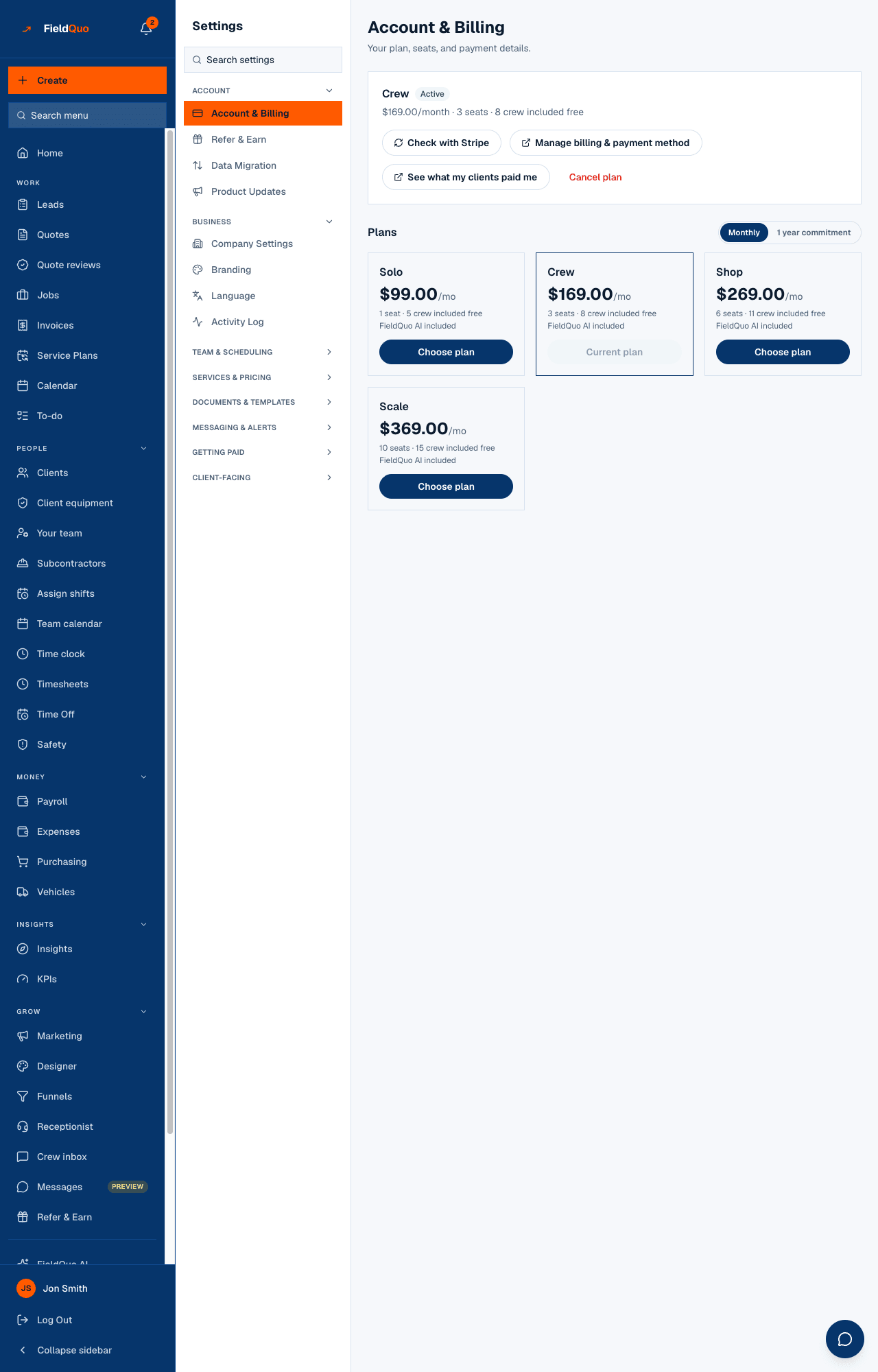
Under the heading Account & Billing — Your plan, seats, and payment details. the plan card reads, for example, Crew · Active · $169.00/month · 3 seats · 8 crew included free · Next billing date 2026-09-30. Each piece of that line is a fact from your subscription, and the table below says where it comes from.
| On the card | What it means |
|---|---|
| The plan name (Solo, Crew, Shop, Scale) | The tier you are on today. If a change is booked for a later date, this still names the plan you have now. |
| The status chip | Trial during your free trial, Active once you are paying, Overdue after a failed payment (a grace clock is running — see Failed payments and the grace period), Cancelled after you leave. |
| The price | Shown on the cadence you are actually billed on — $169.00/month on monthly, or the yearly figure with /year and 1 year commitment if you took the year. |
| Seats and crew | 3 seats · 8 crew included free — the plan's allowance, not how many people you have. Manage Team shows the count you are using. |
| Days left in trial | Only during the free trial: Days left in trial: 12, counting down to the first charge. |
| Next billing date | The day Stripe charges the card on file for the next period. Not shown during the trial, which shows the countdown instead. |
The Plans grid
Under Plans, a Monthly / 1 year commitment switch and one card per tier, each with its price, its seats and crew line, FieldQuo AI included, and a button. The card you are on reads Current plan and is greyed out; the others read Choose plan. With the switch on the year, your own tier's button reads Switch to yearly instead, because taking the commitment is a real change even though the tier is the same.
The switch starts on whatever you are already billed on, and flipping it only re-prices the cards — the plan line above does not move until you actually confirm a change. The grid shows the ladder in your currency only: Canadian dollars for a Canadian address, Australian dollars for an Australian one, US dollars for anywhere else. A company whose address has no country sees a prompt to add it instead of a price list.
Every card carries the words 1 seat · 5 crew included free, 3 seats · 8 crew included free, and so on. Compare that with the seats used line on Manage Team before you upgrade — the crew you already have may fit the plan you are on.
Who can see it
Only an owner or an administrator — the person who signed the company up, or anyone made an administrator with the Make administrator box on their access. Everyone else has no Plan row in the sidebar and no Account & Billing row in Settings, and typing the address shows a refusal, not the page. A Manager preset does not include billing, on purpose: running the day-to-day is not authority over the company's card.
The refusal is enforced by the server on every action, not only by hiding the buttons — a supervisor who posts to the billing routes directly gets Only an owner or admin can change the plan or billing details.
ਅਕਸਰ ਪੁੱਛੇ ਜਾਂਦੇ ਸਵਾਲ
The page says No active plan but I paid a minute ago.
Press Check with Stripe. The page also does this by itself when you arrive back from checkout, but a slow confirmation can beat it. Nothing is charged twice.
Why is there no Next billing date on my card?
You are still in your free trial, and the card shows Days left in trial instead. The first charge lands the day that count reaches zero.
Where is the money my clients paid me?
Not here. Press See what my clients paid me, which opens Settings → Payments — your own connected Stripe account, payouts and fees. See Payment processing fees and payouts.
Can my office manager open this page?
Only if they are an administrator. Tick Make administrator on their access in Manage Team; that also lets them change the plan and the card, so give it to the person who genuinely pays the bill.
ਕੀ ਇਹ ਮਦਦਗਾਰ ਸੀ?