

Painting priced by production rate
Measure the room or the elevation, say what is painted in it, and the quote works out the hours from your production rates and the gallons from coverage — with a rate set per kind of estimate that you keep in Settings.
ਇਹ ਲੇਖ ਫ਼ਿਲਹਾਲ ਅੰਗਰੇਜ਼ੀ, ਫ਼ਰਾਂਸੀਸੀ ਅਤੇ ਸਪੈਨਿਸ਼ ਵਿੱਚ ਉਪਲਬਧ ਹੈ। ਤੁਸੀਂ ਅੰਗਰੇਜ਼ੀ ਸੰਸਕਰਣ ਪੜ੍ਹ ਰਹੇ ਹੋ। Français · Español
Painting in FieldQuo is not a price per square foot. You measure the room or the face of the house, say what is being painted in it — walls, ceiling, trim, doors — and the quote works out how long it takes from your production rates and how much paint it needs from coverage. The hours times your hourly sell rate are the labour; the gallons times what you pay for the paint are the material.
The rates are yours to set, one rate set per kind of estimate, and every one of them stays on your side: the client reads a line and an amount, never the rate behind it.
Overview
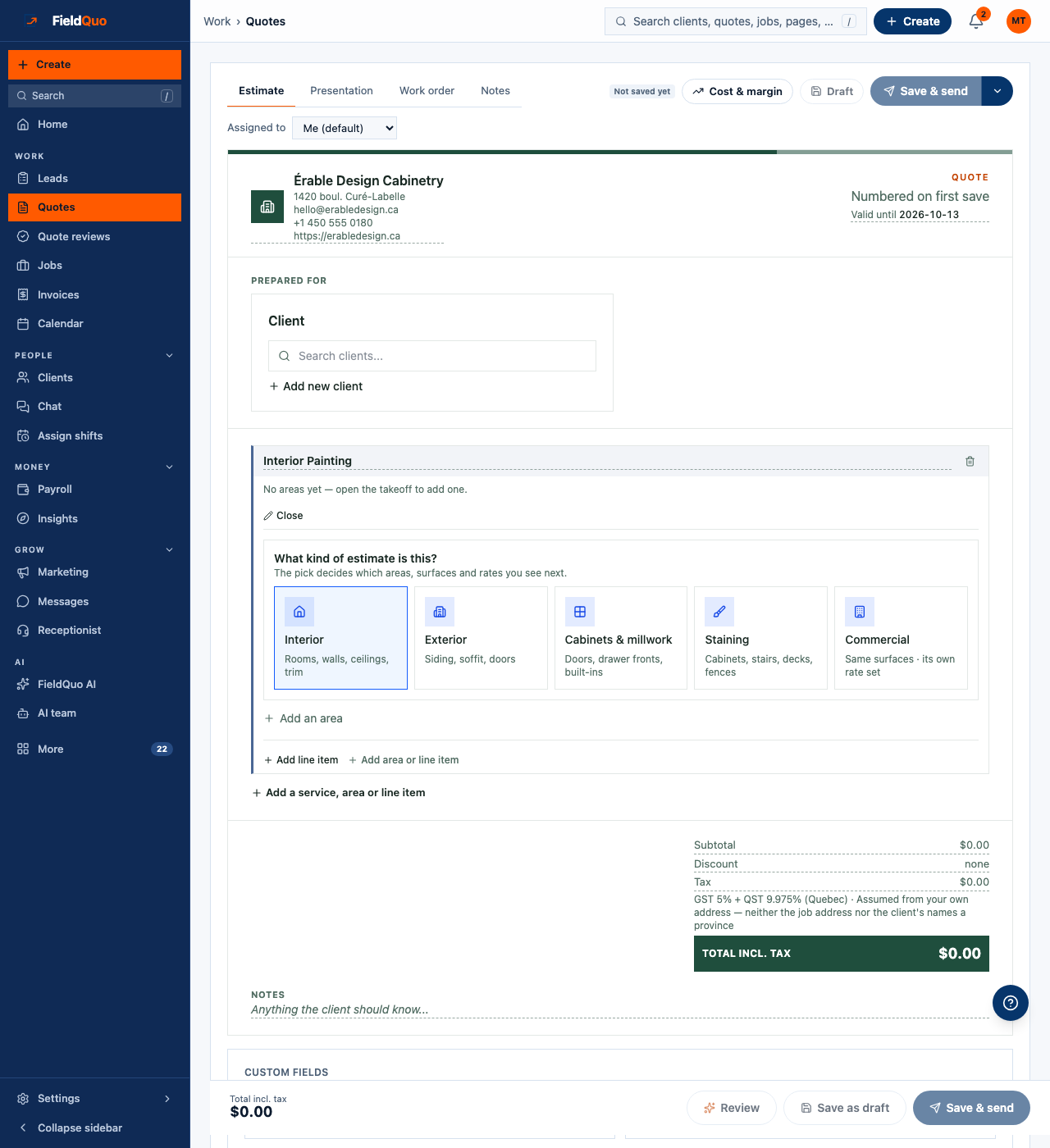
Add an Interior Painting or Exterior Painting service to a quote and its takeoff opens on What kind of estimate is this? — Interior, Exterior, Cabinets & millwork, Staining or Commercial. The pick decides which areas, surfaces and rates you see next, and which rate set the group prices from. Commercial offers the interior and exterior surfaces under a rate set of its own.
How a line is priced
| Figure | How it is worked out |
|---|---|
| Quantity | Read from the area's measurements — the walls of a room are 2 × (length + width) × height, gross: doors and windows are not deducted, because the production rates were set against gross area. Type over any figure to override it. |
| Hours | The quantity divided by the rate's production rate — 414 sqft of walls at 100 sqft an hour is 4.14 hours — plus any prep hours on the line. A surface counted by the piece, such as a door, uses hours per piece instead. |
| Labour | The hours times the rate set's Hourly sell rate. A rate priced as a flat price per unit sells the quantity at that price instead, and its prep hours at the hourly rate. |
| Paint | The quantity times the coats, divided by the product's coverage, times what you pay per gallon. The money uses the gallons the line actually consumes, not the tins you will buy. |
Your rates already cover two coats. An Extra coat offered to the client adds one more coat of paint and a share of the line's hours, set on the rate card.
How to pick a rate on a quote
- Press Add an area, name it and give it its measurements.
- Add the surfaces painted in it. Each one starts on the rate set's default for that surface.
- To use another, open the rate picker and search — Search rates… (walls, ceiling, cutting, wallpaper). Each rate is named for the situation in front of the painter, such as 16 ft walls or 8 ft walls, lots of cutting, and shows its figure. Press Use this rate.
- Nothing fits? Press Create custom rate: a name, the situation, how it is priced and its figure. Tick Save to my Interior rates — the name follows the kind of estimate — to keep it for the next quote; left unticked, it stays on this line only.
Saving a rate to the rate set takes an owner or an administrator. For anyone else the rate stays on the line, and the takeoff says so: Couldn't save it to the rate card — it stays on this line only. An owner or admin can add it in Settings › Services.
Your painting rates in Settings
The rate sets live under Settings › Services & Pricing, in the Painting rates card, shown on the first painting service you have switched on. It is shown to people who can see prices, and a rate saved from a quote lands here too. Nothing on the card reaches a client.
- One rate set per kind of estimate, each with its own Hourly sell rate — and, on the sets that also price exterior areas, Hourly sell rate — exterior areas.
- Each rate's name, the situation it is for, how it is priced — a production rate or hours per piece times your hourly rate, or a flat price per unit — and its figure. A figure you change is highlighted with a reset beside it.
- A default rate cannot be deleted, but Hide from the picker takes it off the list on quotes; a rate you added can be removed. Tags beside the defaults say where they came from: ✓ recovered figures were solved from completed jobs; analogue and example are opening positions to check before you quote with them.
- Paint products — what you pay: the cost per gallon of each product. An unpriced product is counted in gallons and not costed — never as free paint.
- Extra coat — labour, as a share of the line's hours: what an extra coat adds in labour on top of its paint.
Paint to buy
Under the areas, Paint to buy adds up the gallons per product. Two products never pool — ceiling flat and trim enamel are separate tins. By default the surfaces add up before the total is rounded to whole gallons, which is right when rooms share a colour. When every room is its own colour, tick Round gallons up in this area, or Round gallons up on a single surface, so each one gets its own tin. The list is for the work order and the store; the quote's price uses the paint each line consumes.
What the client sees
Each surface becomes a line such as Living room — Walls (414 sqft) with its amount, under the painting group. The production rate, the hourly rate, the hours and the gallons stay in the builder — the formula behind a line is shown to your staff only — and the same goes for the email and the PDF. See Group a quote by room or scope for how areas and surfaces are laid out.
ਅਕਸਰ ਪੁੱਛੇ ਜਾਂਦੇ ਸਵਾਲ
Are doors and windows subtracted from the wall area?
No. Wall area is gross, the way the production rates were measured: cutting in around an opening costs about what its missing area saves. Type over the figure when a wall is mostly glass.
What happens to a painting quote written before estimate types existed?
It prices exactly as it did until you pick a type, and the takeoff says so: This takeoff was written before estimate types existed. It prices as it always did until you pick one.
Can the client choose an extra coat or a better paint?
Yes. Add Extra coat or Premium paint upgrade under Options the homeowner can tick, and the client ticks it on the quote — see Upsell add-ons the client can accept.
ਕੀ ਇਹ ਮਦਦਗਾਰ ਸੀ?