

KPIs: Money flow
Income, Expenses and Remaining for the period with a day-by-day chart and a category breakdown — what each figure reads, how the comparison against last period is made fair, and the materials warning.
ਇਹ ਲੇਖ ਫ਼ਿਲਹਾਲ ਅੰਗਰੇਜ਼ੀ, ਫ਼ਰਾਂਸੀਸੀ ਅਤੇ ਸਪੈਨਿਸ਼ ਵਿੱਚ ਉਪਲਬਧ ਹੈ। ਤੁਸੀਂ ਅੰਗਰੇਜ਼ੀ ਸੰਸਕਰਣ ਪੜ੍ਹ ਰਹੇ ਹੋ। Français · Español
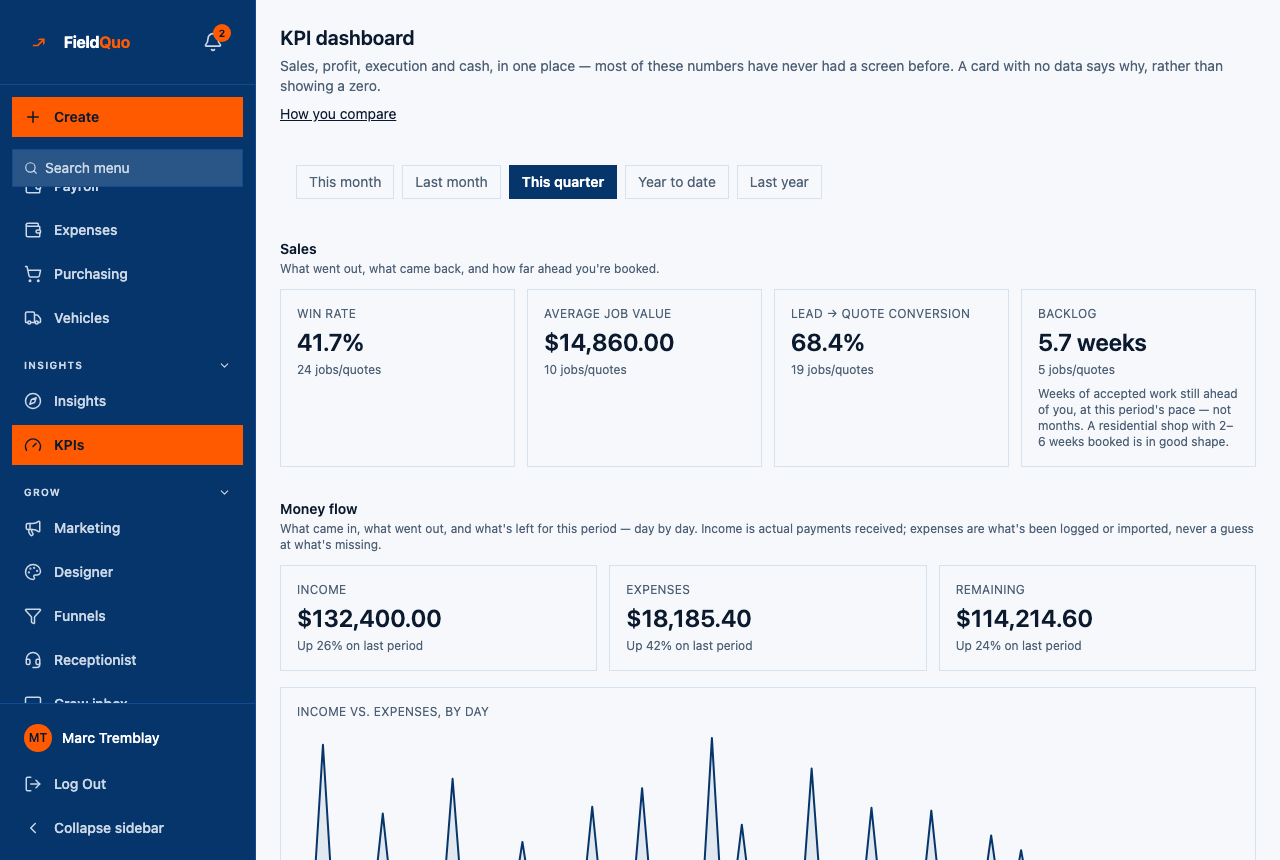
Money flow — What came in, what went out, and what's left for this period — day by day. Income is actual payments received; expenses are what's been logged or imported, never a guess at what's missing. Three tiles, a chart and a breakdown, and the plainest arithmetic on the page: two sums and a subtraction.
It is a section of the KPI dashboard rather than a second screen, and it follows the same period buttons. It has its own gate, so a member who can see the rest of the page may see a refusal in this section alone.
Overview
Income is payments recorded in the period — each payment counted once, by its own date, whichever version of the invoice it was taken against. It is deliberately not invoice totals, which an amendment would double-count. Expenses is every expense dated in the period, whether typed in on Expense Tracking or imported from a bank statement. Remaining is the one minus the other.
A company that has never recorded a payment, or never logged an expense, sees — on that tile and a sentence — “No expense has ever been recorded for this company.” with an Import a bank statement → link — never a confident $0.00. A company with history and a quiet month gets a real $0.
The three tiles
| Tile | What it sums | When it is — |
|---|---|---|
| Income | Payment rows dated in the period, by the date the money was recorded. | No payment has ever been recorded for the company. |
| Expenses | Expense rows dated in the period — logged by hand or imported. | No expense has ever been recorded for the company. |
| Remaining | Income minus expenses. | Either side is unknown — an unknown minus a real number is still unknown. |
The chart and the breakdown
- Income vs. expenses, by day draws one line for each, every calendar day of the period. Days that have not happened yet are dropped rather than drawn as a flat $0 line to the right — on the 3rd, a quarter is three days wide.
- Where the money went lists the three biggest expense categories and folds the rest into Other; the rows always add up to the period's expense total. An expense with no category becomes Uncategorised and competes for a place like any other, so nothing is dropped without being named.
- Category names are the words typed on the expense, shown as recorded — the same names Expense Tracking uses, so the two screens never disagree about what a category is called.
The comparison against last period
Each tile carries “Up 26% on last period”, “Down 12% on last period”, “About the same as last period” or “Up from nothing last period”. The prior period is the same number of days immediately before this one — a 30-day month against the 30 days before it.
- For a period still in progress, the comparison is clamped to the days that have happened against the same number of days before the period started. Three days of September are compared with three days, not with all of August — otherwise every tile read “Down 91%” until the 28th of each month.
- The headline totals still cover the whole selected range: “what have I taken this month” means everything logged against it.
- “Up from nothing” is stated instead of a percentage when last period was $0 — up 100% from what is not a number anyone can read.
The materials warning
Job costing reads expenses only; it never reads the materials buy-list on a job. A company that ticks purchases off the buy-list and never enters them as expenses has real spending that this section cannot see.
When at least $200 was ticked off the buy-list in the period and the expenses on those jobs are a tenth of it or less, an amber note appears: “These jobs show {amount} bought off the materials buy-list this period, but only {expense} of that was ever entered as an expense…” The Expenses tile is still shown, with the warning triangle and “Some materials were bought off the buy-list and never logged”. Log them as expenses, or import the bank statement, and the note goes away.
Who can see it
This section needs Invoices at View only, Expenses at View, record, and edit everyone's, and the See prices switch — company-wide expenses, not “my own”. With the presets, Manager, owners and administrators see it; an Estimator or Dispatcher, whose expenses are their own only, would be refused this section — though they are already refused the page. See Expense tracking and your burn rate for the expense screen itself.
ਅਕਸਰ ਪੁੱਛੇ ਜਾਂਦੇ ਸਵਾਲ
Why is Income different from Revenue this month on Home?
Home's revenue figure totals invoices marked paid; Income here totals payments by their own date. A deposit taken in one month on an invoice marked paid in the next lands in different months on the two screens.
Why does Expenses not include my crew's wages?
Wages are clocked hours, not expense rows. They appear as Payroll this period under Business costs, kept separate so the same money is not counted twice.
Can I import my bank statement from here?
Yes — the Import a bank statement → link opens the CSV import; see Import expenses from a bank CSV.
ਕੀ ਇਹ ਮਦਦਗਾਰ ਸੀ?