

The dashboard in detail
Every card on Home, top to bottom: what is waiting on you, the revenue figure and the four tiles, the detail underneath, the Chase payment button, and who sees which panel.
ਇਹ ਲੇਖ ਫ਼ਿਲਹਾਲ ਅੰਗਰੇਜ਼ੀ, ਫ਼ਰਾਂਸੀਸੀ ਅਤੇ ਸਪੈਨਿਸ਼ ਵਿੱਚ ਉਪਲਬਧ ਹੈ। ਤੁਸੀਂ ਅੰਗਰੇਜ਼ੀ ਸੰਸਕਰਣ ਪੜ੍ਹ ਰਹੇ ਹੋ। Français · Español
Dashboard — Here's what's happening with your business. Home is the screen your team opens most, so it is ranked rather than tiled: what needs a person today comes first, then the one figure the business runs on, then four supporting figures, and everything else under a line called The detail. This article walks it top to bottom and says where every number comes from.
The dashboard: what is waiting on you is the short version — the ranking and why. This one is the detail: every card, every state a card can be in, every button, and which access level sees what.
Overview
Every figure on the page is fetched from a handful of endpoints, and each panel is drawn only when its endpoint answered. A member the server refused for a panel simply does not get that panel — no zero, no apology — because “$0 revenue this month” is a claim about the business, not a blank. A panel that failed for any other reason says so and offers a retry.
Two measures of money sit side by side and are never mixed. Revenue this month totals invoices marked paid this month, by the date they were paid. Money received counts payments by the month the money landed. An invoice marked paid in August against a deposit recorded in July disagrees by design, and the caption under the chart says which is which.
Waiting on you
Waiting on you opens the page and lists the invoices that are actually late — the client, the amount, 12 days past due, the invoice number — with a Chase payment button on each. Up to five rows are named; past that, a {count} more overdue link opens the Invoices list. An invoice with no due date is never here: it has no deadline to miss.
- 2 quotes waiting for you to approve the price. — instant estimates from your website or from a call, waiting in Estimate Reviews for a person to confirm the price.
- 3 calls from your receptionist — nothing done yet. — calls the AI receptionist took that have neither become a quote nor been archived. The line opens the Receptionist screen.
- You have 1 appointment coming up from your calls — the next is … — the visits the receptionist booked that are still ahead. The line opens the calendar.
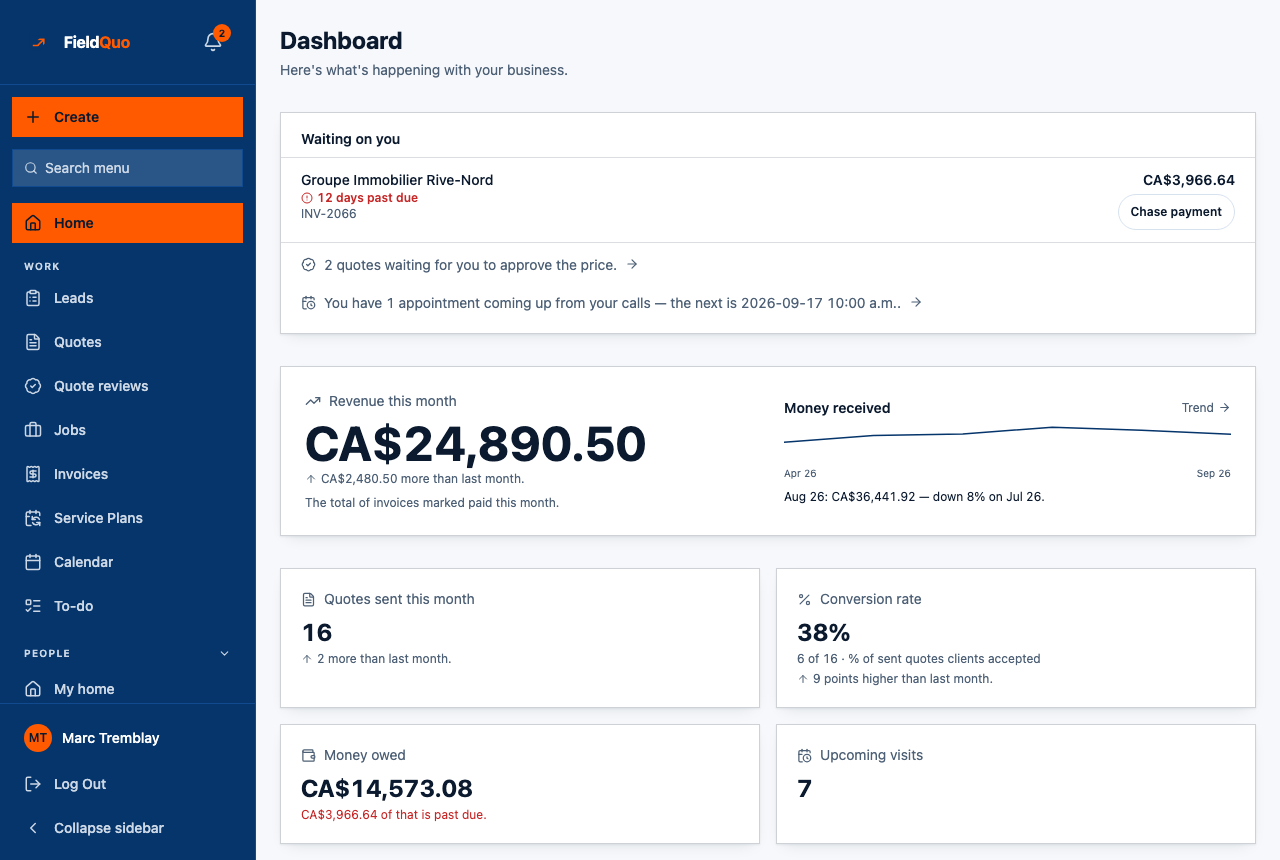
The block removes itself when nothing is late and nothing is waiting. A quiet day has no banner, which is what makes the banner mean something on a busy one.
Revenue this month and the four tiles
Revenue this month is the total of invoices marked paid since the 1st, in large type, with the caption “The total of invoices marked paid this month.” Under it, a change against last month — “CA$2,480.50 more than last month.” — appears only when the company existed for the whole of last month; a company in its first month gets the figure and no invented trend. On the right, Money received draws the last six months of payments as a line, with one sentence comparing the last two complete months — never the month in progress against a finished one.
| Tile | What it counts | The change line under it |
|---|---|---|
| Quotes sent this month | Quotes created this month whose status is sent, accepted or declined. | “2 more than last month.” — only when last month was a full month of trading. |
| Conversion rate | Quotes accepted this month ÷ quotes sent this month, printed with its counts beside it: “38%” then “6 of 16 · % of sent quotes clients accepted”. | “9 points higher than last month.” — only when both months had at least 10 quotes sent. |
| Money owed | What is outstanding across every unpaid invoice — the latest version of each, less the payments recorded against it — and “{amount} of that is past due.” | None. A balance has no honest last-month figure to compare with. |
| Upcoming visits | Every appointment, job visit and held booking still ahead of today. | None. What is ahead has no prior period. |
Under 10 quotes sent, the conversion tile shows the counts alone — “1 of 1”, then “Quotes accepted. A rate needs 10 sent in a month before it means anything.” A percentage off two quotes is a number you would act on and should not. Money owed has three states and none of them is $0.00: “No invoices yet, so nothing is owed to you.”, “Nothing outstanding — every invoice you have sent has been settled.”, or the figure.
The detail
Three buttons sit between the tiles and the line: + New quote (drawn only for someone who may create quotes), View Clients and Schedule Appointment. Under The detail, the page keeps everything it used to open with:
- Money received — the monthly bar chart with 3m / 6m / 12m buttons. The current month is drawn in grey and captioned as still in progress; a month with nothing in it gets no bar at all.
- Money owed — the total “Across {count} unpaid invoices”, the amount past due, the aging ladder (Not yet due, 1–30 days, 31–60 days, 61–90 days, 90+ days, plus No due date) showing only the rungs with something on them, then up to six invoices with the client's contact details, amended, v2 when there was a revision, a Job link, Last chased … · 2× and Automatic reminder sent … lines, and the Chase payment button. The footer says whether an automatic overdue reminder exists, with Set one up or Change it. Full detail: Money owed and receivables aging.
- Revenue goal — the yearly target and your pace against it; see The revenue goal.
- Bookings held for a visit fee that has not been paid yet — they are on no calendar, so this is the one place they show. Absent when there are none.
- Recent Quotes — the five newest, with View all. Absent for a member who cannot see quotes.
- Upcoming Appointments — the next five on the diary, with View all. A member who only sees their own schedule sees their own here.
Above the money, a new company also sees Finish setting up FieldQuo with its progress ring until every step is done, and an owner or administrator sees Additional set-up steps — ten rows that each disappear when the database says the step is done, or when you press Done, hide.
How to chase a payment from Home
- Find the invoice in Waiting on you (if it is late) or in Money owed (late or not) and press Chase payment.
- FieldQuo emails the client a payment request with a link to their portal, from your company's name, and stamps the invoice. The row then reads “Payment request emailed to {address} at {time}”.
- If the client has no email on file, the row says so instead of showing a button. Last chased … · 2× counts your chases; Automatic reminder sent … shows what the overdue rule in Invoice reminders and chasing already did on its own.
Who can see it
Home is on everyone's sidebar, but each panel has its own gate, checked by the server. The money — the revenue figure, three of the four tiles, Money received and Money owed — needs the See prices switch; Money owed also needs at least View only on Invoices. Recent Quotes needs View only on Quotes. The Chase payment button needs View, create, and edit on Invoices. The set-up cards are for owners and administrators.
With the four presets: Crew sees Upcoming visits and their own Upcoming Appointments and nothing about money; Estimator, Dispatcher and Manager see the whole page; and only a Manager, an owner or an administrator can press Chase payment. The panels a member cannot see are absent, not zeroed. See Access levels: who sees what.
ਅਕਸਰ ਪੁੱਛੇ ਜਾਂਦੇ ਸਵਾਲ
Why do Revenue this month and Money received disagree?
They measure different things: invoices marked paid this month, and payments by the month the money arrived. A deposit received in July on an invoice marked paid in August shows in July's bar and in August's figure.
Why is there no change line under Revenue this month?
The comparison needs last month to have been a full month of trading. A company that signed up on the 15th gets the figure and no trend until its first complete month has passed.
A team member sees nothing under Money owed. Is it broken?
No — that member was refused the figure, usually because See prices is off or Invoices is set to No access. A refused panel is left out rather than shown as $0.
ਕੀ ਇਹ ਮਦਦਗਾਰ ਸੀ?