

The instant estimate page
What a homeowner sees on your instant-estimate link: the questions per trade, the photos it requires, the range it shows — or deliberately does not — the email they get, and the review your team does before any of it becomes a quote.
ਇਹ ਲੇਖ ਫ਼ਿਲਹਾਲ ਅੰਗਰੇਜ਼ੀ, ਫ਼ਰਾਂਸੀਸੀ ਅਤੇ ਸਪੈਨਿਸ਼ ਵਿੱਚ ਉਪਲਬਧ ਹੈ। ਤੁਸੀਂ ਅੰਗਰੇਜ਼ੀ ਸੰਸਕਰਣ ਪੜ੍ਹ ਰਹੇ ਹੋ। Français · Español
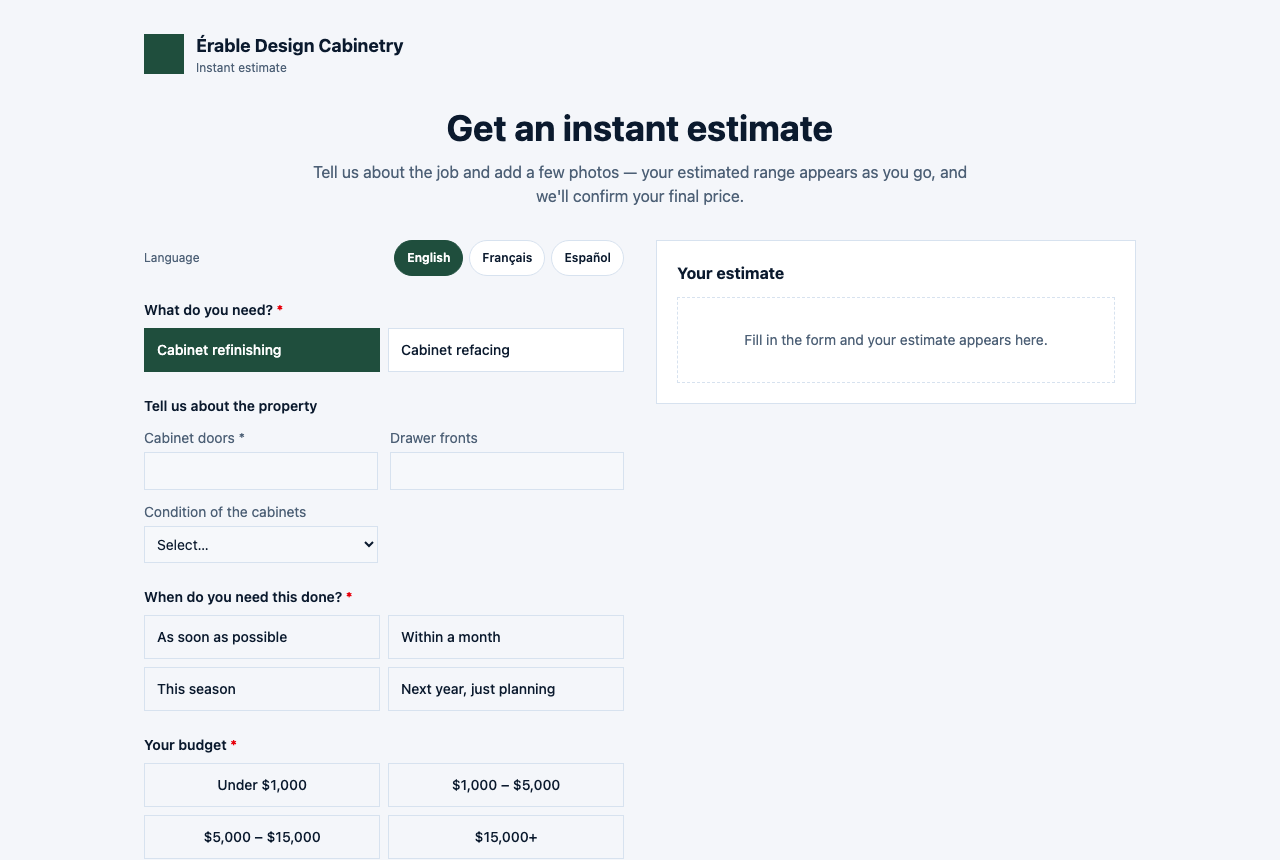
Your instant-estimate link opens a page headed Get an instant estimate: a form on the left, a Your estimate panel on the right. The homeowner picks a trade, describes the job, adds photos and their details, and — depending on what you chose for that trade — sees an estimated range as they type, after they submit, or not at all. Every submission lands on your Estimate Reviews screen and cannot be sent as a quote until a person confirms the price.
Two things are never on this page: a rate card, and a single figure. The public endpoint returns your services and their questions, never your rates; what the homeowner sees is a range priced on the server from your own numbers.
Overview
The page carries your logo, your name and your colour, and — unlike a quote or portal link — is not hidden from search engines. Through the embed snippet on Settings → Instant Quotes it also sits inside any website you already have. A trade appears on it only when its card is On and FieldQuo can actually produce a number from the rates you saved.
The page and its email exist in English and French only, chosen by your company's default language — and in French, the form's questions stay in English while the estimate panel, the messages and the email are translated. A company whose default is Spanish gets the English page.
What the homeowner fills in
- What do you need? — your live trades as chips (Roofing, Cabinet Refinishing, Painting, Junk Removal and so on).
- Tell us about the property — the questions for that trade: a property address for roofing (the roof is measured from satellite imagery), a lawn traced on a map for mowing, an area in square feet with a condition or access choice, door and drawer counts for cabinets, a number of steps, or the items to remove.
- Which option? — the materials you priced, by name only, when there is more than one.
- Your budget — four bands in your currency (“Under $1,000”, “$1,000 – $5,000” …). The browser sends which band, never an amount.
- Where's the job? — an address with autocomplete (roofing already has one).
- Your details — a name and an email or a phone number.
- Photos — at least one photo, video or plan is required.
- The button: Get my estimate, or Reveal my estimate when the range is shown after submitting. While something is missing it lists what: “Still needed: … at least one photo”.
The form does not ask when they want the work done — that is a conversation for the quote.
What they see, by your choice per trade
| What the homeowner sees (Settings → Instant Quotes) | On the page | After submitting, and in the email |
|---|---|---|
| Don't show a price | “We don't show prices online for this service. Leave your details and we'll confirm your price shortly.” | “No price is shown here — we review every job and send your quote ourselves.” The email says the quote is being put together, with no figure. |
| Show the range after they submit | A blurred “$X,XXX – $X,XXX” with a lock: Submit to reveal your estimate. The figure is never sent to the page before they submit. | The range appears in the panel, and the email carries it. |
| Show the range straight away | The range updates as they describe the job, before any contact details. | The same range, on the page and in the email. |
A range reads Estimated range “$4,200 – $5,500” in your currency, then what it was measured from and the sentence “This is an estimate from the counts you gave us, not a final quote. [Your company] will confirm it before anything is binding.” If the job falls under your minimum charge the panel says so. After submitting, You're all set — “[Your company] has your details and will confirm your quote shortly.” — with a Reference Q-2026-0042, and a Book a visit panel when your booking page is set up.
Financing, when you have switched it on, is a sentence in your own words and an optional See financing options button. No monthly figure is shown on this page; that appears on the quote approval page only when you have entered a rate and a term.
After they submit
- If they gave an email, they receive “Your estimate from [Your company]” from your company — the range in a box marked “before tax” when it was shown on the page, the same disclaimer, a Book a visit button when you take bookings, and the reference.
- On your side, a draft quote is created marked Needs review, with the range the homeowner saw, their stated budget, the measurement, their photos and a lead scored from the budget band. Everyone who can approve estimates is told: “Estimate Q-2026-0042 for [client] is waiting for sign-off”.
- The quote sits on Estimate Reviews with “Homeowner saw: $4,200–$5,500” and “Their budget: $1,000 – $5,000”, and an Approve at figure you can change before pressing Approve. Until then, Send on the quote refuses: “This instant estimate hasn't been approved yet. Confirm the price in Estimate Reviews, then send.” The share link refuses the same way.
- Once approved, the quote reads Approved — ready to send and goes out like any other. See Estimate Reviews.
What is never shown
The public page receives your trades, their questions, your material names and your budget bands — never a rate, a surcharge or a minimum. Every figure is computed on the server from the rows you saved, and the browser only ever sends counts, an address or an outline, and a budget band. Publishing a rate card openly would hand it to every competitor in the city; the page is built so that it cannot.
What you control
| On Settings → Instant Quotes | What it changes |
|---|---|
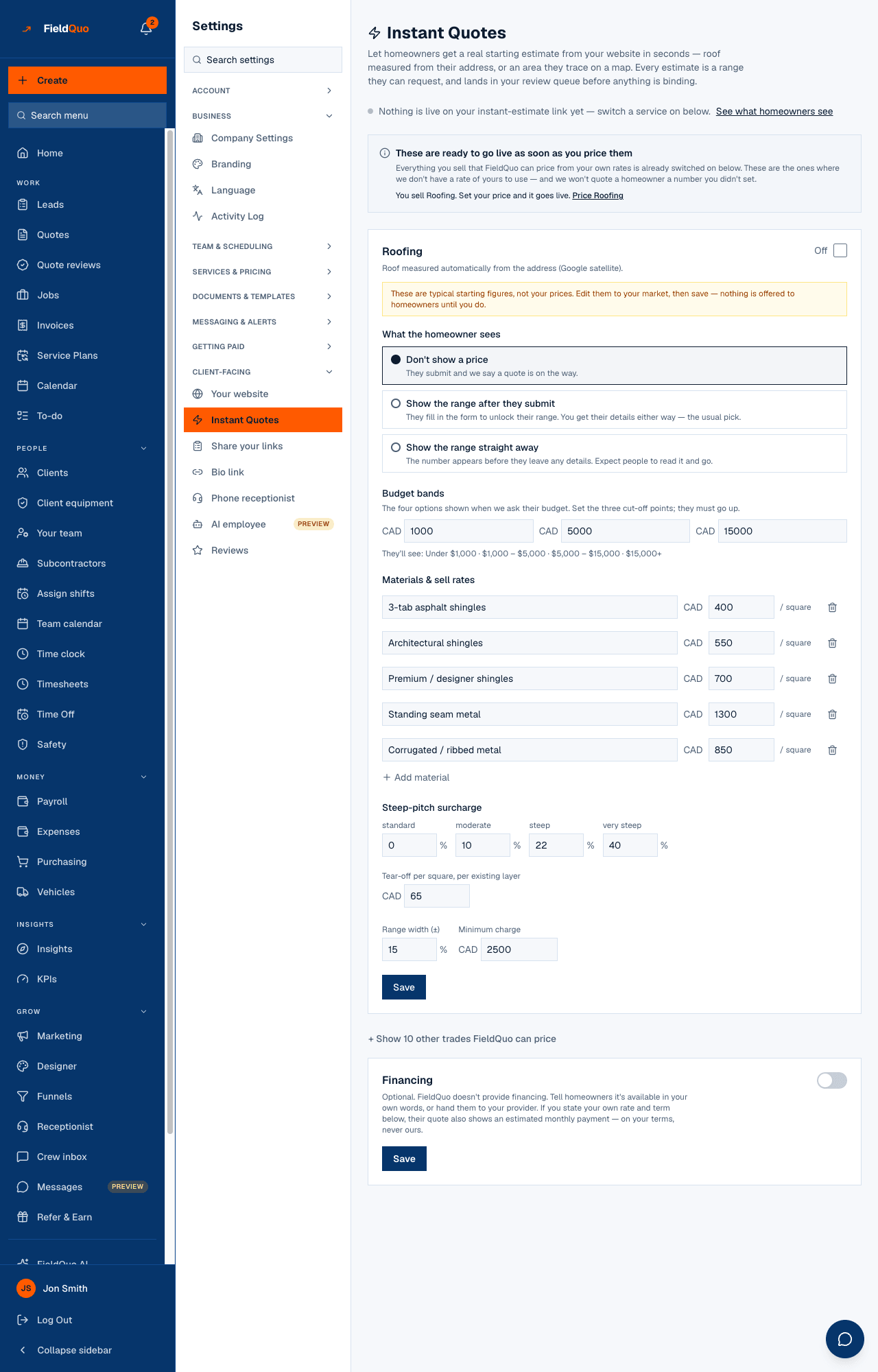
| On / Off on each trade card, and Save & enable | Whether the trade is offered. A card whose rates cannot produce a number reads “Homeowners can't get a price for this yet.” and cannot be switched on. |
| What the homeowner sees | The three modes in the table above, per trade. The default is Don't show a price. |
| Budget bands | The three cut-offs behind the four chips the homeowner picks from. |
| Materials & sell rates, the surcharges, Range width (±) and Minimum charge | The numbers the range is computed from, and how wide it is. |
| Financing | The sentence, the provider link, and — for the approval page — your stated rate and term. |
| See what homeowners see and the embed snippet | Opens the public page; the snippet puts it on your own site. |
Who can see it
The page is public. Opening Settings → Instant Quotes needs the pricing toggle in your access — an Estimator can read it, Crew cannot — and editing the rates or switching a trade on is for owners and administrators only. Approving an estimate on Estimate Reviews needs the Manager level or above.
ਅਕਸਰ ਪੁੱਛੇ ਜਾਂਦੇ ਸਵਾਲ
Can a homeowner see my rates?
No. The page receives services, questions, material names and budget bands; every figure is worked out on the server from rates that never leave it.
Why does one trade not appear on the page?
Its card is Off, or its rates cannot produce a number yet — the card says what is missing — or, for painting, neither Interior nor Exterior Painting is on under Services & Pricing.
Is the range a quote?
No. It is a draft marked Needs review; a person confirms the price on Estimate Reviews before it can be sent, and the page and the email both say so to the homeowner.
Why is the page in English for my French-speaking company?
It follows your company's default language, and exists in English and French. Set the default to French under Settings → Language and the estimate panel, the messages and the email switch; the form's questions stay in English.
ਕੀ ਇਹ ਮਦਦਗਾਰ ਸੀ?