

Notifications
When FieldQuo emails the owners about a large quote or a paid invoice, how far ahead clients are texted a reminder, and browser notifications for you.
Sa ngayon, available ang artikulong ito sa Ingles, Pranses at Espanyol. Binabasa mo ang bersyong Ingles. Français · Español
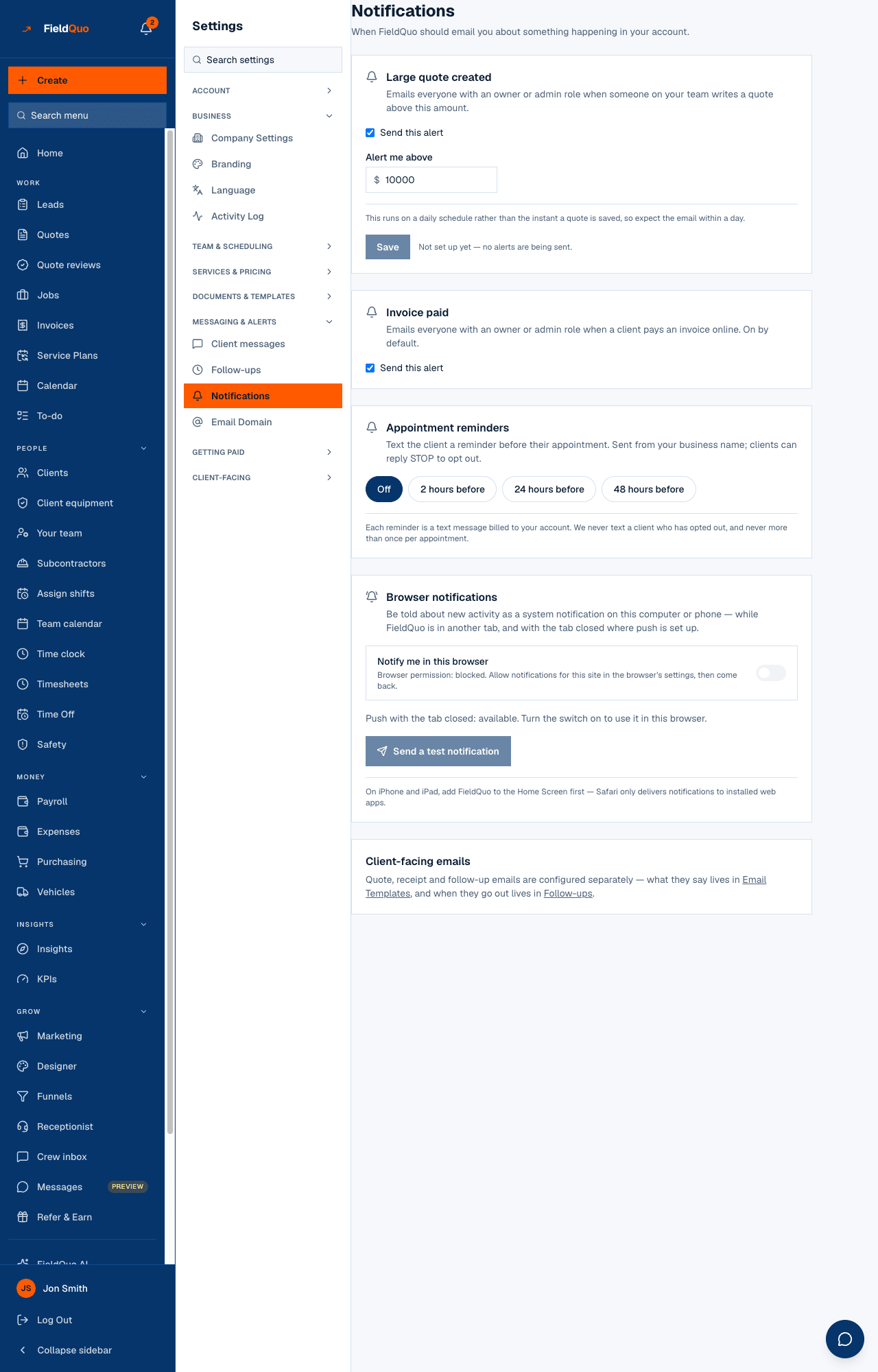
Settings → Notifications is four cards. Two decide when FieldQuo emails everyone with an owner or administrator role — a large quote created, an invoice paid online. One decides whether clients are texted a reminder before a visit and how far ahead. The last is personal: whether this browser, on this device, shows you a system notification when something happens in your account.
Overview
Only alerts that actually fire are listed. There is one threshold to type (the large-quote amount), one switch that is on by default (invoice paid), one choice of lead time (reminders), and one per-browser switch. A footer card, Client-facing emails, reminds you that quote, receipt and follow-up emails are configured elsewhere: what they say lives in Email Templates, when they go out in Follow-ups.
Large quote created
Emails everyone with an owner or admin role when someone on your team writes a quote above this amount. Until you set an amount the card says Not set up yet — no alerts are being sent.
- Tick Send this alert.
- Type the threshold under Alert me above — in your currency, whole quotes above it qualify.
- Press Save. Untick the box and save to switch it off; the amount is kept.
- Expect the email within a day: the check runs on a daily schedule, not the instant a quote is saved.
Invoice paid
Emails everyone with an owner or admin role when a client pays an invoice online. On by default. The single Send this alert box saves as soon as you tick or untick it. A company that has never touched it is on; only an explicit untick turns it off. Manual payments you record yourself do not trigger it.
Appointment reminders
Text the client a reminder before their appointment or job visit. Sent from your business name; clients can reply STOP to opt out. Four pills, one of which is selected: Off, 2 hours before, 24 hours before, 48 hours before. Pressing one saves it.
- Reminders reach both appointments and job visits, once each — never twice for the same visit.
- A client who has opted out is never texted, and a visit with no client phone number simply sends nothing.
- The check runs every hour, so a 24-hour reminder lands within the hour before the 24-hour mark.
- Reminders are included in your plan; nothing is billed per text. The wording is yours to change under Client messages.
Reminders go by text message only. There is no email reminder. Full detail: Appointment reminders.
Browser notifications
Notify me in this browser is a per-person, per-device switch. Turning it on asks the browser for permission; from then on new activity — the same events as the bell in the top bar, and new messages in your inbox — shows as a system notification while FieldQuo is in another tab. Where push is set up on the deployment, the same events arrive with the tab closed.
- The card states the browser permission plainly: allowed, blocked (with where to change it), or not asked yet.
- Send a test notification shows one now, so you can see the thing itself rather than trust a toast.
- On iPhone and iPad, add FieldQuo to the Home Screen first — Safari only delivers notifications to installed web apps.
A blocked permission cannot be undone from a page. Allow notifications for the site in the browser's own settings, then turn the switch on again.
Who can see it
Owners and administrators only. The company-wide cards write rules the routes refuse to anyone else, and the browser card is shown on this screen for the same people; the row is hidden from every other level.
Mga madalas itanong
Who receives the large-quote and invoice-paid emails?
Every member with an owner or administrator role who has an email address. There is no per-person opt-out on this screen.
I wrote a $15,000 quote and nothing arrived. Why?
The large-quote check runs once a day. If the threshold is set and the box ticked, the email arrives on the next run.
Can I get a text instead of an email for these alerts?
No. Alerts to you are email and, if you turn it on, a browser notification. Texts are for clients.
Nakatulong ba ito?