

Appointment reminders
A text to the client 2, 24 or 48 hours before an appointment or a job visit: how to turn it on, what it says, which entries get one, and what it costs.
Sa ngayon, available ang artikulong ito sa Ingles, Pranses at Espanyol. Binabasa mo ang bersyong Ingles. Français · Español
Fewer locked doors: with reminders on, every client with a mobile number gets one text before their appointment or job visit, in their own language, starting with your company name. It is off until an owner or administrator switches it on; the texts themselves are included in your plan, nothing is billed per message.
Reminders go by text message only. There is no email reminder.
Overview
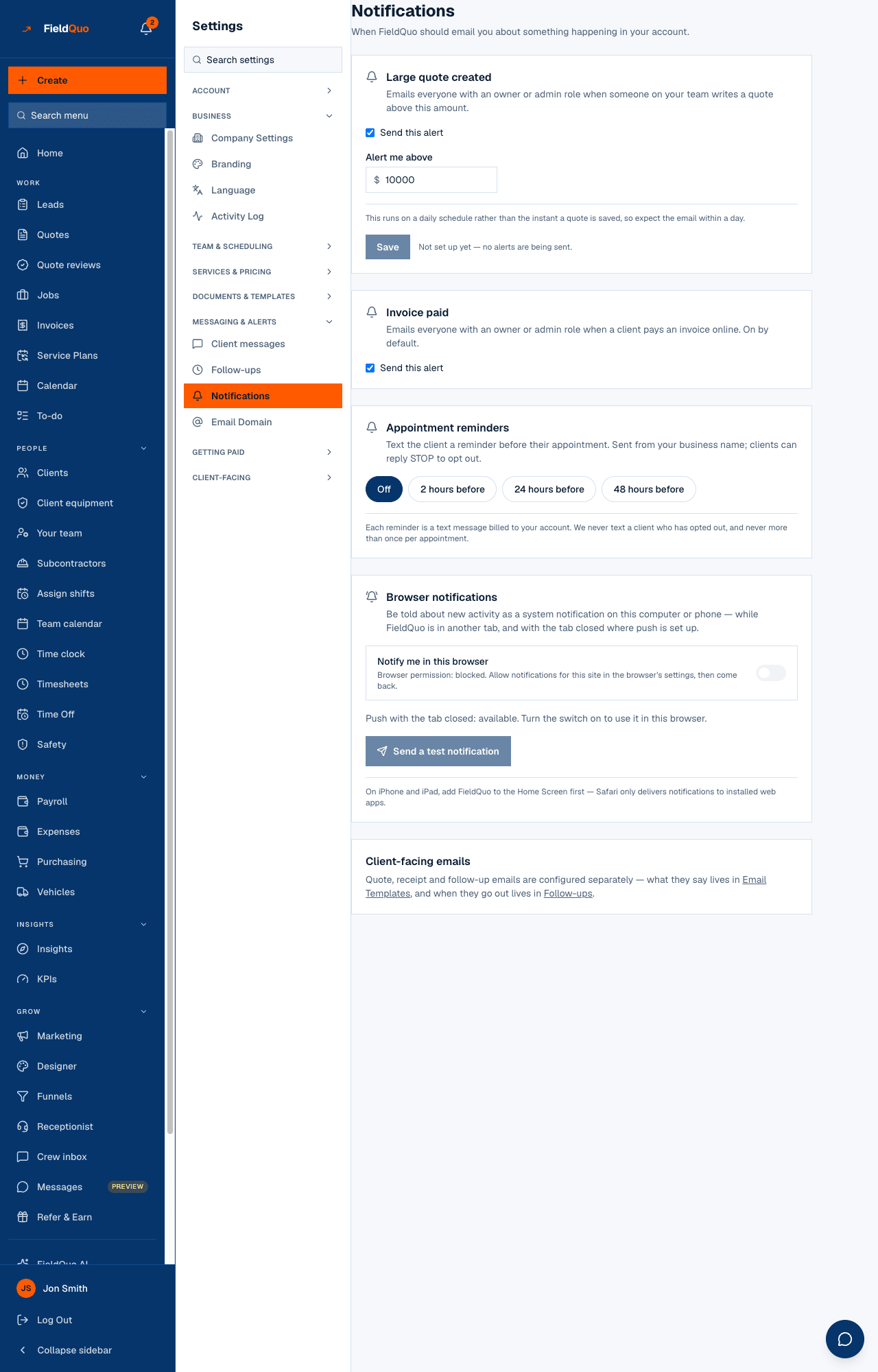
The setting is one choice on Settings → Notifications: Off, 2 hours before, 24 hours before or 48 hours before. FieldQuo checks every hour, so a reminder goes out within the hour after its lead time is reached — a 24-hour reminder for a Tuesday 2:00 PM appointment goes out between 2:00 and 3:00 PM on Monday.
Appointment reminders are marked partial in FieldQuo's own feature list: text only, no email reminder. The wording is editable on Settings → Client messages, alongside the “On my way” text.
How to turn them on
- Open Settings → Notifications.
- Find the Appointment reminders card — “Text the client a reminder before their appointment or job visit. Sent from your business name; clients can reply STOP to opt out.”
- Press 2 hours before, 24 hours before or 48 hours before. It saves as you press it.
- To stop, press Off. Reminders already sent are not affected; none are sent from then on.
When a reminder goes, and when it does not
Each appointment and each job visit is considered once, and a text goes only when all of the following are true:
- It is an appointment in status Scheduled — booked with New Appointment, made from a booking on your booking page, or booked by the AI receptionist — or a job visit on a job that is not archived. A Supervisor required, completed or cancelled entry gets none.
- It is within the next seven days and the lead time has been reached.
- The client has a phone number FieldQuo can text.
- The client has not opted out of texts or calls — see Client consent and unsubscribes.
- No reminder has been sent for this entry before. Never more than one per appointment or visit, even if you change the lead time or the entry moves.
What it says
The built-in wording is “Northside Painting: Reminder — your appointment is Tue, Aug 12 at 2:00 PM at 123 Oak St. Reply STOP to opt out.”, with the time in the client's language and your company's time zone, and the place only when the appointment has a location. It exists in eight languages; a client reads the one their record says, or your company's default.
Make it sound like you on Settings → Client messages, with the fields {company}, {when} and {location}. Your wording goes to clients who read your company's language; everyone else gets the built-in wording in theirs. See The “On my way” text for how that editor works.
Which entries get a reminder
Appointments and job visits. A Job visit booked on a job gets the same text at the same lead time, with the job's site address (or the client's) as the place; the crew's On my way tap is a second heads-up, at the moment they leave. A Client booking that has not yet become an appointment does not either — it becomes one as soon as it is confirmed and, if there is a visit fee, paid.
Reminders are per company, not per person: the lead time applies to every scheduled appointment and visit in the account, whoever it is assigned to.
Who can change it
Notifications is an owner-and-administrator screen. A Manager or Dispatcher does not see it, and the server refuses the change with Only owners and admins can change reminder settings.
Mga madalas itanong
What does a reminder cost?
Nothing per message — reminders are included in your plan, and the Notifications card says so. They are off until you choose a lead time, so nothing is sent for a company that never opened the setting.
Can I remind by email instead?
No. Reminders are text messages only today.
The client did not get a reminder.
Check that the entry is Scheduled (not Supervisor required, completed or cancelled), that the client has a phone number, that they have not opted out, and that the appointment was still in the future when the hourly run came round — an appointment already inside its lead time is texted on the next run, one that has passed is not.
Nakatulong ba ito?