

When a client reschedules or cancels
The link in the booking confirmation lets a client move or cancel their visit themselves — within the notice you set, with the visit fee returned only if your policy says so — and tells you by email.
Per ora questo articolo è disponibile in inglese, francese e spagnolo. Stai leggendo la versione inglese. Français · Español
Every booking made through your booking page, or by the AI receptionist, comes with a confirmation email that carries a Change or cancel this visit link. On that page the client sees when and where, what they can still do, and exactly what happens to any visit fee they paid — all computed from your settings, never from anything the browser sends.
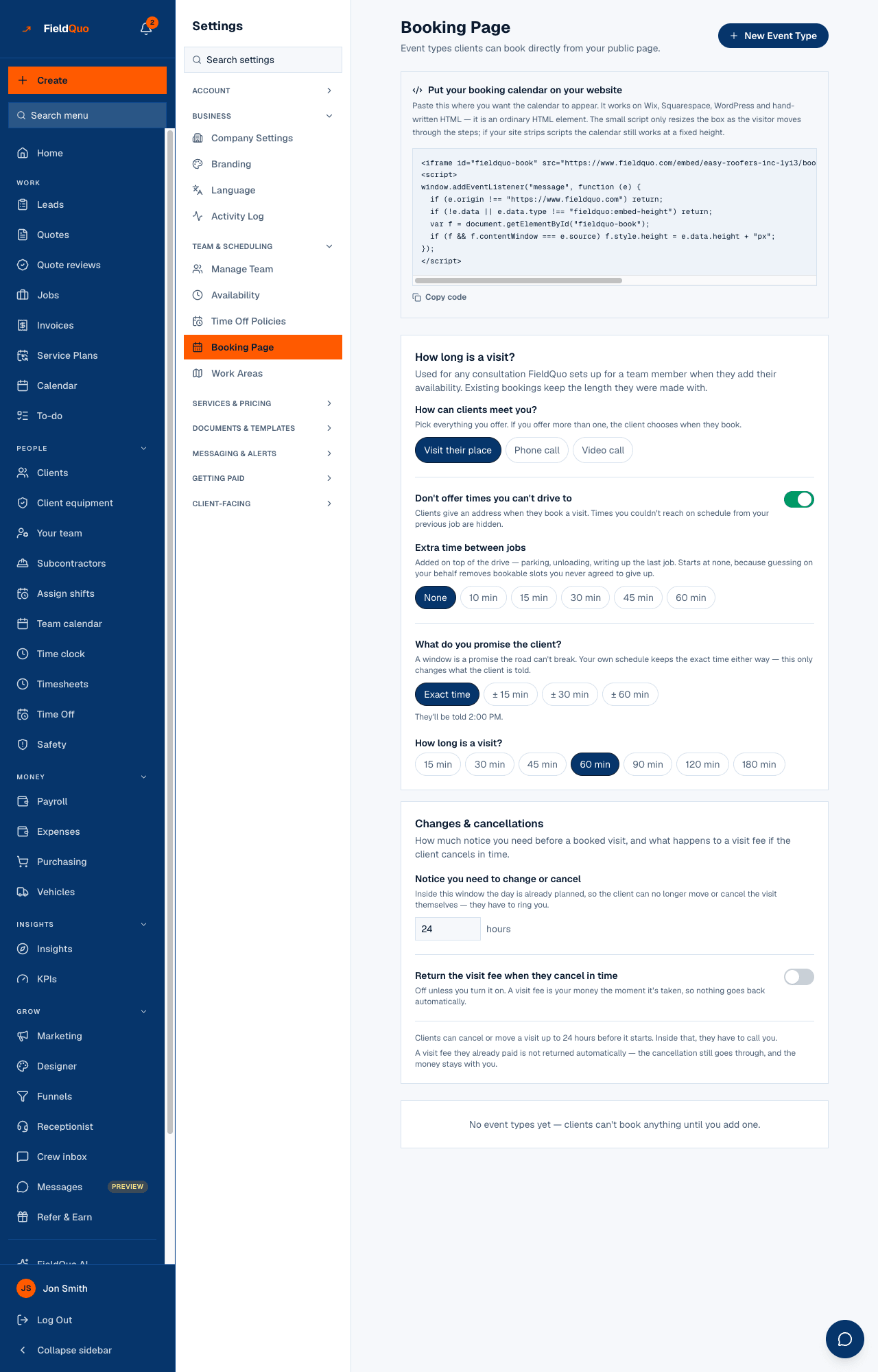
You set two windows and one switch on Settings → Booking Page, under Changes & cancellations. This article explains what each does and what you receive when a client uses the link.
Overview
Two windows, because they answer two different questions. Notice you need to change or cancel is how much warning the crew needs: inside it, the day is planned and the van is loaded, so the link stops offering changes and tells the client to call you. Notice needed to get the fee back is how much warning the money needs, and it may be longer — “move it up to a day before, but the fee only comes back with two days' notice”. Refunds are off unless you turn them on.
The client's link
The link is minted when the booking is confirmed and lives in the confirmation email and in every “your visit has moved” email after it. The page, in the client's language, shows Your visit — when (with your arrival window, if you set one), where, the deposit paid — and, under Need to change something?, Change the time and Cancel this visit. When neither is allowed any more, it says why: “Northside Painting asks for at least 24 hours' notice, so this visit can't be changed here any more. Call Northside Painting on … — they can still move it for you.”
Only bookings have this link. An appointment you booked by hand with New Appointment and a visit booked on a job send the client nothing at booking and have no self-serve link; when the office moves or cancels one, the client can be emailed from that dialog. The emails around a booking — confirmed, moved, cancelled — and the manage page are all in the client's language, and a moved or cancelled letter says whether it was as requested or the office's change.
The three settings
| Setting | Default | What it changes |
|---|---|---|
| Notice you need to change or cancel | 24 hours | Inside this many hours before the visit, the client's link no longer offers Change the time or Cancel this visit. Blank or unreadable reads as 24, never as 0. |
| Return the visit fee when they cancel in time | Off | On, a visit fee paid through FieldQuo is refunded to the client's card automatically when they cancel with enough notice. Off, the cancellation still goes through and the money stays with you. |
| Notice needed to get the fee back | Same as the notice above | Shown only when the refund switch is on. Set it longer than the change notice to keep a window where the client can still cancel but the fee stays with you; the page warns you when it is shorter. |
Under the inputs the page prints your policy as the client will experience it — “Clients can cancel or move a visit up to 24 hours before it starts. Inside that, they have to call you.” and “A visit fee they already paid is not returned automatically — the cancellation still goes through, and the money stays with you.” — and reminds you when none of your event types charges a fee yet.
When a client cancels
- The booking and the appointment it became are both marked Cancelled, and the slot is free again on your booking page and your calendar.
- If the refund switch is on and the notice was met, the fee is refunded through Stripe to the card they paid with; the page and the emails say so. If the fee was not taken through FieldQuo, nothing can be refunded automatically and both emails say to sort it out together.
- The client gets a “Your visit is cancelled” email. You get “A booking was cancelled” at your company email, with the client's name and email, the time, the place, and whether the fee was refunded.
- The client's page then reads Visit cancelled — “Northside Painting has been told.” A cancelled visit cannot be moved afterwards; the client books again.
When a client moves the visit
- Change the time shows the same slots your booking page would offer — your availability, the event type's length, and the travel check with its buffer — so the new time is one you can reach. A time inside your change notice is refused: “That time doesn't give us enough notice — please pick a later one.”
- The booking and its appointment move to the new time. The old slot is free again.
- The client's email says the new time (with your arrival window) and the previous one; yours says the exact new time and the old one, and that nothing was charged or refunded.
- The visit fee, if any, carries over to the new time. A reminder text already sent for the old time is not sent again.
How to set your policy
- Open Settings → Booking Page and scroll to Changes & cancellations.
- Type the hours under Notice you need to change or cancel. It saves when you leave the field.
- Turn on Return the visit fee when they cancel in time if you want refunds to happen on their own; then fill Notice needed to get the fee back, or leave it blank to use the same notice.
- Read the two sentences under the card — they are the policy the client's page will apply.
Who can change it
Owners, administrators and supervisors — the Dispatcher and Manager presets — open the Booking Page screen; Crew and Estimators do not. The policy is the company's, not the person's: whoever the visit is assigned to, the same notice and the same refund rule apply.
Domande frequenti
The client says the link does not let them cancel.
They are inside your change notice. The page names the notice and your phone number. Agree the change on the phone, then press Reschedule or Cancel visit on the appointment's row in the calendar: the booking behind it moves or is cancelled with it, and, with the email tick left on, the client is told the office made the change.
Why was the fee not refunded?
Refunds are off unless you turned on Return the visit fee when they cancel in time, and even then only with the notice you set. The client's page and both emails say which applied.
Does the client get the link if I book the appointment myself?
No. The link exists only for bookings made through the booking page or by the AI receptionist. An appointment you create from the calendar sends the client nothing.
È stato utile?