

Overhead and your minimum price
Settings → Overhead: the jobs-per-week capacity and target margin that turn your fixed costs into a cost per job and a minimum price, the five registers that feed it, the unabsorbed-labour panel, where the number is used, and who can see it.
Per ora questo articolo è disponibile in inglese, francese e spagnolo. Stai leggendo la versione inglese. Français · Español
Overhead is “Fixed monthly costs. These, divided by how many jobs you can take on, are the lowest price a job can go out at and still cover the business.” It is the number a contractor most wants and least often has, and it is deliberately not guessed: until you say how many jobs a week you can take on, the page shows the registers and no price.
The page is under Services & Pricing in the Settings menu. This article is the page top to bottom; the pricing rule itself, and why it uses cost rather than cash, is also in The break-even price.
Overview
Everything on this page is one sum: what a month of trading costs, divided by the jobs you do in a month, marked up by your target margin. The cost side is read from five registers on the same page — fixed costs, salaries, debt, assets, bills — and from nothing else; there is no industry average and no rule of thumb anywhere in it. Change a register and the price changes straight away.
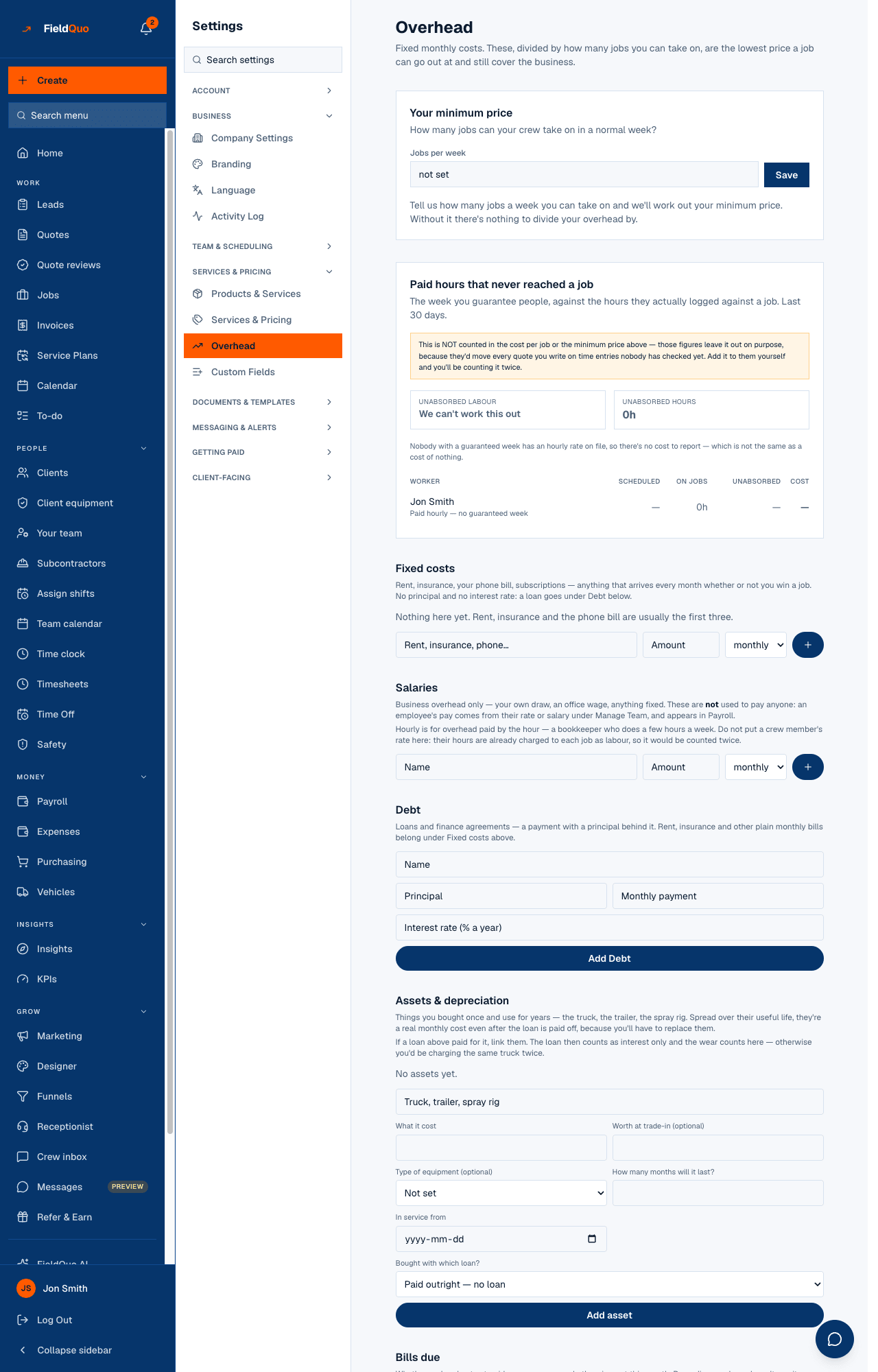
What is on the screen
- Your minimum price — “How many jobs can your crew take on in a normal week?” with Jobs per week, Target margin % (placeholder 20 (default)) and Save. Until capacity is set: “Tell us how many jobs a week you can take on and we'll work out your minimum price. Without it there's nothing to divide your overhead by.”
- Four tiles — Monthly fixed costs, Jobs / month, Cost per job, Minimum price — and under them the sentences that account for the total: “Includes {fixed} fixed costs + {salaries} salaries + {debt} debt payments”, the depreciation and loan interest it also includes, the actual cash leaving the bank and why it differs, and “At a {pct}% target margin. This covers overhead only — materials and labour for the specific job are on top.”
- Paid hours that never reached a job — the last 30 days of guaranteed weeks against hours logged on jobs: Unabsorbed labour, Unabsorbed hours, and a row per worker (Worker, Scheduled, On jobs, Unabsorbed, Cost).
- Fixed costs — “Rent, insurance, your phone bill, subscriptions — anything that arrives every month whether or not you win a job.” Name, Amount, weekly / monthly / yearly, Add fixed cost.
- Salaries — business overhead only: your own draw, an office wage. Amount with weekly / monthly / yearly / hourly (Hours / week, Rate / hr). Not used to pay anyone — an employee's pay comes from Manage Team and appears in Payroll.
- Debt — loans and finance agreements: Principal, Monthly payment, Interest rate (% a year), Add Debt.
- Assets & depreciation — the truck, the trailer, the spray rig: What it cost, Worth at trade-in (optional), How many months will it last?, In service from, Bought with which loan?, Sold or written off today, Add asset.
- Bills due — Outstanding, Out this month, Overdue, each bill with Due {date} and Mark paid, Add bill.
How the price is worked out
- Jobs / month = Jobs per week × 4.33.
- Monthly fixed costs = recurring fixed costs at their monthly equivalent + salaries + depreciation on assets in service + loan interest on loans linked to an asset + the full payment on loans linked to nothing.
- Cost per job = Monthly fixed costs ÷ Jobs / month.
- Minimum price = Cost per job ÷ (1 − target margin). The default margin is 20%; the field accepts 0 to 95.
The cost figure is not the cash figure, and the page prints both. Cash counts the whole loan payment and nothing for wear; cost counts the wear (depreciation) and only the interest on a loan that bought an asset, because repaying capital is not an expense. A floor built on cash double-charges the truck while the loan runs and loses it the month the loan ends — which is how a contractor quietly drops below break-even. The Monthly burn rate on Expense Tracking is the cash figure; Monthly fixed costs here is the cost figure.
An asset with no loan linked beside a loan with no asset linked triggers the page's own warning: if they are the same truck you are charging it twice. Link them with Bought with which loan? and the loan drops to interest only.
What each register feeds
| Register | In the minimum price | In the burn rate | Elsewhere |
|---|---|---|---|
| Fixed costs | Yes, at the monthly equivalent | Yes | The same rows as a Recurring + Overhead expense on Expense Tracking; the statements count each in the month it is dated. |
| Salaries | Yes | Yes | Nowhere else — these never pay anyone. |
| Debt | Interest only when linked to an asset; the full payment otherwise | The full monthly payment | Loan interest and principal on Financial statements; loans outstanding on the balance sheet. |
| Assets & depreciation | Yes — straight-line depreciation while in service, stopping when fully written down or disposed | No — depreciation moves no money | Book value per asset; a vehicle's cost on Vehicles. |
| Bills due | No — “Bills don't change your minimum price — the recurring cost above already covers that. This is cash flow, not cost.” | No | Only this page. Marking a bill paid records nothing else; pay it your usual way. |
Paid hours that never reached a job
For everyone with a guaranteed week set under Your team, the panel compares the last 30 days of that guarantee with the hours they logged against a job, and prices the gap at their hourly rate. Someone paid hourly with no guaranteed week has no gap to report; someone with no rate on file shows hours and no cost, and the total says it is short rather than counting those hours as free. Office staff are left out — their whole cost is overhead already.
The amber box says it plainly: this is not counted in the cost per job or the minimum price. It would move every quote you write on time entries nobody has checked yet, so it is shown first and left out of the price. Add it to your price yourself and you are counting it twice.
Where the number goes
Cost per job is the overhead the quote builder's Cost & margin panel charges against every estimate, so a quote's margin on screen is net of the business, not just of the job. The KPI dashboard's Net margin needs it too — without capacity it reads “Set how many jobs a week you can take on in Settings → Overhead, and net margin can be worked out.” The Fixed costs card on the KPI page and the burn rate on Expense Tracking read the same registers.
Who can see it
The Overhead row needs the ability to manage users and the Job costing toggle: every wage in the company and the company's margin are on this page. Manager, administrators and the owner see it. A Dispatcher can manage users but holds Job costing off, so the row is hidden and every endpoint behind it refuses. Deleting a register row asks first — “your price floor changes straight away” — and deleting an asset warns that its depreciation history goes with it; mark it sold instead to keep what it already cost you.
Domande frequenti
Why is there no minimum price on my page?
Jobs per week is not set. FieldQuo used to assume three jobs a week for everyone and priced every quote against an invented number; it now refuses to answer until you type your own.
My crew's wages are not in Salaries. Is the price too low?
No. Crew hours are charged to each job as labour, so a job's own cost carries them. Salaries here is for overhead pay only — your draw, an office wage. Putting a crew rate here would count it twice.
The loan is paid off. Does the truck disappear from my costs?
Not if it is in Assets & depreciation. The loan's payment stops, the wear keeps being charged until the asset is fully written down, and you keep saving toward replacing it.
Does the minimum price include materials and labour?
No. It covers overhead only; the materials and labour for the specific job are on top. The quote builder adds them from the estimate.
È stato utile?