

Add a seat, or a free crew login
The two Add buttons on Manage Team, what each one costs, how invitations work, what happens when the plan is full, and which plan you need next.
ਇਹ ਲੇਖ ਫ਼ਿਲਹਾਲ ਅੰਗਰੇਜ਼ੀ, ਫ਼ਰਾਂਸੀਸੀ ਅਤੇ ਸਪੈਨਿਸ਼ ਵਿੱਚ ਉਪਲਬਧ ਹੈ। ਤੁਸੀਂ ਅੰਗਰੇਜ਼ੀ ਸੰਸਕਰਣ ਪੜ੍ਹ ਰਹੇ ਹੋ। Français · Español
Manage Team has two doors for adding a person, because they cost different money: Add crew — free for someone who works in the field, and Add a seat for someone who prices work or writes invoices. Both land on the same New User form with a different starting point selected, and both end in an email invitation the person accepts to set up their own login.
Joining a company is invite-only. There is no way for anyone to add themselves to your company; every member started as an invitation sent from this screen.
Overview
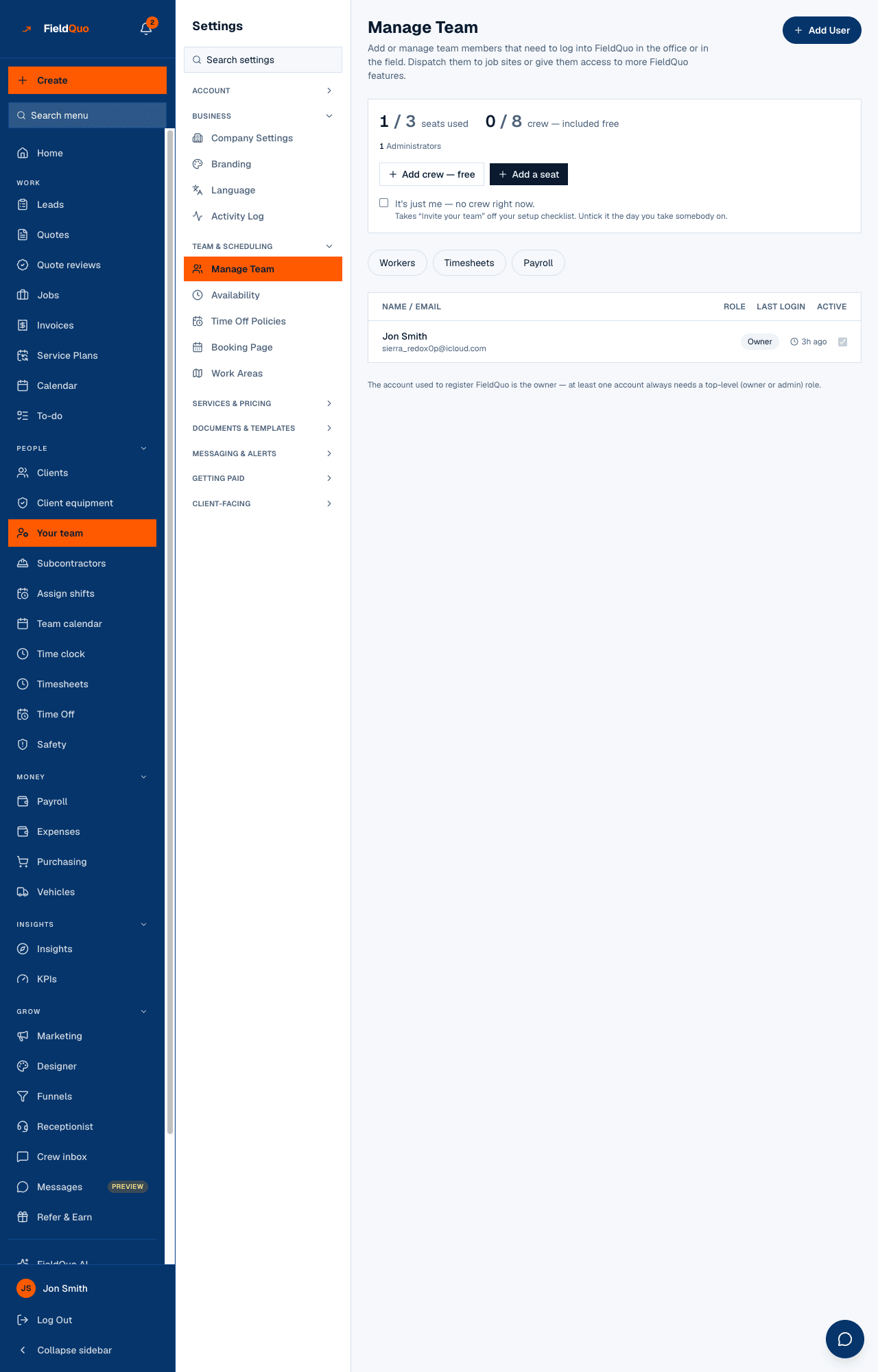
The panel at the top reads, for example, 1 / 3 seats used and 0 / 8 crew — included free, with a breakdown underneath (1 Administrators, 2 Crew …). The first number of each pair is what you are using, counting pending invitations; the second is what your plan includes. Below the counts are the two buttons, and below them the roster with each person's access level.
A seat is anyone whose access lets them create or change quotes, jobs, invoices or requests — the owner, every administrator, and the Estimator, Dispatcher and Manager presets. Crew is everyone at or below the Crew preset. Full definitions in The four plans and Seats and crew logins.
Add a crew login (free)
- Open Your team in the sidebar (or Settings → Manage Team) and press Add crew — free.
- The New User form opens with the Crew preset already selected. Fill in their name, email and mobile number; the address and labour cost are optional.
- Leave the preset on Crew — it has no dials to move. Raising any permission above it turns the person into a seat, and the seat count will say so.
- Press Send Invite. They get an email with a link to set up their own login; until they accept, the roster shows them as Invited with Cancel invite beside them.
Someone on the payroll who will never log in — a helper paid by the hour who does not need the app — does not need an invitation at all. Add them under Workers instead; see Payroll settings.
Add a seat
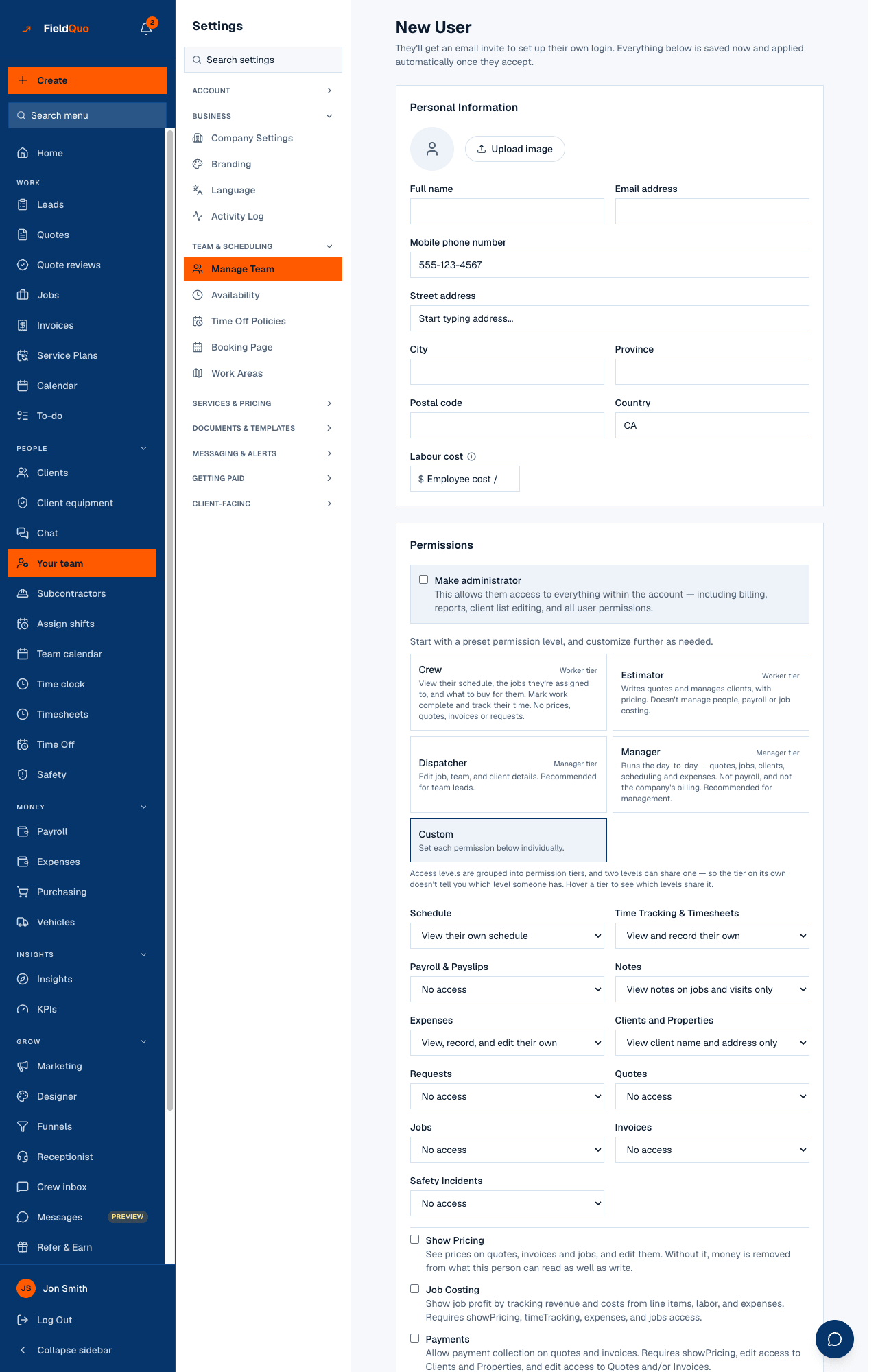
- Press Add a seat. The form opens on the Dispatcher preset — the cheapest thing that is actually a seat. Pick Estimator or Manager if that fits better, or move individual dials; any change turns the preset into Custom.
- Tick Make administrator only for someone who should also see billing and everything else in the account. Administrators are seats too.
- Press Send Invite. The seat is counted from the moment the invitation exists, so a pending invite holds a seat until it is accepted or cancelled.
Adding a seat costs nothing extra while your plan has one free: the plan price is flat, and 3 seats means three people at $169. It costs money only when the plan is full and the next tier is the way to get another — see below.
When the plan is full
The two doors close separately. When every seat is used, Add a seat is disabled and reads You've used every seat on your plan. on hover, while Add crew — free stays live; when every crew place is used it is the other way round. A crew member may also occupy a seat you are not using, so a Solo company with one seat and six crew is still within its allowance if the seat is free.
Next to a disabled button the page names the way out: You've used all your seats. Crew covers 3 seats and 8 crew. with an Upgrade link to Account & Billing for owners and administrators. Beyond Scale it reads You've outgrown the plans we sell online — talk to us.
The server refuses an invitation that would exceed the plan even if a button looks live — a second tab, a stale count. The refusal says which limit was hit and which plan fits. It never removes a person you already have: the limit gates adding, not holding.
Who can add people
- Owners and administrators can invite anyone at any level, change an existing person's access, and see the Upgrade link.
- Managers and Dispatchers can invite too, but only at the Worker tier — Crew or Estimator — and never with a dial higher than their own. They see At your plan's limit but no upgrade link, because the plan is not theirs to change.
- Estimators and Crew cannot open the form.
ਅਕਸਰ ਪੁੱਛੇ ਜਾਂਦੇ ਸਵਾਲ
Does inviting someone charge my card?
No. The plan price is flat. Adding people within the plan's seats and crew places changes nothing on your bill; going past them means choosing the next plan on Account & Billing, and that is the only charge.
I moved a crew member's dials and the seat count went up.
That is the rule working: a seat is counted from what the person can do. Put them back on the Crew preset and the seat is freed.
Can I cancel an invitation to free the seat?
Yes — Cancel invite on their row. The link stops working and the seat is released at once. Any worker record already on your books is kept.
Can someone sign up and ask to join my company?
No. Joining is invite-only; the only way in is an invitation from this screen.
ਕੀ ਇਹ ਮਦਦਗਾਰ ਸੀ?